
What if a fixed monthly IT fee still leaves your practice facing unplanned work and workflow disruption? The predictability of flat-rate IT support for medical practice operations depends on what the agreement covers, not just how the fee is structured. When staff rely on connected systems and healthcare applications, unclear scope makes budgeting and comparing support arrangements harder.
A recurring arrangement can make support more consistent and costs easier to plan, but “flat-rate” doesn’t automatically mean every issue, application, or project is included. To assess the value, distinguish ongoing managed support from break-fix work, then identify exclusions and how separate projects are scoped.
This article explains what a flat-rate arrangement may cover, what to assess in its service scope, and how to decide whether it fits your operational needs. It also looks at why healthcare-focused support matters, from infrastructure and end-user assistance to application support, cybersecurity, and longer-term IT planning. Use these criteria to weigh cost predictability against the expertise and responsibilities your practice needs.
Key Takeaways
- Understand why flat-rate billing can make expenses more predictable without covering every task or project.
- Explore how infrastructure, help desk, healthcare application support, and cybersecurity needs shape the scope of flat-rate IT support for medical practice operations.
- Compare flat-rate, break-fix, hourly, and co-managed arrangements by how support is organized and work is initiated.
- Use an inventory of staff, devices, applications, and operational dependencies to separate recurring support needs from separately scoped projects.
- See how MEDITIL’s healthcare-focused managed IT, infrastructure, application support, and strategic planning relate to practice operations.
What Flat-Rate IT Support for a Medical Practice Means
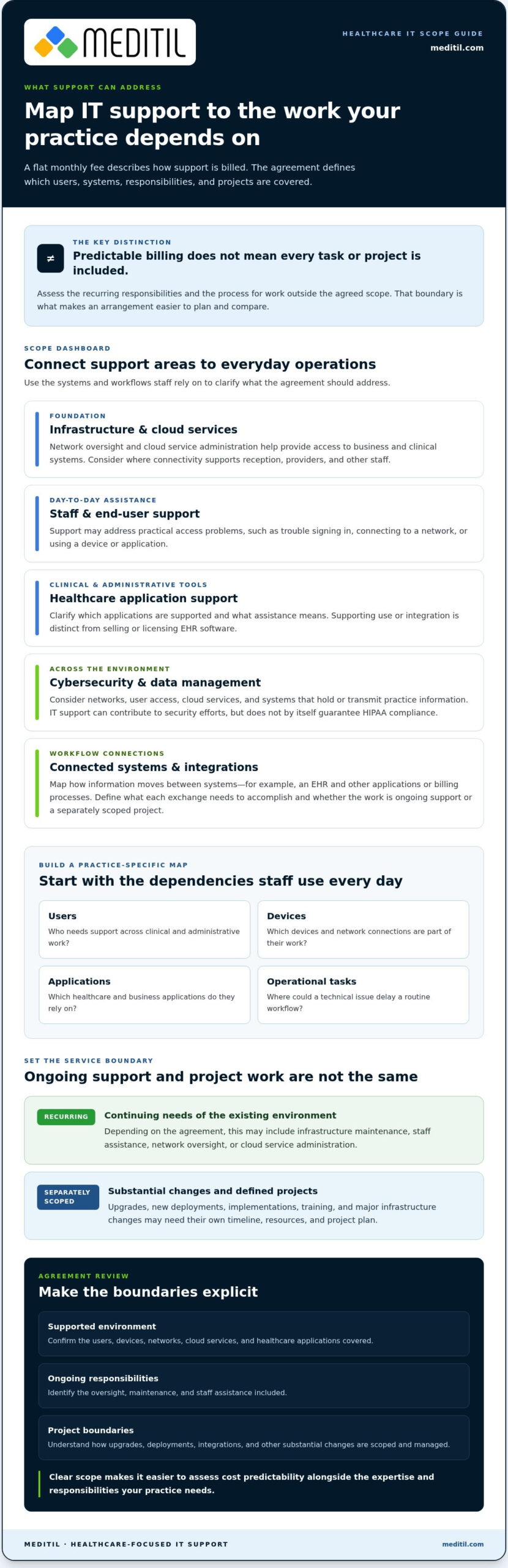
A flat-rate IT arrangement is an ongoing service relationship in which a practice pays a recurring fee for an agreed set of IT services. Flat-rate describes how support is billed; the agreement defines what support covers. That distinction matters in a medical environment. A predictable monthly expense can help with planning, but it doesn’t explain how a particular issue or project will be handled.
With break-fix support, a practice requests assistance and pays when work is performed. Managed support is structured around continuing oversight as well as responding to support needs. Depending on the agreement, ongoing work may include maintaining infrastructure, assisting staff, or managing cloud services. The goal is to organize IT responsibilities continuously rather than wait for an interruption to prompt action. The agreement’s scope still determines exactly what is included.
Healthcare operations rely on connected systems for administrative and clinical work. Health Information Technology (HIT) includes technologies that support health information management and exchange. In practice, disruptions to network access, cloud services, or user accounts can affect how staff reach the tools and information their work depends on. Consistent IT management can help keep these dependencies visible and support smoother workflows, but it doesn’t replace the practice’s operational or compliance responsibilities.
What a recurring IT support arrangement is designed to cover
Recurring support focuses on the continuing needs of an existing IT environment, rather than a one-time setup alone. An arrangement may include network oversight, cloud service administration, or help for staff who have trouble accessing a device or application. These activities support day-to-day operations. Implementation, training, and major infrastructure changes are different kinds of work and may need separate project planning under the agreement.
What flat-rate does not tell you by itself
The label doesn’t specify which users, devices, applications, or support hours fall within the arrangement. It also doesn’t establish how an upgrade, new deployment, integration, or implementation will be handled. Those boundaries are set by the scope and terms. Reviewing them helps a practice distinguish routine support from work that needs its own timeline, resources, and project plan.
Look for clear descriptions of:
- Supported environment: the users, devices, networks, cloud services, and healthcare applications covered.
- Ongoing responsibilities: the types of oversight, maintenance, and staff assistance included.
- Project boundaries: how upgrades, new deployments, and other substantial changes are scoped and managed.
This distinction makes flat-rate IT support for medical practice operations easier to assess. Predictability comes from understanding both the recurring responsibilities and the process for work outside them.
What Healthcare-Focused Flat-Rate IT Support Can Address
Assess healthcare IT scope by mapping it to the systems and workflows staff depend on, not by relying on a generic list of technical tasks. A practice may need reliable connectivity at reception, access to clinical applications for providers, and working connections between records and billing processes. Healthcare-specific IT scope should reflect the systems staff use every day and the workflows those systems support.
For flat-rate IT support for medical practice operations, relevant categories often include infrastructure, staff assistance, healthcare applications, security, and connected systems. The precise responsibilities depend on the practice’s environment and the services defined in its agreement.
Infrastructure, user support, and healthcare applications
Network and cloud services provide the foundation for accessing business and clinical systems. End-user support addresses practical problems staff encounter, such as trouble signing in, connecting to a network, or using an application. Healthcare application support focuses on the technology environment around clinical and administrative tools. It is distinct from selling or licensing EHR software, which is not the same as assisting with its use or integration.
Consider where a delay first affects work. A connection issue may interrupt several roles, while an application access problem may affect one team. Map users to their devices, applications, and routine tasks to clarify which support functions matter most and where technical issues could disrupt workflows.
Security, data, and connected systems
Cybersecurity and data management apply across the wider environment, not just to one application. Consider security alongside networks, user access, cloud services, and systems that hold or transmit practice information. Technology support can contribute to privacy and security efforts, but an IT arrangement alone doesn’t guarantee HIPAA compliance. Practices retain broader responsibilities for their policies, processes, and oversight.
Connected workflows deserve separate attention. An EHR may exchange information with other systems, while billing processes may depend on accurate, timely data moving between applications. Integration and interoperability work can address these connections. Define which systems exchange information, what staff need those exchanges to accomplish, and whether the work is ongoing support or a separately planned integration project.
Use this practice-centered map to organize the discussion:
- Infrastructure: Identify the networks and cloud services staff rely on across daily operations.
- People and applications: Connect each team’s responsibilities to the devices and healthcare applications they use.
- Security and data: Note where sensitive information is accessed, stored, or exchanged, and how IT support relates to the practice’s wider safeguards.
- Workflow connections: Trace how clinical records, administrative tasks, and billing processes depend on system integrations.
This map gives a practice an operational basis for defining managed support. MEDITIL aligns healthcare-focused managed IT services with infrastructure, end-user needs, application support, and systems integration, connecting technical responsibilities to the way a practice works.
Flat-Rate vs. Break-Fix, Hourly, and Co-Managed IT
A recurring fee is useful when the support behind it matches the practice’s operational needs. The key differences between IT models are how billing is structured, who is responsible for ongoing work, and what triggers a response. A practice with a small, stable environment may have different needs from one that relies on multiple connected applications or already has internal IT staff.
Model
Billing predictability
Responsibility and how work begins
Flat-rate managed support
Recurring fee for an agreed scope.
The IT partner handles defined ongoing responsibilities; support and maintenance follow the arrangement’s processes.
Break-fix
Costs arise as assistance is requested or work is performed.
The practice initiates support after an issue occurs, so work is generally reactive rather than based on continuous oversight.
Hourly support
Charges vary with the time spent on requested work.
The practice requests assistance as needs arise; responsibility outside that work depends on the arrangement.
Co-managed IT
Depends on the services and responsibilities shared.
Internal IT staff and an IT partner divide duties and coordinate how requests and ongoing work are handled.
How flat-rate support differs from break-fix
Break-fix can suit a practice with limited support needs or an internal team that handles routine oversight. The trade-off is that assistance typically begins after staff identify a problem. Managed support can include continuing operational responsibilities, but a recurring fee doesn’t mean every request or project is included. The written scope determines which users, systems, and types of work are covered, and how work beyond that scope is addressed.
That boundary matters for planning. Routine support for an established environment and a major network change are different kinds of work. A flat-rate arrangement may cover the former while the latter is planned separately. Distinguishing the two helps the practice understand what its recurring support is intended to accomplish.
When co-managed support or internal IT may fit
Co-managed IT shares responsibility between a practice’s internal staff and an IT partner. Internal staff might coordinate daily requests while the partner contributes infrastructure, cybersecurity, healthcare application support, or strategic planning. Define the division based on actual capacity and operational priorities. Practices assessing these models can review MEDITIL’s managed IT services for healthcare guide for broader service-model context.
For flat-rate IT support for medical practice operations, compare the proposed scope with recurring needs, internal capacity, and separately planned projects. The right model is the one that makes responsibility clear and aligns ongoing support with the way the practice works.
How to Map Your Practice’s Needs to a Flat-Rate IT Scope
A useful scope starts with how the practice operates, not with a generic technology inventory. Document who uses each system, what tasks depend on it, and where support responsibility sits today. This gives the practice a practical basis for defining recurring needs, identifying project work, and assessing whether flat-rate IT support for medical practice operations matches actual workflows.
Create a practical technology and workflow inventory
Build the inventory with input from clinical, administrative, and operations staff. Record the systems they rely on and what happens to work when access is delayed. Then use these steps to turn that information into a support map.
- List people and roles. Record user groups, such as providers, reception, and billing staff, and note which teams need support with access, devices, or applications.
- Document the environment. Inventory endpoints, network components, cloud services, and critical applications. Include EHR, billing, and communication systems without assuming a particular vendor.
- Trace important workflows. Follow routine processes, such as a staff member accessing an EHR or moving information into a billing workflow. Note handoffs, system dependencies, and points where access issues or delays create operational friction.
- Identify ownership and escalation. Record who handles each system today, who staff contact when something fails, and how an unresolved issue moves to the next responsible person. Clear ownership helps prevent requests from falling between internal teams and IT support.
Keep the inventory focused on operational impact. For example, distinguish an issue affecting one user from a network problem that could affect several teams. This context helps organize priorities without assuming that every system requires the same support approach.
Separate recurring operations from project requirements
Once the environment is mapped, classify each need by its nature. Ongoing support may relate to established infrastructure, user assistance, or healthcare application support. Planned work, such as a new deployment, system integration, major upgrade, or EHR implementation and training, needs its own project definition—an area where technology advisory firms like ITS Canada Inc assist organizations in establishing clear scope and technical roadmaps. Separating these categories makes responsibilities, planning, and budget discussions clearer.
- Recurring operations: Identify the continuing support and infrastructure responsibilities the practice expects to manage.
- Project requirements: Describe the intended outcome, affected workflows, stakeholders, and dependencies for each planned change.
- Agreement boundaries: Document what work belongs to ongoing support, how project work is scoped, and who approves changes in responsibility.
MEDITIL provides managed IT alongside project-based consulting and implementation, allowing ongoing operational support and defined initiatives to be planned as distinct but related needs. For budgeting those categories, the IT budgeting for medical practices guide offers additional planning context.
Use your inventory to structure a healthcare IT scope around your practice’s people, systems, and workflows. Discuss your practice’s managed IT needs with MEDITIL.
How MEDITIL Aligns Managed IT Support with Medical Practice Needs
A useful IT partnership connects technology responsibilities to the way a practice operates. MEDITIL focuses on healthcare IT, aligning managed infrastructure, end-user support, cybersecurity, and healthcare application support with the systems and workflows staff depend on. This approach connects technical responsibilities to operational needs rather than treating them as a generic list of services.
Coordinate operational support with healthcare technology
Network and cloud services provide the foundation for staff to access systems used in clinical and administrative work. End-user support addresses practical issues affecting those users, while healthcare application support focuses on the applications within the practice’s technology environment. Systems integration and interoperability address how information moves between connected systems, including clinical and billing workflows.
These responsibilities work best when considered together. For example, an access problem may involve a user account, network connection, or application. Understanding how those elements relate helps connect support activities to real operational needs. Cybersecurity also needs to be considered across the environment, including systems, access, and information flows. IT services can contribute to security efforts, but they don’t independently establish HIPAA compliance. Practices can explore broader planning considerations in MEDITIL’s healthcare cybersecurity services guide.
Move from assessment to a tailored support conversation
An inventory of users, systems, workflows, and dependencies provides a practical starting point for defining support scope. It helps clarify which needs are ongoing, where internal staff already provide coverage, and which initiatives require separate planning. That context makes it easier to align managed services with current operations without treating every technology need as the same kind of work.
MEDITIL coordinates managed IT with healthcare application support and integration needs. An augmented IT team can complement existing staff when internal capacity or future plans call for additional support. For practices that need planning beyond day-to-day operations, fractional CIO services and project-based consulting can support strategic decisions and defined initiatives. The right combination depends on the practice’s responsibilities, priorities, and technology environment.
As you consider flat-rate IT support for medical practice operations, bring your inventory and workflow map into the conversation. They help frame questions about ongoing responsibilities, internal ownership, security priorities, and separately scoped projects. A tailored discussion can focus on how support aligns with the practice, rather than assuming one model fits every organization.
Discuss IT support for your medical practice with MEDITIL and explore how managed services, augmented IT, or strategic guidance can relate to your operational needs.
Make Your IT Scope a Foundation for What Comes Next
Your support arrangement should reflect how the practice works now and provide a clear basis for planning as needs change. Treat the scope as an operational reference and revisit it when workflows shift, systems connect in new ways, or internal responsibilities evolve. This keeps the discussion focused on fit, not simply on choosing a billing model.
For flat-rate IT support for medical practice operations, MEDITIL brings healthcare-focused managed IT and infrastructure capabilities together with support that can align with internal capacity. Practices can also consider management of IT operations, augmented IT teams, fractional CIO guidance, or project-based consulting as their operational and planning needs develop.
Start with the priorities that matter most to your team, then use them to shape a practical support conversation. Discuss IT support for your medical practice with MEDITIL and take a clear next step toward technology support aligned with your work.
Frequently Asked Questions
What does flat-rate IT support for a medical practice usually include?
It usually covers agreed ongoing IT responsibilities, but the precise mix depends on the service scope. A practice might consider whether network and cloud administration, staff help desk support, cybersecurity, and healthcare application support address its daily needs. For example, if new employees regularly need access configured, clarify how user onboarding is handled. Review the scope alongside your systems and workflows rather than assuming every service is part of the recurring arrangement.
Is flat-rate IT support the same as unlimited IT support?
No. A flat recurring fee describes a billing structure, not unlimited access to labor or every type of IT work. A substantial system change, new deployment, or integration may need separate planning even if ongoing support is covered. Before work begins, identify how requests are categorized, who approves work outside routine responsibilities, and how project work is scoped. These details help staff understand what to expect when a new need arises.
Can a medical practice use flat-rate IT support alongside an internal IT team?
Yes. A practice can divide responsibilities between internal staff and an external IT partner through a co-managed arrangement. For example, internal staff may handle routine coordination while a partner supports infrastructure, cybersecurity, or specialized healthcare applications. Define who owns each system, where staff send requests, and how the teams share information. A clear division reduces duplicated effort and helps internal employees know when to involve additional expertise.
How does flat-rate IT support differ from break-fix IT?
Flat-rate managed support is organized around continuing responsibilities defined in an agreement, while break-fix work is generally requested after a problem occurs. For instance, a practice relying only on break-fix may call for help after staff lose access to a shared system. A managed arrangement may also include ongoing oversight, depending on scope. Neither model automatically covers every task, so compare how each handles recurring maintenance, user requests, and planned changes.
Does managed IT support guarantee HIPAA compliance?
No. An IT partner can support security and risk-management activities, but using managed services alone doesn’t guarantee that a practice meets its HIPAA obligations. Compliance involves broader organizational responsibilities, including administrative practices and oversight. For example, technical controls may help protect access to information, while the practice still needs appropriate internal policies and processes. Treat IT support as one part of a coordinated compliance effort, not a substitute for the practice’s responsibilities.
Are EHR software licenses included in managed IT support?
Not automatically. Managed IT services address technology operations and support; an EHR software license is separate. MEDITIL provides EHR implementation and training, application support, and integration services, but doesn’t sell EHR software. For planning, separate licensing from services such as configuring workflows, training staff, or connecting an EHR with billing processes. This distinction helps practices budget and assign responsibility accurately.
How should a medical practice estimate its IT support needs before choosing a scope?
Start by recording staff roles, devices, network components, cloud services, and applications, then connect them to daily tasks. Note which processes depend on timely access, such as appointment administration, clinical documentation, or billing. Also record recurring requests, current support ownership, and upcoming changes. This gives practice leaders a grounded view of ongoing operational needs versus projects, helping shape a scope that reflects actual use instead of assumptions.