
What if a slow EMR screen isn’t an EMR problem alone? A lagging chart, delayed search, or sluggish documentation workflow can interrupt clinical work, while the cause may lie in a device, network, integration, or application. Effective EMR performance tuning looks across the full clinical workflow, not just the software.
It’s understandable to want a quick fix, but changes made without a clear diagnosis can create new issues for care delivery, integrations, security, or vendor support. Start by measuring where and when delays occur. Then investigate the systems and workflows involved before adjusting configurations or infrastructure.
This article explains how to identify measurable performance symptoms and connect them to likely causes across devices, networks, applications, and integrations. You’ll learn how to prioritize lower-risk improvements, coordinate changes with the appropriate teams and vendor guidance, and validate results without guesswork. It also outlines a repeatable monitoring process to help keep clinical workflows responsive over time.
Key Takeaways
- EMR performance tuning works best when you investigate the full clinical technology environment, not just the application.
- Establish a baseline by tracking affected workflows, users, locations, devices, timestamps, and relevant system events.
- Compare evidence across application, endpoint, network, hosting, integration, and workflow layers to narrow down likely bottlenecks.
- Reduce change risk by addressing one issue at a time, testing and validating each adjustment, and preparing a rollback plan when needed.
- Use recurring reviews and clear escalation triggers to maintain responsiveness and coordinate with clinical leaders, IT owners, and the EMR vendor.
What EMR Performance Tuning Means for Clinical Workflows
EMR performance tuning is the process of identifying, measuring, and addressing delays across the technology and workflows that support clinical work. The goal isn’t simply to make an application appear faster. It’s to find where users encounter friction, determine which systems or processes may contribute, and make controlled improvements that preserve reliable access to clinical information.
Slowness can interrupt the rhythm of a visit or administrative task, even when the system remains available. Staff may notice delayed chart loading, slow searches, sign-in delays, or lag while entering documentation. These symptoms can make routine tasks harder to complete, but they don’t by themselves establish that patient outcomes have been affected. For background on the broader record system, see this overview of the Electronic Health Record (EHR).
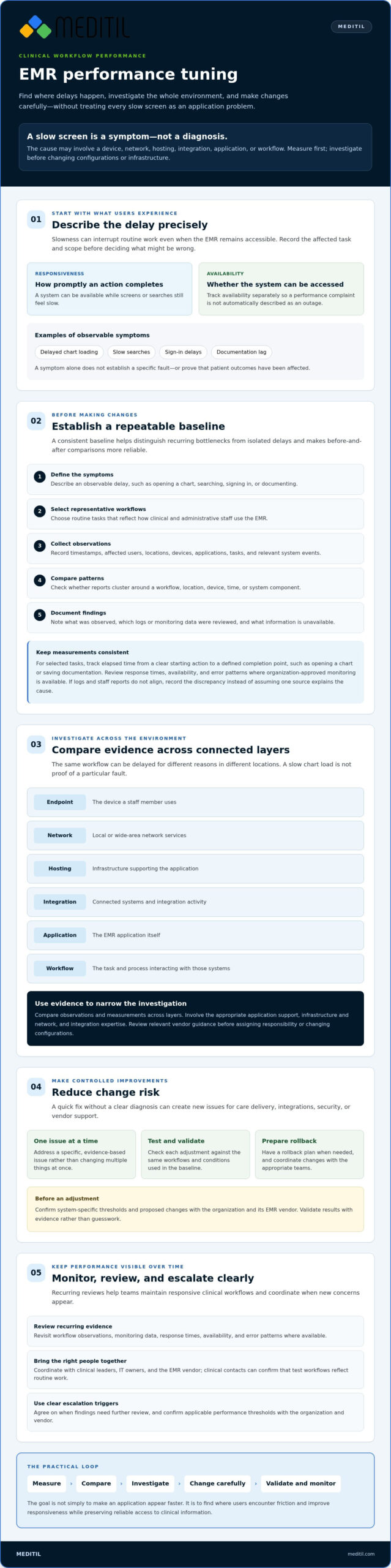
Responsiveness describes how promptly the system completes a user’s action; availability describes whether the system can be accessed. An EMR can be available while users still experience slow screens or searches. Tracking both helps teams describe the issue precisely instead of treating every performance complaint as an outage.
Which EMR delays should teams investigate first?
Start by establishing the scope. Is slowness affecting users across the organization, or is it limited to one person, location, device, or workflow? Record when the delay occurs, how often it recurs, and which task is affected. Ask clinicians and administrative staff for specific examples, such as opening a patient chart, finding a record, signing in, or saving documentation. These details help distinguish a recurring pattern from an isolated report.
Why the EMR application may not be the only cause
A delay can involve several connected layers: the endpoint a staff member uses, the local or wide-area network, hosted infrastructure, an integration, the application itself, or the workflow interacting with those systems. A slow chart load is a symptom to investigate, not proof of a specific fault. The same task may be delayed for different reasons in different locations. Compare observations and measurements, then review relevant vendor guidance before assigning responsibility or changing configurations.
This cross-functional view keeps an investigation grounded in evidence. Healthcare application support, infrastructure and network services, and integration expertise can help coordinate analysis across these layers. MEDITIL supports EMR/EHR environments but does not sell the software. Confirm system-specific thresholds and proposed changes with the organization and its EMR vendor.
How to Establish an EMR Performance Baseline Before Making Changes
Before changing settings or infrastructure, establish what users experience under normal conditions. A consistent baseline helps separate a recurring bottleneck from an isolated delay and provides a fair way to assess whether a later adjustment made a difference. A baseline makes before-and-after comparisons more reliable because it records the same workflows and conditions before and after a change.
Use a repeatable sequence:
- 1. Define the symptoms. Describe the delay in observable terms, such as a slow chart opening, search, sign-in, or documentation task.
- 2. Select representative workflows. Choose routine tasks that reflect how clinicians and administrative staff actually use the EMR.
- 3. Collect observations. Record timestamps, affected users, locations, devices, applications, tasks, and relevant system events.
- 4. Compare patterns. Check whether reports cluster around a particular workflow, location, device, time, or system component.
- 5. Document findings. Note what was observed, which logs or monitoring data were reviewed, and what information is unavailable.
Choose useful measures for real clinical tasks
For selected workflows, track elapsed time from a clear starting action to a defined completion point, such as opening a chart or saving documentation. Use organization-approved monitoring to review response times, availability, and error patterns where available. Keep the measurement method consistent across observations. If logs and staff reports don’t align, record the discrepancy rather than assuming one source explains the cause. Confirm performance thresholds with the organization and EMR vendor.
Coordinate clinicians, IT teams, and the EMR vendor
A clinical contact can confirm that test workflows reflect routine work and identify steps that may be missed in a technical reproduction. Infrastructure and application teams should align timestamps and interpret relevant logs together, while the EMR vendor can advise on product-specific metrics and guidance. HealthIT.gov’s resource on EHR implementation and optimization provides broader context for assessing system use and improvement.
Clear ownership helps connect user experience with technical evidence. Organizations coordinating responsibility across infrastructure, applications, and support may find this overview of managed IT services for healthcare useful. MEDITIL provides healthcare IT consulting and managed IT services, and supports EMR/EHR environments without selling the software. For an overview of its services, see healthcare IT support and consulting.
How to Compare EMR Performance Bottlenecks Across Systems
A slow chart load can point to different issues depending on where and when it occurs. Compare observations across the technology stack before selecting a fix. A measured bottleneck is supported by repeatable evidence; a plausible cause is a hypothesis that still needs verification. That distinction helps teams avoid treating a symptom as a diagnosis.
| Layer | Indicators to compare | Evidence to review |
|---|---|---|
| Application | Specific screens or functions respond slowly, or errors recur during a task. | Application response patterns, error records, and vendor guidance. |
| Endpoint | Delays cluster around one device or group of devices. | Compare the same workflow across affected and unaffected endpoints; review relevant device events. |
| Network | Users in one location or on one connection report similar delays. | Compare timing with network events and approved connection monitoring. |
| Hosting | Several locations or workflows show a shared pattern. | Review available hosting or infrastructure monitoring with the responsible team or provider. |
| Integration | Information from another system arrives late, or connected tasks stall. | Check integration events and queues with the teams responsible for those interfaces. MEDITIL’s healthcare interoperability guide provides related context. |
| Workflow | Delay occurs during a particular sequence of steps, rather than across all use. | Observe the task with clinical staff and identify handoffs, repeated entry, or dependencies. |
Hardware upgrades aren’t always the right first move. Faster hardware may not resolve delays caused by network conditions, an integration queue, or a workflow dependency. Compare the same task across users, devices, locations, and time periods. Protect sensitive operational data while collecting and sharing logs, and use only organization-approved monitoring.
Application, database, and vendor-managed components
Review application response patterns and errors with the EMR vendor or an authorized support team. Treat database-level tuning as vendor-governed work, not an unsupported local adjustment. Before proposing changes, confirm system-specific access, maintenance, and escalation procedures, and check current vendor guidance.
Network, endpoint, and integration contributors
Compare affected and unaffected devices or connections, then check whether timing aligns with network events, endpoint constraints, or integration queues. A repeated delay in one location may narrow the investigation, but it doesn’t prove the network is responsible. EMR performance tuning should proceed from evidence across these layers, with clinical workflow needs considered alongside technical findings.
The American Medical Association’s Framework for EHR Usability offers context for examining how system design and usability affect work. Use it to inform questions, not as a substitute for local measurements or vendor-specific advice.
How to Tune EMR Performance Safely, Step by Step
Once evidence supports a likely bottleneck, make a controlled change rather than adjusting several systems at once. This makes it easier to identify what helped and respond if the change introduces a new issue. Effective EMR performance tuning protects clinical operations while testing whether a targeted adjustment improves the workflow.
- Prioritize one issue. Choose a specific, measurable delay and address its likely cause before moving to another problem.
- Agree on the change. Define the proposed adjustment, expected effect, responsible owner, required approvals, and criteria for rollback. Coordinate application or database changes with the EMR vendor and follow its current guidance.
- Test safely. Use a suitable test environment when one is available and approved. Include representative users and tasks so validation reflects real clinical and administrative work.
- Validate and document. Compare results with the original baseline, confirm workflows remain usable, and record the change, observations, approvals, and any unexpected effects.
- Monitor or roll back. Watch for regressions after implementation. If agreed criteria aren’t met, restore the prior state using the rollback plan.
Prioritize low-risk interventions before complex changes
Start with verified issues that can be addressed within authorized support boundaries, such as a confirmed endpoint or network concern, or a workflow step that staff can review with appropriate clinical oversight. Don’t assume a local adjustment is appropriate just because it seems straightforward. Before implementation, specify the expected effect, owner, approval path, and rollback criteria for every proposed change.
Test changes without disrupting patient-facing work
Where changes could affect clinical operations, schedule an approved maintenance window and have a practical rollback plan ready. Validate with representative users performing relevant tasks, not only with technical checks. Compare response patterns with the baseline and confirm connected workflows still operate as expected. If user feedback or monitoring indicates a regression, follow the agreed process to restore the prior state and reassess the cause.
Changes should be coordinated across application, infrastructure, integrations, and clinical teams. MEDITIL provides EMR/EHR implementation and training support, along with healthcare IT consulting. It supports these environments but doesn’t sell the software. Details about its EMR implementation and training support are available here.
How to Sustain EMR Performance and Decide When to Get Help
Performance needs ongoing attention after an issue is resolved. User needs, connected systems, and approved changes can shift, so a fix that worked before may not address a new pattern. A recurring review gives clinical and IT teams a shared view of user feedback, monitoring trends, incidents, and system changes. It also helps determine whether EMR performance tuning is holding up in day-to-day workflows.
Create an ongoing performance review routine
Assign owners to gather recurring symptoms, review available monitoring, track unresolved incidents, and record approved changes. Compare new observations with the established baseline, using consistent workflows and measurement methods. Investigate meaningful changes, such as delays appearing in a new location or recurring after a system update. Keep vendor guidance, approvals, and verified resolutions with the troubleshooting record so teams can refer to them during future investigations.
Agree on escalation triggers in advance with clinical leaders, IT owners, and the EMR vendor. Triggers may include a sustained or expanding pattern, a delay affecting a critical workflow, recurring errors, or a change that hasn’t resolved the documented issue. Confirm system-specific thresholds and escalation procedures with the organization and vendor. Escalation should bring the right people together, not assume a cause before evidence is reviewed.
When healthcare IT consulting can help
Consider additional support when an investigation crosses infrastructure, application, integration, or team boundaries, or when internal teams lack clear ownership of the next step. Healthcare IT support can help coordinate review across these areas while clinical leaders confirm the operational context and the EMR vendor advises on system-specific issues. MEDITIL provides managed IT services, healthcare application support, and consulting for healthcare organizations. It supports EMR/EHR environments but doesn’t sell the software.
To prepare for a useful discussion, document one recurring delay: the affected task, when and where it occurs, which users or devices are involved, and any relevant monitoring or incident records. Include what’s already been checked and whether the issue changed after an approved system update. This focused record gives the organization and its support partners a practical starting point without presuming the root cause.
A structured review can help clarify ownership, organize the evidence, and identify appropriate next steps with your IT teams and EMR vendor.
Build a More Responsive Clinical Technology Environment
Better EMR performance starts with evidence, not assumptions. Establish a baseline around real clinical tasks, compare symptoms across application, infrastructure, integrations, and workflow, then make controlled changes that can be validated against users’ experience before the change. A consistent review process helps teams recognize recurring issues and respond with greater clarity.
This cross-functional work may require coordination among clinical leaders, IT teams, and the EMR vendor. MEDITIL provides healthcare-focused managed IT, infrastructure, and application support, along with EMR/EHR implementation and training expertise and systems integration and interoperability consulting. MEDITIL supports EMR/EHR environments but doesn’t sell the software.
If recurring delays are difficult to trace or span multiple systems, discuss a structured EMR performance assessment with MEDITIL. A measured next step can help your team organize the evidence, clarify ownership, and plan improvements with care.
Frequently Asked Questions
What causes an EMR system to run slowly?
An EMR can run slowly because of delays in the application, endpoint, network, hosting environment, integrations, or workflow. The same symptom, such as a delayed chart load, can have different causes, so user reports alone can’t confirm the source. Compare whether the issue affects multiple users, locations, devices, or tasks, then review relevant system events and available monitoring with IT teams and the EMR vendor before choosing an intervention.
How do you measure EMR performance?
Measure performance by timing consistent, representative tasks such as signing in, opening a chart, searching, or saving documentation. Record the start and end points, timestamps, affected users, locations, devices, and application context. Compare observations with organization-approved monitoring for response times, availability, and error patterns. Use the same method for later checks so results are comparable, and confirm suitable thresholds and interpretation with the EMR vendor.
Can a slow network make an EMR appear unresponsive?
Yes. Network delays can slow communication between a user’s device and hosted EMR components or connected systems, making a screen or task appear unresponsive. Compare reports from different devices, locations, and connections, and check whether delays align with network events. A pattern can help focus an investigation, but it doesn’t prove the network is responsible. Review network evidence alongside application and endpoint data before making changes.
Does adding server capacity always improve EMR performance?
No. More server capacity may not resolve a delay caused by an endpoint, network, application, integration, or workflow issue. First establish where the bottleneck occurs and review relevant monitoring with the teams responsible for the affected systems. If evidence points to hosting capacity, coordinate next steps with the hosting provider or EMR vendor. Validate any approved change against the original measurements rather than assuming added resources will improve responsiveness.
How can we tune EMR performance without disrupting clinical workflows?
Start with a documented, measurable issue and address one suspected cause at a time. Agree on the change, owner, approval, expected effect, and rollback criteria before implementation. Use an approved test environment when available, and involve representative users to confirm routine tasks still work. If a change could affect clinical operations, use an approved maintenance window and rollback plan. Compare results with the baseline and monitor for regressions.
Should healthcare organizations change EMR database settings themselves?
Organizations shouldn’t make unsupported database-level changes. These settings may be governed by the EMR vendor, and an unapproved adjustment can create operational or support risks. Document the observed issue and relevant evidence, then consult the vendor or authorized support team about approved options. Confirm access, maintenance, and escalation procedures before work begins. Healthcare IT teams can help coordinate the investigation, but vendor guidance should direct system-specific database changes.
When should a medical practice contact its EMR vendor about performance issues?
Contact the vendor when delays recur, affect important workflows, appear across users or locations, coincide with application errors, or remain unresolved after initial evidence gathering. Share specific task examples, timestamps, affected users and devices, relevant system events, and the troubleshooting already completed. Ask which logs or measurements the vendor needs and confirm applicable escalation procedures. If the cause may cross application, infrastructure, or integration boundaries, coordinate with your IT owners as well.