
What if a clinician can’t reach a system in the field, even though the hospice’s core software is still running? For distributed teams, reliable access depends on more than an EHR. Hospice IT support services should connect staff, infrastructure, applications, and security so technical issues don’t disrupt daily operations.
Hospice leaders need to protect sensitive information while giving staff timely access to the tools they use. The challenge is determining whether support covers one application or the organization’s wider IT environment. This guide explains the capabilities to consider, compares internal, reactive, and managed support models, and outlines how to plan a transition with clear accountability and continuity. It also shows how help desk support, infrastructure, cybersecurity, cloud services, and application integration fit together, giving leaders a practical framework for evaluating needs and next steps.
Key Takeaways
- Hospice IT support services should cover more than clinical software. Consider the technology, access, and safeguards staff rely on across locations.
- Map needs across infrastructure, help desk, cybersecurity, applications, and strategic oversight to identify connected responsibilities and ownership gaps.
- Compare internal, break-fix, and managed support by ownership, continuity, scalability, and coordination, not only by how problems are fixed.
- Plan a transition in stages, starting with an inventory of systems, users, dependencies, access, and current responsibilities.
- MEDITIL brings healthcare IT capabilities together through managed services, consulting, and project-based support tailored to organizational workflows.
What hospice IT support services cover beyond hospice software
Hospice IT support services maintain the technology that helps an organization’s teams access systems, communicate, and manage information. They are operational services, not clinical care or an electronic medical record (EMR) license. Because hospice care can involve different settings and coordinated work across roles, as outlined in this Hospice Care Overview, IT support needs to account for how office and field-based work connect.
Concise definition: Hospice IT support services maintain and coordinate an organization’s technology environment. Hospice EMR software is a specific application used to document and manage hospice operations.
How hospice operations shape day-to-day IT needs
Office teams, field staff, and leadership may rely on shared systems from different locations and devices. A staff member away from the office might need to sign in, retrieve an authorized record, or resolve an access issue before completing routine administrative work. Support requirements therefore include network connectivity, managed devices and accounts, and a clear process for reporting problems.
These systems may hold sensitive information and connect with other applications. Access needs careful management, and support teams should understand how a change to one system could affect related workflows. The goal is operational reliability and appropriate access, not a claim about clinical outcomes.
Hospice IT support versus hospice software support
Software-vendor support generally covers the vendor’s product, such as application-specific errors, updates, or questions about product functions. Organization-wide IT support covers the environment the application depends on, including networks, devices, user accounts, connectivity, cloud services, and help desk coordination. The distinction matters when an application is working but a user can’t connect, sign in, or reach information they’re authorized to use.
- Application vendor: Product features, updates, and technical issues within its software.
- IT support: Network, device, account, access, and help desk issues affecting the broader technology environment.
- Shared responsibility: Some issues cross boundaries. Clear ownership and coordination help route them to the right support team.
MEDITIL provides healthcare application support, EMR/EHR implementation and training, and systems integration for the applications organizations use. Its implementation and support work can help connect technology to operational needs. For a wider view of how infrastructure, cybersecurity, help desk, and application support fit together, explore this managed IT services for healthcare guide.
Which hospice IT support capabilities keep systems connected and protected?
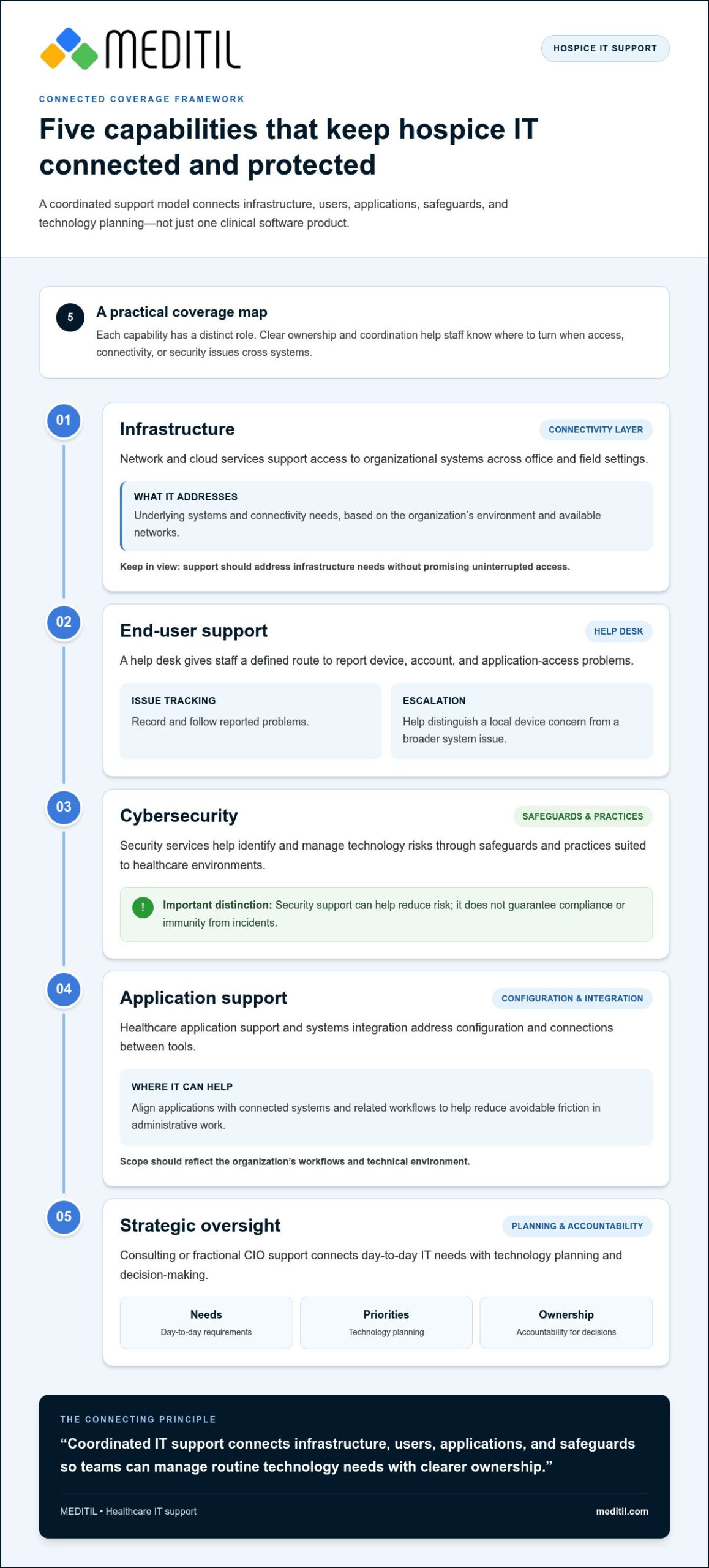
Hospice IT support services work best as a coordinated set of capabilities, rather than disconnected fixes. Each area has a distinct role, but gaps between them can leave staff unsure where to turn when access, connectivity, or security issues involve more than one system. A useful framework covers five areas:
- Infrastructure: Network and cloud services support access to organizational systems across office and field settings. Connectivity depends on the environment and available networks, so support should address infrastructure needs without promising uninterrupted access.
- End-user support: A help desk gives staff a defined route to report device, account, and application-access problems. Issue tracking and escalation help distinguish a local device concern from a broader system issue.
- Cybersecurity: Security services help identify and manage technology risks through safeguards and practices suited to healthcare environments. They support risk reduction, not a guarantee of compliance or immunity from incidents.
- Application support: Healthcare application support and integration can address configuration and connections between systems, helping reduce avoidable friction in administrative workflows.
- Strategic oversight: Consulting or fractional CIO support connects day-to-day IT needs with planning, priorities, and accountability for technology decisions.
Quotable principle: Coordinated IT support connects infrastructure, users, applications, and safeguards so teams can manage routine technology needs with clearer ownership.
Infrastructure, help desk, and application support
Network, cloud, and end-user support address different layers of the same operating environment. Infrastructure services focus on connectivity and underlying systems. Cloud services support the organization’s use of cloud-based resources, while help desk support assists staff with access and technical issues. Together, these capabilities help leaders determine whether a problem is tied to a user, device, connection, or service, instead of treating each report as an isolated event.
Application support and systems integration can reduce friction where tools exchange information or support related workflows. MEDITIL provides healthcare application support, systems integration, and EMR/EHR implementation and training. For example, a project may involve preparing an application for use, training staff, or aligning it with connected systems. Scope should reflect the organization’s workflows and technical environment.
Cybersecurity and compliance support for hospice organizations
Security needs to be managed across technology and staff processes. Access controls define who can use systems and information, while security practices guide how accounts, devices, and data are handled. Risk management can include reviewing the organization’s environment, identifying concerns, and setting priorities for safeguards. These activities contribute to a broader compliance program, but no IT service can guarantee compliance on its own.
Technology decisions may also affect administrative workflows such as eligibility and billing. CMS provides information on Medicare Hospice Benefits and Regulations, which can inform organizational planning alongside appropriate operational and compliance guidance. MEDITIL brings cybersecurity, infrastructure, help desk, and application capabilities together, with support tailored to healthcare organizations. Explore healthcare cybersecurity services to consider how security fits within the broader support environment, or learn about MEDITIL’s healthcare IT support.
How to compare hospice IT support service models
The right support model depends on the work your organization needs covered, the capacity already in place, and how technology decisions are managed. Compare hospice IT support services by ownership, continuity, strategic oversight, scalability, and coordination, not simply by whether technical help is available.
When internal, reactive, or managed support may fit
An internal team offers direct organizational knowledge and control over priorities. Its capacity and coverage depend on team size, skills, and competing responsibilities. Reactive break-fix support can address specific issues as they arise, but it doesn’t establish ongoing oversight or a plan for recurring needs by itself. Managed services provide ongoing support through an agreed scope tailored to the organization’s environment and operating needs.
- Internal IT: The organization employs and directs its IT resources. Leadership has direct visibility, while responsibility for coverage, skills, and continuity rests within the organization.
- Reactive support: Assistance focuses on reported issues or defined projects. This can suit organizations with limited ongoing needs, but planned maintenance, strategic guidance, and coordination may need separate ownership.
- Managed services: An external partner handles agreed ongoing responsibilities in coordination with organizational leadership. Scope can include infrastructure, help desk, security, and applications, with documented responsibilities to preserve clarity and context.
Outsourcing doesn’t automatically mean losing control. Organizational leaders still set priorities, approve decisions, and retain oversight. Clear documentation, agreed access and escalation processes, regular communication, and defined decision boundaries help preserve that control. A well-structured partnership adds capacity while keeping the organization’s operational context central.
A decision framework for hospice leaders
Start with the current workload and identify which responsibilities take up internal time. Then assess the complexity of the environment, whether staff have the capacity and expertise to manage it, and how clearly leaders can see risks, open issues, and planned work. This turns a broad comparison into a practical review of organizational requirements.
- Map current responsibilities. Record who handles user support, infrastructure, security, application issues, projects, and vendor coordination. Note overlaps and responsibilities without a clear owner.
- Assess capacity and complexity. Consider the number and variety of systems, locations, users, and dependencies, along with the internal team’s available time and skills.
- Define continuity needs. Identify the knowledge, documentation, escalation paths, and handoffs needed to maintain consistent support when staff or responsibilities change.
- Set strategic priorities. Clarify which technology decisions need leadership visibility and how support should align with operational plans.
Service and project needs vary with scope, system complexity, and operating model, so compare the responsibilities included rather than relying on generic cost ranges. MEDITIL offers managed IT services, project-based consulting, augmented IT team support, and fractional CIO consulting, shaped around organizational needs. For additional context on strategic oversight, the virtual CIO services guide explains how technology leadership can connect operational priorities with longer-term planning.
How to plan a hospice IT support transition without avoidable disruption
A dependable transition starts with a shared understanding of the current environment, not with an immediate change to systems or support responsibilities. For hospice IT support services, leaders need a clear picture of what exists, how components depend on one another, and who currently owns each task. A staged plan helps teams transfer knowledge, communicate changes, and address priorities in sequence. This can reduce avoidable confusion, though it can’t guarantee zero downtime or a specific transition timeline.
Discovery, documentation, and transition planning
Begin discovery with the people who understand daily operations and the technology. Map infrastructure, cloud services, applications, user groups, integrations, and existing support responsibilities. Identify dependencies and order transition priorities with organizational leaders. Sequence the work according to scope, naming owners, communication points, and decisions before responsibilities change.
A responsible IT handover documents systems, users, dependencies, access, ownership, support paths, and planned communication.
- Build an inventory. Record systems and services in use, the user groups that rely on them, and the teams or vendors responsible for support. Include devices, accounts, cloud environments, and connected applications within scope.
- Map dependencies and access. Document how applications connect and which routine tasks depend on each connection. Review account ownership and access processes so the incoming support team understands how access is managed, without relying on informal knowledge.
- Set priorities with leaders. Identify critical operational dependencies, upcoming projects, and gaps in documentation. Agree which items need attention first and who approves changes or decisions.
- Plan the knowledge transfer. Arrange staged handoffs of documentation, open issues, vendor contacts, and established procedures. Keep current support owners involved until the incoming team understands responsibilities and escalation paths.
Onboarding, staff support, and ongoing review
Onboarding is also a staff communication exercise. Tell employees which support route to use, what details to provide when reporting an issue, and how escalation works. A concise guide can reduce uncertainty, especially for staff working away from the office. Share changes before they take effect and provide a clear point of contact for transition questions.
After onboarding, review open issues, recurring support needs, documentation gaps, and planned technology work with organizational leaders. Regular reviews keep responsibilities visible and help adjust the support scope as workflows or systems change. They also provide a structured opportunity to clarify ownership when an issue crosses infrastructure, application, or vendor boundaries.
MEDITIL provides managed IT services and project-based consulting tailored to organizational needs, including transition planning, implementation, and ongoing support. Learn about planning a healthcare IT support transition with MEDITIL and aligning the handover with your systems, responsibilities, and operational priorities.
How MEDITIL can align healthcare IT support with hospice operations
Hospice organizations need technology support that reflects how their teams work, how systems connect, and where leaders need visibility. MEDITIL is a healthcare IT partner offering managed services, consulting, and project-based support. By considering infrastructure, user support, security, and applications together, MEDITIL can help organizations align these capabilities with operational priorities.
A coordinated partner for healthcare IT operations
Support can be structured around an organization’s existing team and technology environment. Managed IT services provide ongoing support for agreed operational responsibilities. Augmented IT team support adds capacity alongside internal staff, while project-based consulting can focus on a defined implementation or integration need. Leaders can choose the level and type of assistance that fits their internal resources.
For example, a support plan may bring together infrastructure and network services, cloud services, end-user help desk support, cybersecurity, and healthcare application support. If staff encounter an application access issue, the cause may involve an account, device, network, or system connection. Coordinating these service areas can clarify ownership and help teams address the issue across the environment.
Application projects can be scoped around operational requirements. MEDITIL provides systems integration and interoperability services, as well as EMR/EHR implementation and training. Its implementation and training work helps organizations prepare to use their chosen systems, while integration work addresses how applications relate to one another. Scope can reflect workflows, existing systems, and project objectives. MEDITIL’s healthcare-sector focus informs this work without assuming every organization has the same needs.
Operational support can also benefit from strategic guidance. Fractional CIO consulting connects technology priorities with leadership planning, while managed services address agreed day-to-day responsibilities. Together, these services can help leaders align operational requirements, project decisions, and longer-term technology direction.
Define the next step for evaluating support
Before discussing a support arrangement, assemble a concise picture of the current environment. This gives the conversation a practical starting point and helps distinguish ongoing operational needs from discrete projects. Include:
- Systems and dependencies: Applications, infrastructure, cloud services, and key connections between them.
- Support responsibilities: Internal roles, existing support arrangements, and areas where ownership is unclear.
- Current gaps and risks: Recurring issues, access or security concerns, and documentation that needs attention.
- Near-term priorities: Upcoming projects, training needs, or changes that may affect staff workflows.
With that context, MEDITIL can discuss whether managed IT services, consulting, augmented team support, or project-based work aligns with the organization’s priorities. Discuss a tailored healthcare IT support approach with MEDITIL, grounded in your systems, internal capacity, and operational goals.
Set a clear direction for your next IT decision
Turn concerns into priorities by identifying what your team needs to work reliably, where accountability is unclear, and which technology decisions need leadership attention. This focused view can help shape a support arrangement around your organization’s operating needs rather than a generic package.
Hospice IT support services should make responsibilities easier to understand and give leaders a practical way to plan for changing needs. Start with the issues that matter most, then consider how ongoing support, consulting, or project work could address them over time. A focused review can help define a manageable path forward.
Discuss healthcare IT support for your organization with MEDITIL. Bring your priorities into the conversation and identify the support that fits your systems and operational goals.
Frequently Asked Questions
What do hospice IT support services typically include?
Hospice IT support services typically include the technical work needed to keep an organization’s systems usable, maintained, and connected. Scope can include managing user access, troubleshooting devices, coordinating application issues, and supporting technology changes. For example, leaders can define whether support covers new employee account setup, staff departures, or recurring problems with a particular workflow. Documenting routine tasks clarifies responsibilities and helps teams identify gaps.
How can IT support help hospice staff working outside the office?
IT support can help staff outside the office troubleshoot access, device, and connectivity problems through an established help desk process. For example, if an employee can’t sign in to an approved application from a work device, support can investigate whether the issue relates to the account, device, connection, or application. Clear instructions on how to report the problem, including what details to provide, make it easier to route and investigate.
Does hospice IT support include EMR or EHR software?
IT support can include services related to EMR/EHR systems without including the software itself. MEDITIL provides EMR/EHR implementation and training, healthcare application support, and integration services. An organization might use these services to prepare a system for staff or address how it connects with other applications. The organization selects and licenses the software separately from its chosen vendor.
Can a managed IT partner support HIPAA-related security work?
A managed IT partner can support technical security activities that contribute to an organization’s broader HIPAA-related work, such as reviewing access practices, identifying technology risks, and helping prioritize safeguards. For example, a review can help leaders identify accounts that need attention or clarify who is responsible for security-related tasks. IT support can assist with implementation and documentation, but it can’t independently guarantee compliance or replace the organization’s own compliance responsibilities.
When should a hospice organization consider managed IT support?
Consider managed IT support when technical work regularly competes with other staff responsibilities, recurring issues lack a clear owner, or leaders have limited visibility into system risks and planned work. Start by reviewing recent support requests and noting which were delayed, repeated, or passed between teams. If those patterns point to ongoing needs rather than isolated projects, an ongoing support arrangement may be worth evaluating.
How can a hospice reduce disruption when changing IT support?
Reduce avoidable confusion by transferring knowledge before responsibilities shift. Keep a current record of system owners, key contacts, open issues, account processes, and dependencies. Tell staff where to direct requests and what information to include. For a change affecting one application, identify related workflows and the people who rely on it before adjusting support processes. A sequenced handover helps teams understand what is changing and who owns each next step.
What is the difference between hospice software support and managed IT support?
Hospice software support addresses questions and technical problems within a particular application, while managed IT support covers agreed responsibilities across the organization’s wider technology environment. For example, a software vendor may address an application error, while an IT team investigates whether a user’s device or account is preventing access. Some issues involve both parties, so documented ownership and escalation routes help staff avoid reporting the same problem repeatedly without resolution.