
A reliable EHR launch depends on planning the entire transition, not just installing a system. An EHR implementation project plan should coordinate system selection, workflow preparation, data migration, technical setup, staff training, go-live, and ongoing user support. Hospital implementations usually take around six to eight months, according to the National Center for Biotechnology Information.
It’s understandable to focus on the launch date, but the work leading up to it determines whether staff and systems are ready. A clear plan assigns responsibilities, organizes dependencies, and gives staff time to learn new workflows while day-to-day operations continue.
This guide explains how to build the plan step by step, from setting goals and selecting a system to testing migrated data, preparing users, and supporting the organization after go-live. It also covers practical ways to track progress and manage issues, keeping the transition structured from the first planning meeting through launch.
Key Takeaways
- Build a phased timeline around your organization’s size, workflows, integrations, and readiness, then track milestones and dependencies.
- Prepare migration by identifying which records and documents to transfer, mapping them to the new system, and testing the results.
- Assign clear responsibilities across clinical, project, IT, and workflow leads so decisions and issues have accountable owners.
- Tailor hands-on training to staff roles and balance implementation work with daily operations to support adoption.
- Plan go-live support in advance, including issue tracking, backup recovery, and a clear process for responding to launch problems.
EHR implementation timelines
Build the schedule around organizational scope, technical dependencies, and clinical readiness. Key phases include goal setting, system selection, migration, setup, testing, training, launch, and support.
-
Set Project Goals and Timeline
Define outcomes, requirements, budget, and target launch before scheduling the work. Specify which clinical and administrative workflows the system must support, which systems need to connect, and what security and infrastructure changes are required. These decisions establish project scope and help the team assess whether the work fits the schedule.
Account for licensing, hardware upgrades, infrastructure improvements, third-party interfaces, and staff time in the budget. Also plan for potential overtime during critical phases and set aside funds for additional training or post-launch support. Avoid choosing a launch date before understanding these dependencies.
For EHR software-as-a-medical-device modules in the United States, premarket submission may be initiated under the FDA 510(k) program, according to the U.S. Food and Drug Administration. Include any relevant review work in the schedule when the project involves such modules.
-
Schedule Phases and Milestones
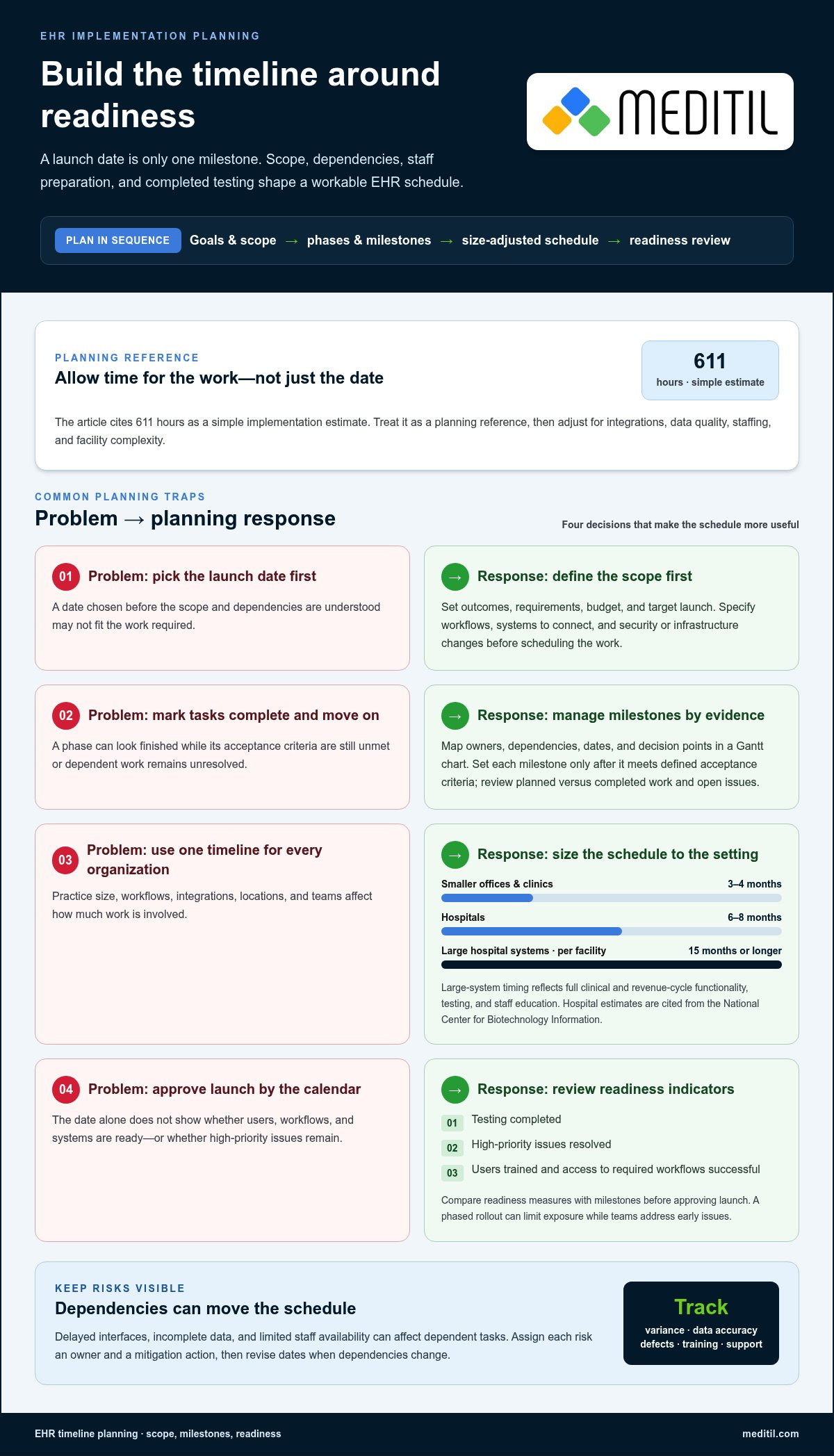
Map each phase in a Gantt chart, showing owners, dependencies, start and finish dates, and decision points. Include system selection, workflow design, data migration, technical setup, testing, training, launch preparation, and user support. Set a milestone for each phase only after it meets defined acceptance criteria, not simply when its tasks appear complete.
A simple estimate for EHR implementation is 611 hours, while hospital implementations usually take around six to eight months, according to the National Center for Biotechnology Information. Treat these as planning references, then adjust the schedule for integrations, data quality, staffing, and facility complexity.
Identify risks alongside milestones. Delayed interfaces, incomplete data, and limited staff availability can affect dependent tasks. Assign an owner and mitigation action to each risk. Track planned versus completed work and open issues in regular project meetings, then revise dates when dependencies change.
-
Adapt the Schedule to Practice Size
Set the timeline according to the number of workflows, locations, integrations, and teams involved. EHR implementation in smaller medical offices and clinics can take three to four months. Hospital implementations usually take six to eight months, according to the National Center for Biotechnology Information, and large hospital systems may need 15 months or longer per facility for full clinical and revenue-cycle functionality, testing, and staff education.
Measure readiness using practical indicators: completed testing, resolved high-priority issues, trained users, and successful access to required workflows. Compare these measures with the milestones before approving launch. A phased rollout can limit exposure while teams address early issues; a broader launch requires coordinated readiness across departments and locations.
Review timeline variance, migration accuracy, unresolved defects, training completion, and support demand to assess implementation progress. Use these measures to guide launch-readiness and support decisions rather than relying on the calendar date alone.
Data migration planning, preparation, and testing
Reliable migration starts with an inventory of patient records, practice documents, and connected systems. Organize the work around clear transfer rules, security review, and repeatable tests.
-
Plan Patient and Practice Data Migration
Inventory the information in each source system before mapping it to the new EHR. Include patient demographics, medication lists, allergies, visit histories, scanned documents, and practice information such as schedules and provider details. Identify records needed for active care and administration, then document how staff will handle incoming outside documents after migration.
Assign an owner to each data category and record its source, destination, and validation method. For example, a clinical lead can review medication and allergy mappings, while an administrative lead checks patient demographics and scheduling data. This division helps expose omissions before transfer. Identify duplicate, incomplete, or outdated records for review rather than moving them without a documented decision.
Assess the EHR system’s data security and privacy capabilities, including how it handles breaches and supports compliance with HIPAA and other applicable requirements. Document who can access migration files, where temporary copies are stored, and when they should be removed. Define how staff will handle new outside documents so they don’t create separate, untracked records during the transition.
-
Choose Data Entry and Migration Methods
Choose a transfer method for each information type: migrate structured data, manually enter essential records, or retain selected documents in an accessible archive. Base the decision on clinical use, data quality, format, and the receiving EHR’s capabilities. A medication list may need structured fields for continued use, while older scanned documents may be easier to preserve as files.
Map each source field to its destination before transfer. For example, confirm that a legacy system’s allergy field maps to the correct allergy section, not to general notes. Ask the vendor to explain supported file formats, extraction steps, transformation rules, and error reports. Test a representative sample first, then refine the mappings before the full transfer.
Plan system integration alongside migration. List connected systems, such as billing or laboratory applications, and define what information must pass between them. Confirm how interfaces handle missing fields, rejected messages, and duplicate entries. Integration testing examines interactions between modules, while interface testing checks exchanges between separate systems.
-
Test Migrated Data
Run a controlled test migration and compare source records with their destination versions. Check record counts, required fields, document readability, and whether relationships remain intact, such as a note appearing under the correct patient. Correct migration processes can reduce data errors by 10%, according to market estimates; validation helps identify discrepancies before wider use.
Include unit testing for a single module, integration testing between modules, and interface testing between systems. Use realistic workflows, such as opening a patient chart, reviewing allergies, and sending a billing record. Record each failure, its owner, and its resolution, then repeat the affected test after making a correction.
Have clinical and administrative reviewers approve samples against agreed criteria. Keep a reconciliation log of missing, duplicated, or transformed records, and document decisions about exceptions. Don’t treat a successful transfer message as proof of accuracy. Before approving the migration for operational use, confirm staff can locate and interpret the information in the new EHR.
EHR solution selection and implementation team roles
Choose a system against documented clinical, administrative, technical, and security requirements. The implementation team needs clinical champions, a project manager, an IT/EHR lead, super users, and a workflow coordinator.
-
Select the EHR Solution
Define the organization’s essential workflows before reviewing electronic health record systems. Include clinical documentation, scheduling, billing, reporting, records access, and required integrations. Then assess usability, functionality, security capabilities, vendor pricing structure, and total cost of ownership.
Use a request for proposal to compare vendor responses against the same criteria. Shortlist 3 or 4 finalists for demonstrations, then ask clinicians and administrative staff to complete representative tasks. For example, test how a clinician records a visit and how front-desk staff schedule a follow-up. Score each system against requirements rather than choosing from presentation quality alone.
Document selection decisions and unresolved requirements in the EHR implementation project plan. This helps the team distinguish essential configuration needs from preferences and gives the vendor a clear basis for implementation planning.
-
Assign Implementation Team Roles
Appoint a physician champion to represent clinical priorities and support decisions that affect care workflows. Give the project manager responsibility for scope, schedule, issue tracking, and coordination. The IT/EHR lead should oversee technical requirements, system access, and integration planning.
Select super users from clinical and administrative teams to test workflows, share feedback, and help colleagues learn the system. Assign a workflow coordinator to document current processes and organize decisions about future workflows. For example, the coordinator can bring a rooming workflow issue to the appropriate clinical and technical owners.
Record each person’s responsibilities, decision authority, and expected time commitment in the EHR implementation project plan. This prevents key work from going unassigned alongside daily patient care and administrative operations.
-
Set Committee Responsibilities
Create an implementation committee with clinical, administrative, technical, and operational representation. The committee should resolve cross-functional decisions, review risks, approve workflow changes, and monitor readiness. Keep routine task ownership with workstream leads so the committee can focus on decisions affecting multiple teams.
Choose a sourcing model that matches internal capacity: an in-house team, vendor implementation staff, external project-based support, or a hybrid model. Define who configures the system, manages integrations, validates records, and trains users. The organization remains accountable for its workflows and acceptance decisions, even when outside specialists support delivery.
Set a regular meeting cadence and use a decision log, issue register, and action owners. Each committee update should cover completed work, open risks, decisions needed, and impacts on the transition. This structure makes responsibilities visible and helps leaders address blockers before they affect implementation.
Technical implementation and staff training
Coordinate technical configuration with role-based training so users can practice workflows in the environment they’ll use. Schedule both around clinical operations, testing, and launch readiness.
-
Implement the Technical Setup
Configure access, user roles, devices, network capacity, and system connections against documented workflows. For example, verify that clinicians can access the correct patient views and administrative users can complete scheduling tasks. Assign an owner to each configuration area and record decisions, dependencies, and open issues.
Test the setup before training begins. Check that accounts work, permissions match job duties, connected applications exchange the expected information, and common workflows perform reliably. Record each defect, its impact, and its resolution owner. Avoid training staff in a temporary configuration that will change before launch, since this can undermine practice and require repeated sessions.
-
Allocate Resources and Staff Workload
Reserve staff time for workflow reviews, testing, training, and issue resolution. Map project duties against daily responsibilities, then identify which teams need coverage as implementation work proceeds. A clinic might schedule administrative testing outside peak appointment periods and arrange clinical participation around patient-care commitments.
Balance project work with routine operations to reduce fatigue and protect morale. Assign backup owners for tasks that depend on a clinician or technical lead, and maintain a visible workload plan. If testing or configuration falls behind, adjust assignments and milestones rather than quietly adding tasks to already full schedules.
-
Train Staff and Trainers
Use hands-on sessions built around each role’s actual tasks. Clinicians can practice documenting a visit, while front-desk staff rehearse registration and scheduling. A train-the-trainer program prepares key staff to teach and support colleagues. Give trainers practice materials, clear workflows, and a way to report questions they can’t resolve.
Track attendance and ability to complete essential tasks, not attendance alone. Training programs have a 10% increase in productivity at stake. Use test scenarios to identify where users need more instruction, then schedule focused follow-up sessions. Prepare concise self-help instructions for recurring tasks, such as locating a chart or correcting a draft entry.
-
Support Change and Ongoing Learning
Explain what will change, why the workflow is changing, and where staff can raise concerns. Ask super users to collect recurring questions during practice and report patterns to the implementation team. For example, repeated confusion about a documentation step may point to a training gap or a configuration issue.
Keep support available through the transition, then use reported issues to shape refresher training. Review help requests, task-completion problems, and feedback from each role. The vendor may assist with technical implementation, staff training, and self-help instructions. Define how staff will route an issue, receive an update, and learn from its resolution.
EHR launch, implementation, and user support
Plan training around staff roles, test clinical and administrative workflows, and prepare clear support before go-live. The organization should also define launch readiness, issue escalation, and recovery steps before activating the system.
-
Test the EHR Before Go-Live
Run end-to-end tests using realistic healthcare workflows, from patient registration through documentation and billing. Include system stress or load testing, then record defects, owners, and resolution status. Test interactions between connected functions and verify that staff can complete essential tasks with their assigned access.
Confirm that the system can be restored from backups before launch. Document disaster recovery procedures, maintain a working backup plan with copies stored off-site, and define how the team can stop the rollout and return to paper processes if necessary. Review pre-launch information-blocking and API obligations under the 21st Century Cures Act.
- Choose the rollout approach before scheduling activation. Decide between incremental and big-bang implementation, and whether to launch at all locations or selected locations. Organizations can test workflows by first deploying to a limited number of programs, giving teams a chance to identify operational issues before expanding.
Set readiness criteria for each location or program, such as completed workflow testing, available support coverage, and resolved launch-blocking issues. Confirm that every user has logged into the EHR at least once one week before the official go-live date. This access check can reveal account or permission problems before patient care depends on the new system.
-
Launch the EHR and Support Users
Assign named support contacts for clinical, administrative, and technical questions during go-live. Schedule a midday huddle and an end-of-day debrief to review progress, identify issues, and assign follow-up actions. Keep an issue log with severity, owner, status, and affected workflow.
Make escalation routes visible to all team members. For example, direct a login problem to technical support and a documentation workflow issue to its clinical lead. Share brief updates with practice staff and vendor implementation staff so users know what is being addressed and where to report new problems.
- Review launch performance each day using operational measures, not impressions alone. Track unresolved issues, workflow interruptions, support requests, and whether essential functions are available to intended users. Compare findings across locations or programs before expanding a phased rollout.
Keep user support active after launch and turn recurring questions into targeted guidance or refresher training. If a serious issue threatens safe operations, follow the documented pause and paper-process plan. Close each issue by recording its resolution and any workflow change, giving the implementation team a reliable basis for continued improvement.
MEDITIL: Managed IT Services (Ongoing)
MEDITIL supports healthcare organizations that need ongoing IT coordination after an EHR launch or help with infrastructure, security, and user support during implementation. Its Managed Services (Ongoing) can provide continuity as teams manage technical operations alongside clinical work.
Turn to MEDITIL when network or infrastructure readiness needs attention, cybersecurity and compliance need ongoing support, or staff need a clear route for technical help. End-User Support & Help Desk can assist users as they adapt to system workflows, while Infrastructure & Network Services support the environment those workflows rely on. These HIPAA-compliant healthcare IT services complement an organization’s EHR planning and internal responsibilities.
To discuss how MEDITIL’s IT services can support your organization, contact MEDITIL.
Set Up the Next Stage of EHR Operations
Once the system is live, make ongoing ownership part of the EHR implementation project plan. Assign responsibility for reviewing operational issues, coordinating technical changes, and keeping support aligned with staff needs. This turns launch decisions into a practical foundation for future adjustments as workflows and organizational needs evolve.
MEDITIL can support healthcare organizations with Managed IT Services (Ongoing), Infrastructure & Network Services, and Cybersecurity & Compliance. These offerings can help address IT operations, infrastructure, and security needs that continue beyond implementation. If your team is planning an EHR transition or wants to strengthen ongoing IT support, contact MEDITIL about EHR implementation to discuss the next step for your organization.
A considered approach helps your team move forward with clear ownership and a steadier operational footing. When you’re ready to plan what comes next, start a conversation with MEDITIL about healthcare IT support.
Frequently Asked Questions
What is EHR implementation?
EHR implementation is the organized transition to an electronic health record system for clinical and administrative work. An EHR implementation project plan coordinates preparation, configuration, data transfer, system connections, testing, and staff adoption. For example, a clinic may need to coordinate chart access, appointment scheduling, billing, and laboratory results. Implementation is complete when the system supports intended workflows and users can perform their responsibilities accurately.
Why change EHR systems?
Organizations change EHR systems when their current platform no longer supports operational needs. Common triggers include difficult workflows, limited reporting, integration gaps, or organizational changes. Before deciding, document the specific problem and how it affects clinicians, administrative teams, or patients. For example, if staff repeatedly re-enter billing information, assess whether a prospective system can support a more suitable workflow and connection.
How long does an EHR implementation typically take?
Implementation duration depends on organizational size, system scope, integrations, and readiness. Smaller medical offices and clinics can take three to four months, while hospital implementations usually take six to eight months, according to the National Center for Biotechnology Information. Treat these as planning references, not fixed deadlines. Account for workflow decisions, technical dependencies, staff availability, testing, and training before setting a launch date.
What are typical EHR implementation costs for hospitals and small practices?
There isn’t one typical cost that applies to both hospitals and small practices. Project pricing depends on the case and is given after a quote request; key cost factors include system scope, user needs, data migration, integrations, hardware, infrastructure, training, and post-launch support. Hospitals may need to coordinate more departments and interfaces, while a small practice may have a simpler setup. Build the budget around the work required.
How do you assess workflows and select an EHR system before implementation?
Start by observing how clinical and administrative tasks move through the organization, from patient registration to follow-up and billing. Document bottlenecks, duplicate entry, handoffs, and reporting needs. Use the EHR implementation project plan to turn findings into selection criteria, then compare systems on functionality, usability, security, integration capability, and total cost of ownership. Include staff who perform the work in demonstrations so they can test realistic tasks.
What data migration, integration, and interoperability tasks should an EHR project plan include?
Inventory source records and connected applications, then map information to its destination and define validation steps. Identify which patient data and documents staff need, how outside records will be handled, and who reviews exceptions. For interoperability, specify required standards or formats, such as FHIR, USCDI, HL7 v2/v3, CCDA, NCPDP SCRIPT, and HIPAA X12 837/835. Test data exchange, rejected messages, and duplicate handling before relying on connected workflows.
What are the EHR implementation requirements under HIPAA and ONC rules?
During discovery, identify which HIPAA and ONC requirements apply to the organization’s system and workflows. Assess how the EHR manages privacy and security, controls access, and supports the organization’s breach-response processes. Document applicable requirements, assign an owner to each, and retain evidence of review in project records. Map requirements to actual system use cases, since obligations depend on the organization’s context and how the technology is used.