
What happens when a documentation issue, scheduling change, or technology problem interrupts care? Home health agency IT support helps agencies manage compliance records, streamline administrative workflows, and give staff practical assistance with the systems they use. Reliable support matters because clinicians and administrators depend on technology across both office and field operations.
Compliance and timely documentation require attention across many processes. The challenge is making those processes easier to manage without adding unnecessary work for staff. A well-planned IT approach can connect systems, improve access to information, and give users a clear path to help when technical issues arise.
This article explains how IT support can contribute to compliance tracking and audit readiness, reduce administrative friction, and help staff with everyday technology needs. It also outlines what to consider when choosing a support model and how healthcare-focused expertise can fit into an agency’s operations.
Key Takeaways
- Organize compliance documentation so records and workflows are easier to review during an audit.
- Keep coverage rules in view: according to the Centers for Medicare & Medicaid Services, Medicare does not pay for 24-hour care unless it is medically necessary.
- Connect scheduling, billing, payroll, and visit verification workflows to reduce duplicate administrative work.
- Assess IT support by how well it addresses healthcare applications, infrastructure, cybersecurity, and staff technology issues.
Compliance tracking and audit support
Compliance tracking gives agency leaders a structured view of records, access, and unresolved documentation. A useful process connects each care activity to its supporting record, such as a skilled nursing visit note, an updated schedule, or a billing entry. When a reviewer requests information, staff can locate the relevant item without piecing together separate files. Home health agency IT support helps maintain the systems and access practices behind that workflow.
Medicare does not pay for 24-hour care unless it is medically necessary, according to the Centers for Medicare & Medicaid Services. Clear documentation helps agencies distinguish skilled nursing and other ordered services from personal care or assistance. For example, records can show the service delivered, the staff member responsible, and how the entry relates to the care plan. Medicaid and private coverage may involve their own documentation processes, so consistent record organization helps staff handle each workflow accurately.
How can an agency choose a HIPAA-compliant IT support provider? Assess whether the provider can explain its approach to protecting patient information, controlling access, and documenting support activity. Look for clear processes for handling security concerns and resolving application issues, with examples relevant to caregivers working in the office and in patients’ homes.
For practical audit preparation, organize technology processes around repeatable checks:
- Review user access when staff roles change, and remove access no longer needed.
- Keep a record of system issues, actions taken, and resolution status.
- Confirm that visit notes, schedules, and billing records follow a consistent workflow.
- Document how staff report misplaced devices or unexpected access problems.
These steps make it easier to track how information moves through agency operations and identify gaps, such as a missing visit note or an account with outdated permissions. Caregivers need technology that supports timely documentation and patient comfort without making routine work harder. A defined support process gives staff a clear route to assistance and managers a more organized basis for reviewing records and addressing exceptions.
Automation and administrative efficiency
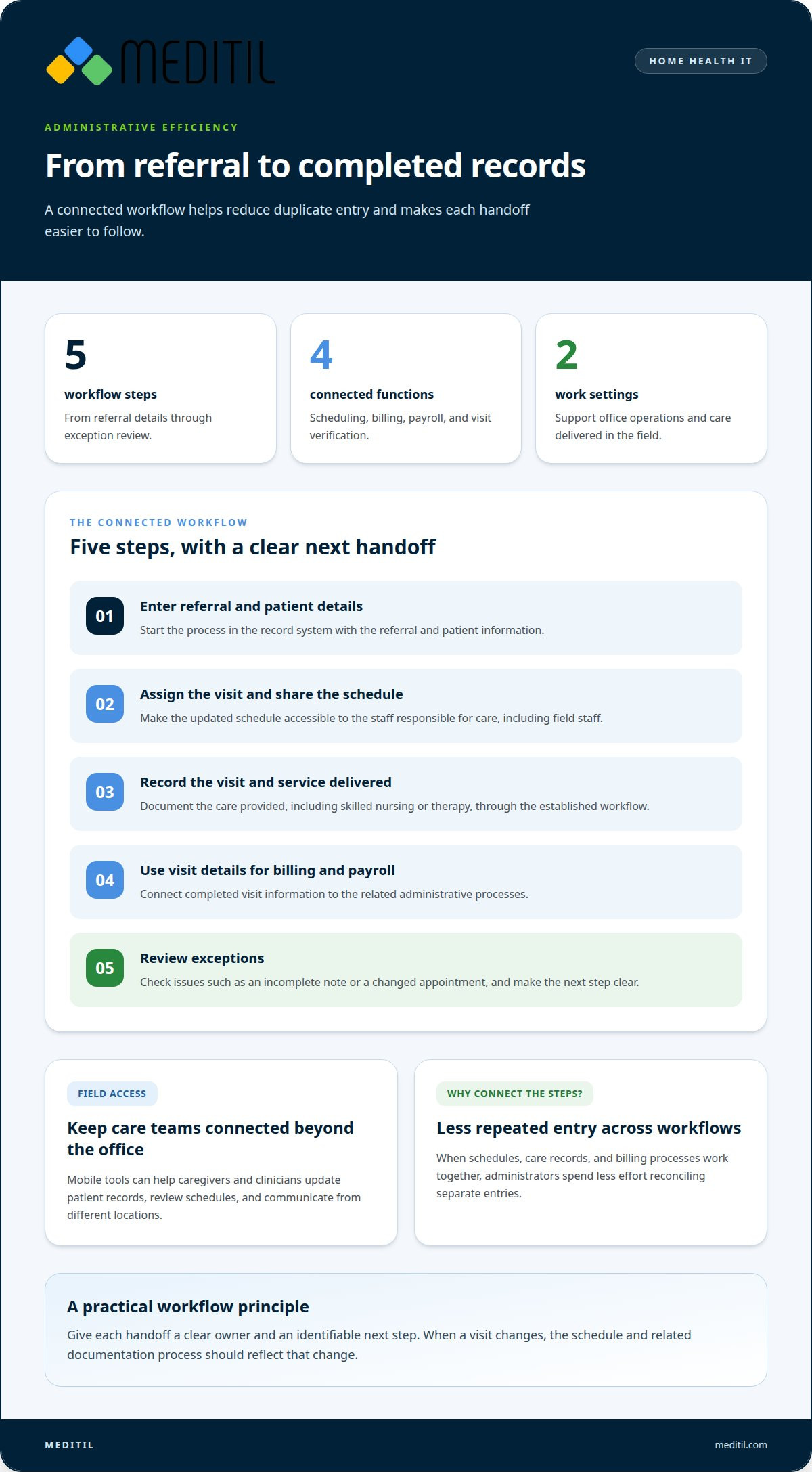
Administrative automation connects the steps from referral to scheduled visit to completed documentation. For example, when a coordinator changes a visit time, the updated schedule should be visible to the staff responsible for care. A connected workflow reduces duplicate entry and helps administrators see where a task is waiting, leaving more time for care services and compassionate support for people living at home.
What technology do home health agencies need for electronic health records, scheduling, billing, and field staff? They need systems that connect those functions, with mobile access so caregivers and clinicians can update patient records, view schedules, and communicate from different locations. Scheduling, billing, payroll, and visit verification should work together rather than depend on disconnected manual handoffs.
A practical workflow can follow this sequence:
- Enter referral and patient details into the record system.
- Assign the visit and make the schedule accessible to field staff.
- Record the visit and service delivered, including skilled nursing or therapy.
- Use visit details to support billing and payroll processes.
- Review exceptions, such as an incomplete note or a changed appointment.
Each handoff should have a clear owner and an identifiable next step. If a visit changes, for instance, the schedule and related documentation process should reflect that change. These connections help prevent administrative teams from entering the same information repeatedly across care records, scheduling, and billing. They also make it easier to distinguish skilled from non-skilled services, with workflows and documentation suited to each.
Field access matters because caregivers work beyond the office. Mobile tools let clinicians update records, review schedules, and communicate while coordinating visits. For example, a therapy clinician can document a completed visit through the established workflow while office staff process the related administrative task. Reliable network access and compatible systems support that exchange and help keep quality care focused on visits, independence, and comfort.
For agencies addressing repeated billing handoffs, billing automation and integration can connect administrative processes with existing workflows. The aim is not automation for its own sake. It is a more consistent path from scheduled care to completed records and payment processing, supported by systems that help committed staff spend less effort reconciling separate entries.
Customer support for home health agencies
A clinician unable to access a patient record during a home visit needs a clear route to technical help. Support arrangements should cover both office workflows and home health care delivered in the field.
Provider and Support Model Comparison
Managed IT services provide ongoing external support, while in-house IT assigns daily technology responsibilities to agency employees. Compare how each model handles application issues, network problems, staff questions, and planned maintenance. The right fit depends on the agency’s internal expertise, workload, and need for healthcare-specific assistance.
For example, an agency with internal staff may rely on them for routine requests and use external support for specialized systems. A managed arrangement may suit an agency seeking broader coverage without building every technical role internally.
Cybersecurity and Secure Mobile Access
Common risks include phishing messages, lost mobile devices, weak account controls, and access that remains active after staff duties change. Agencies can reduce exposure by using individual accounts, strong authentication, managed device settings, and a defined process for reporting suspected incidents.
For clinicians, secure remote access should let approved users reach the records and scheduling tools they need for their work. Limit access by role, require screen locks, and establish steps for reporting a missing device. These controls support patient privacy while keeping skilled nursing and other health care documentation accessible to authorized staff.
IT Support Service-Level Agreements
A service-level agreement should define support channels, issue priorities, response targets, escalation steps, and each party’s responsibilities. Include the systems staff use, such as scheduling, patient records, and billing, and a process for reporting recurring problems. Clear terms make it easier to assess whether support meets operational needs.
Compare the agreement’s response commitments with the agency’s actual workflow. A blocked account during a care visit may need a different priority from a request to adjust a user profile.
When changing providers or migrating systems, document applications, user access, integrations, and data ownership first. Plan the transfer sequence, test key workflows, communicate changes to staff, and assign support responsibilities during the transition. This helps protect continuity for patients and care services.
What are the best IT support providers for home health agencies in the United States?
No single provider fits every home health agency in the United States. Look for a partner that understands healthcare workflows and supports the systems staff use for patient records, scheduling, billing, and field communication. For example, a provider should explain how it handles an application issue affecting a clinician during a visit, not only routine office computer problems.
Compare providers by service scope and how they make support accessible. A help desk should have a clear process for reporting issues, prioritizing interruptions, and escalating problems that affect care operations. Consider whether the provider can support healthcare applications and coordinate with the agency’s existing technology environment.
Use these criteria to assess fit:
- Healthcare experience: Ask how support processes account for clinical and administrative workflows.
- Application assistance: Confirm the provider can help staff troubleshoot the applications they use.
- Security practices: Discuss account access, device issues, and incident escalation.
- Service clarity: Review support channels, issue priorities, responsibilities, and reporting.
Test the proposed approach against a real agency scenario. Consider, for example, a new staff member unable to access a care application, or a schedule change that creates a technical issue for field staff. A capable support model clarifies who receives the request, how it is routed, and how the agency gets updates. It should also distinguish urgent operational interruptions from routine requests, without relying on vague promises.
Finally, examine how the provider would support a transition. A structured plan should identify applications, integrations, user access, and responsibility for each system. It should also include communication and workflow testing before staff depend on changed systems. Choose a partner whose defined scope aligns with the agency’s actual needs, whether those center on user assistance, application troubleshooting, or both. Discuss healthcare IT support for your agency as a next step.
MEDITIL: Healthcare Application Support
MEDITIL provides Healthcare Application Support for agencies managing technology across clinical and administrative workflows. Turn to this support when staff need help resolving application issues, coordinating system use, or making technology fit daily operations.
For broader needs, Managed IT Services (Ongoing) supports continued technology operations, while Infrastructure & Network Services address the systems that connect staff and applications. Cybersecurity & Compliance helps agencies strengthen technology protections and align IT processes with compliance priorities. The appropriate scope depends on the agency’s systems, support needs, and operational goals.
A defined support approach gives staff a clear path to technology assistance and helps address issues affecting workflows. Contact MEDITIL to discuss healthcare application support for your agency.
Set a Clear Direction for Your IT
Start by identifying which technology responsibilities need consistent ownership. Focus on workflows that most affect staff: application access, system reliability, security processes, and help with day-to-day issues. This assessment can shape home health agency IT support around the agency’s operations rather than a generic technology checklist.
MEDITIL supports this work through ongoing Managed IT Services, Infrastructure & Network Services, and Cybersecurity & Compliance. Agencies can consider these capabilities together when they need coordinated oversight, or focus on specific operational priorities. The right starting point depends on where technology friction affects staff and which systems need attention.
A focused conversation can help clarify those priorities and define a practical support approach. Contact MEDITIL about IT support to discuss your agency’s needs and next steps. With clear priorities and an appropriate support structure, your team can move forward with greater confidence in its technology operations.
Frequently Asked Questions
What IT support services do home health agencies need?
Home health agencies need support for healthcare applications, user assistance, network infrastructure, cybersecurity, and system integration. The right combination depends on how the agency handles referrals, patient records, billing, and communication with field staff. Support can help investigate a recurring application error, coordinate with a system vendor, or manage technology access when an employee changes roles.
What HIPAA and HITECH requirements apply to home health agency IT systems?
Agencies should align their IT systems and support processes with applicable HIPAA and HITECH obligations for protecting health information. Practical steps include defining who can access sensitive records, documenting how security concerns are escalated, and clarifying how technology vendors support the agency’s safeguards. The agency’s privacy or compliance lead should map its specific obligations, while IT teams help implement and maintain the related controls.
Are there state or local IT, privacy, or cybersecurity requirements for home health agencies?
State and local requirements may add obligations beyond federal frameworks, depending on where an agency operates and how it handles information. Identify applicable rules with compliance leadership, then translate them into technology procedures for access management, record handling, and incident response. An IT partner can help implement those procedures across systems, while the agency remains responsible for determining which rules apply to its operations.