
Encryption alone doesn’t make a file-sharing service suitable for a clinic. HIPAA compliant file sharing for clinics combines safeguards such as encryption, access controls, and audit logs with a business associate agreement when a vendor handles protected health information (PHI) on the clinic’s behalf. The right setup protects sensitive files while allowing authorized staff to share and use them.
Choosing a tool can feel complicated when security, daily workflows, and file access all matter. This guide explains what a HIPAA-compliant service involves, how encryption protects files in transit and at rest, and which features clinics can use to compare options. It also covers secure links, user permissions, and activity records, helping you assess tools against your clinic’s needs rather than relying on an encryption claim alone.
Key Takeaways
- Assess encryption in transit and at rest alongside access controls, backups, and the way staff share files.
- Understand why a service’s security features must work together with the clinic’s HIPAA responsibilities.
- Recognize how patient identifiers can make information protected health information, even when shared outside a medical record.
- Compare tools by reviewing safeguards such as business associate agreements, audit logs, authentication, and version control.
Encryption in transit and at rest
For clinics, encryption should protect patient information both while files move and while they are stored. HIPAA compliant file sharing for clinics also requires attention to risk analysis, documentation, and the vendor relationship.
Encryption During File Transfer
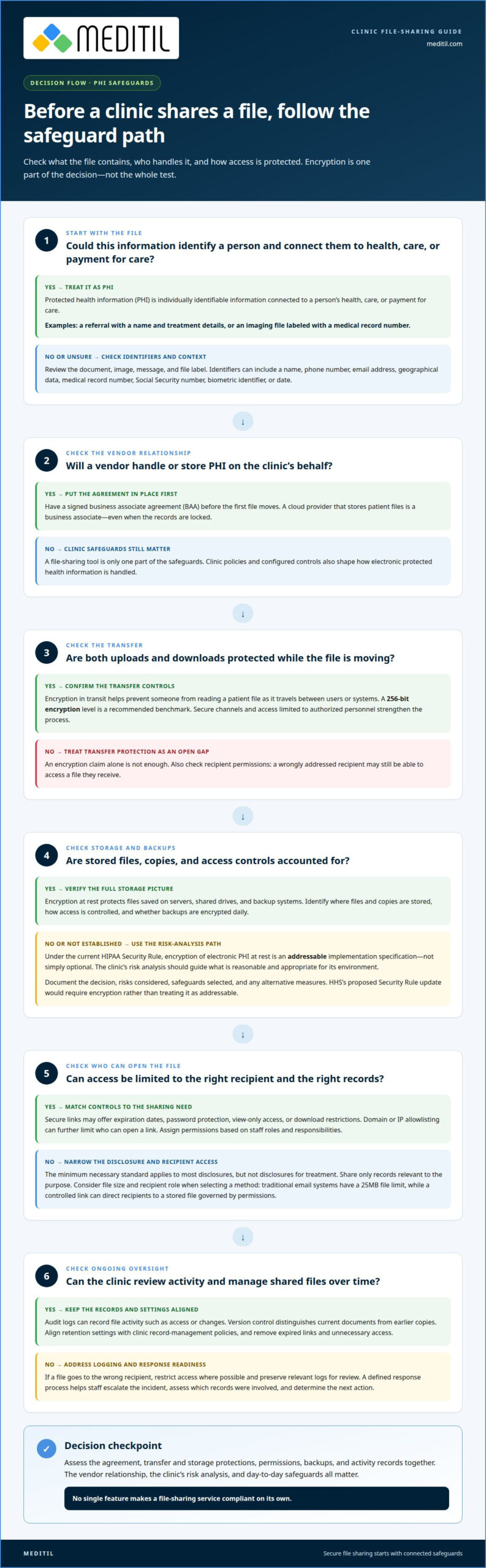
Encryption in transit protects data as it travels between users or systems. For example, it helps prevent someone from reading a patient file while staff send it to another authorized user. Look for encryption covering both file uploads and downloads; 256-bit encryption is a recommended benchmark. Secure channels and access limited to authorized personnel strengthen the transfer process. Encryption does not replace permissions: a wrongly addressed recipient may still be able to access a file they receive.
Encryption for Stored Data
Encryption at rest protects files saved on a server, shared drive, or backup system. If a storage device or account is accessed without authorization, encrypted data is harder to read without the relevant key. Assess where clinic files and copies are stored, including backups, and whether backups are encrypted daily. Document which systems hold patient information and how access is controlled. End-to-end encryption is not always necessary; its privacy benefits should be weighed against possible limits on audit logging and collaboration.
Security Rule Encryption Requirements
Under the current HIPAA Security Rule, encryption of electronic protected health information at rest is an addressable implementation specification. Addressable does not mean optional: a clinic’s risk analysis should guide whether encryption is reasonable and appropriate for its environment. Document the decision, risks considered, safeguards selected, and any alternative measures. HHS’s proposed Security Rule update would require encryption rather than treating it as addressable.
Include file transfer, storage, backups, and user access in the risk analysis. If a cloud provider stores patient files, it is a business associate even when records are locked. Before the first file moves, have a signed business associate agreement in place. That agreement documents the relationship; encryption and operational safeguards protect files through their lifecycle.
What Is a HIPAA Compliant File Sharing Service?
A file-sharing service helps clinics exchange electronic health information with safeguards for protected records. HIPAA permits sharing for treatment, payment, or healthcare operations without separate authorization; vendors handling protected information need a business associate agreement before access. Insecure sharing can expose patient records, and lower-tier per-violation amounts took effect January 28, 2026, ranging from $145 to $73,011.
Secure PHI Sharing and Transmission
Secure sharing sends protected health information through controlled channels to authorized recipients. This matters when a clinic exchanges a referral, lab result, or imaging file with another care team. A secure link may offer expiration dates, password protection, view-only access, or download restrictions. Domain or IP allowlisting can further limit who can open it. These controls help reduce exposure from misdirected messages or forwarded attachments.
Email and SMS attachments can leave clinic records in inboxes or on personal devices. Traditional email systems also have a 25MB file limit, which may not accommodate larger healthcare files. A controlled link can instead direct a recipient to the stored file, with access governed by permissions. Clinics should select a method that supports the file’s size and the recipient’s role.
File-Sharing Security Requirements
The HIPAA Security Rule sets administrative, physical, and technical safeguards for electronic protected health information. A file-sharing tool is only one part of those safeguards; clinic policies and configured controls also shape how healthcare data is handled. The minimum necessary standard applies to most disclosures, but not disclosures for treatment. Sharing only the records relevant to the purpose helps keep access appropriately scoped.
Before a vendor handles patient information, the clinic needs a business associate agreement. The agreement defines the relationship and responsibilities for handling protected information. Encryption, access restrictions, and secure transmission support broader safeguards, but no single feature makes a service compliant on its own.
Managing Shared-File Access and Response
Access management assigns permissions according to staff roles and responsibilities. Audit logs can record file activity, such as access or changes, helping clinics review how records moved. Version control distinguishes current documents from earlier copies. Retention settings should align with the clinic’s record-management policies, and expired links and unnecessary access should be removed.
If a shared file is sent to the wrong recipient, restrict access where possible and preserve relevant logs for review. A defined response process helps staff escalate the incident, assess which records were involved, and determine the next action. Clinics aligning these safeguards across systems can explore healthcare cybersecurity and compliance support.
Protected health information and sensitive identifiers
Protected health information (PHI) is individually identifiable information connected to a person’s health, care, or payment for care. A name on a general directory differs from a name attached to a diagnosis or appointment document. HIPAA was established in 1996 to protect sensitive health information in the United States. For file-sharing decisions, clinics need to recognize identifiers in documents, images, messages, and other patient data.
Examples of identifiers include a patient’s name, phone number, email address, geographical data, medical record number, Social Security number, biometric identifier, or date. A referral containing a name and treatment details can identify the patient, as can an imaging file labeled with a medical record number. Protecting the file means considering both its contents and identifying details in its filename or message.
Map document workflows before selecting a file-sharing tool. Trace how a referral, laboratory result, or imaging study moves from its source to the staff member or care partner who needs it. Record where each file is created, accessed, stored, and transferred, including cloud storage and backups. This workflow view helps identify access points and handoffs where patient data could be exposed or sent incorrectly. It also clarifies which users need access for their roles.
File types and sizes affect how clinics exchange records. Medical imaging files average 1.5GB; MRI studies can reach 2-3GB, while digital mammography files typically range from 500MB to 1GB. Digital pathology slides can reach 10GB for high-resolution whole-slide imaging. These examples show why a workflow designed only for small documents may not support imaging safely or reliably. Clinics should account for file formats, storage locations, transfer paths, and intended recipients when mapping each workflow. A large file may need a controlled transfer process that preserves access restrictions from upload through recipient access.
HIPAA-compliant file-sharing tool comparison
Compare file-sharing tools against the clinic’s actual workflows, not a “HIPAA-compliant” label alone. HHS recognizes no HIPAA certifications, so a certificate or vendor claim does not establish compliance by itself. A stronger comparison considers the vendor’s safeguards, contract terms, and how staff will use the system. The right choice is a tool whose controls support required work without creating unmanaged copies on individual devices.
Start with the vendor relationship. If a provider handles protected health information for the clinic, a business associate agreement must be in place before the first file moves. Then assess whether the service provides these operational controls:
- Access and authentication: Can administrators assign permissions by role and enforce two-factor authentication across the organization?
- Link controls: Can a shared link expire, require a password, restrict download, or limit access by domain or IP?
- Audit and version records: Do logs show file activity, and can staff distinguish current files from earlier versions?
- Storage and recovery: Does the service protect stored files and backups, and does its workflow fit the clinic’s retention needs?
Compare practical limits alongside safeguards. Test how a staff member shares a document, how a recipient opens it, and what happens when access expires. Consider whether large imaging files can move through the same controlled workflow. End-to-end encryption can add privacy benefits but may limit audit logging or collaboration. Weigh that trade-off against the clinic’s need to review activity and work with authorized recipients.
SOC 2 can help evaluate how a vendor handles data security and privacy, and it can complement HIPAA safeguards. It does not replace the agreement, clinic policies, or configured controls. A structured comparison of these areas helps expose gaps before staff depend on the tool. Get support assessing file-sharing security controls as part of a broader cybersecurity and compliance approach.
MEDITIL
MEDITIL helps clinics align file-sharing decisions with their broader IT environment. Its cybersecurity and compliance support can help assess safeguards, vendor risks, and how file access fits clinic workflows. Infrastructure and network services address the systems that support secure file movement, while managed IT services and end-user support help maintain consistent practices across staff and devices.
Consider MEDITIL when your clinic is reviewing file-sharing controls, coordinating systems, or addressing gaps between security policies and everyday use. The goal is a practical setup that supports authorized access and protects patient information across clinic operations. To discuss your clinic’s healthcare IT needs, contact MEDITIL.
Make secure sharing part of daily operations
HIPAA-compliant file sharing for clinics works best when it becomes part of routine operations, not a separate technology decision. Assign responsibility for access reviews, staff onboarding, and workflow changes so permissions keep pace with the clinic. When teams adopt a new process or collaborate with another organization, revisit who needs access and how the exchange fits existing procedures.
A practical next step is to document how staff use shared files today, then identify where responsibilities or processes need clearer coordination. This gives clinic leadership a useful basis for aligning technology decisions with patient-care workflows and operational priorities. MEDITIL can help healthcare organizations assess those needs through its healthcare IT and compliance services.
Contact MEDITIL to discuss your clinic’s needs. A considered approach can help your team move forward with greater clarity and confidence.
Frequently Asked Questions
Protected Health Information (PHI): What Needs to Be Protected?
Protect information that identifies a patient and relates to their health, care, or payment for care. Context matters: a patient’s name beside a diagnosis, appointment details, or a claim document can reveal protected information. Review attachments and filenames as well as document contents. For example, removing a name from a report may not prevent identification if its filename still contains the patient’s medical record number.
How Should Healthcare Organizations Implement Secure Large File Sharing?
Start by mapping the file’s path, recipients, and storage locations, then choose a transfer method suited to the file type and size. For a large imaging study, use controlled access rather than splitting it across ordinary email attachments. Confirm the recipient’s authorization, restrict access to intended users, and make sure activity can be reviewed. Include any cloud storage provider handling the files in the workflow assessment.
Is a BAA always mandatory?
No. A business associate agreement is required when a business associate handles protected health information on a covered entity’s behalf, not for every exchange of information. For example, a file-sharing vendor storing clinic records may be a business associate. The key question is the vendor’s role and whether it handles PHI for the clinic. Put the agreement in place before the vendor receives or stores the first file.
What Are the Specific HIPAA Requirements for Sharing Large Files Containing PHI?
Large file size does not remove the need to protect PHI during sharing. Apply the clinic’s safeguards to the transfer, recipient access, storage, and any retained copies. For a radiology image, plan who needs access and whether the recipient needs to view or download it. A suitable workflow should accommodate the file without bypassing permissions or moving patient information into uncontrolled personal accounts.
What makes a file-sharing service HIPAA compliant?
No single feature or vendor label establishes that a service is compliant. Evaluate its safeguards in the context of the clinic’s policies and use, including access management, activity records, secure transfers, and storage protections. Also determine whether the provider handles PHI as a business associate and needs an agreement. A security report such as SOC 2 may inform vendor assessment, but it complements rather than replaces HIPAA safeguards.
Does HIPAA require a business associate agreement for file-sharing vendors?
Yes. When a file-sharing vendor qualifies as a business associate by handling PHI on a clinic’s behalf, the clinic needs a business associate agreement before sharing files. The agreement documents the vendor relationship and its responsibilities for protected information. A provider that stores clinic records can have this role even if the records are encrypted. Assess what the vendor does with the data, not only whether it can read it.