
What good is an email security control if it protects patient information but disrupts the messages clinicians need to do their work? Healthcare email security services need to address both sides of the problem: phishing, account compromise, and accidental exposure of electronic protected health information, as well as the day-to-day demands of clinical communication.
Look for clear answers about HIPAA safeguards, how security measures fit existing systems, and who will oversee them over time. A product feature list alone won’t show whether an approach supports your workflows or aligns with wider IT operations. Effective protection depends on controls, usability, and accountability working together.
This guide explains the capabilities and service considerations to assess, from encryption and access protections to vendor agreements, operational support, and integration with your current environment. You’ll learn how to compare approaches based on organizational risk, clinical needs, and IT capacity, and which questions clarify how ongoing oversight will work. MEDITIL brings healthcare-focused IT, cybersecurity, and compliance expertise to these decisions, helping organizations connect email protection with broader security priorities and clinical workflows.
Key Takeaways
- Assess healthcare email security services by their safeguards, ongoing oversight, and fit with clinical workflows, not by feature lists alone.
- Map identity and access, message protection, monitoring, incident response, and governance to the email risks your organization has documented.
- Compare platform-native protections, specialized email security, and managed support by who administers each layer and how it fits your IT environment.
- Start implementation with an inventory of email systems, user groups, sensitive-data workflows, and existing controls, then review protection as needs change.
- Coordinate email security with broader healthcare IT, cybersecurity, and compliance operations to support patient information and day-to-day communication.
What healthcare email security services protect, and what HIPAA compliance means
Healthcare email security services combine policies, technical safeguards, monitoring, and operational support to reduce the risk of patient information being exposed through email. They protect more than messages as they travel between mailboxes. They also address who can access an account, how suspicious activity is detected, and what happens when a threat is identified.
Email can carry protected health information (PHI) in a message, attachment, or reply chain. A phishing email may trick a staff member into entering credentials on a fraudulent site. A malicious attachment can introduce harmful code, while spoofing makes a message appear to come from a trusted colleague or organization. Accidental misdelivery, such as sending a patient document to the wrong recipient, can expose information even when no attacker is involved.
Which healthcare email risks should security services address?
A compromised mailbox can expose patient communications and give an attacker a trusted account to misuse. It may also interrupt clinical and administrative work while access is investigated and restored. Security measures should address both prevention and response. Assess how the service detects suspicious sign-ins, controls account access, and supports investigation and containment when an alert is raised.
Staff practices matter too. Clear procedures for handling sensitive information, verifying recipients, and reporting suspicious messages help make technical safeguards effective. For example, staff should know how to report a suspected phishing message and how to confirm a recipient before sending a patient document. The aim is to reduce risk without adding avoidable friction to routine clinical communication.
How does HIPAA relate to email security?
The Health Insurance Portability and Accountability Act (HIPAA) includes the Security Rule, which concerns safeguards for electronic protected health information (ePHI). Email controls should be considered within the organization’s broader risk analysis and risk management, not as a standalone compliance checkbox. Appropriate protections depend on the organization’s circumstances, the information it handles, and how email is used.
Encryption can help protect ePHI in transit, but it doesn’t establish HIPAA compliance by itself. Access management, staff procedures, monitoring, and incident handling also contribute to a broader security program. Secure email hosting provides the underlying mail environment and its available protections. Wider email security services can add oversight, configuration, support, and coordination with organizational policies. When a service provider handles ePHI on the organization’s behalf, applicable business associate arrangements, including a Business Associate Agreement, should be addressed as part of the relationship.
Which healthcare email security controls should a service include?
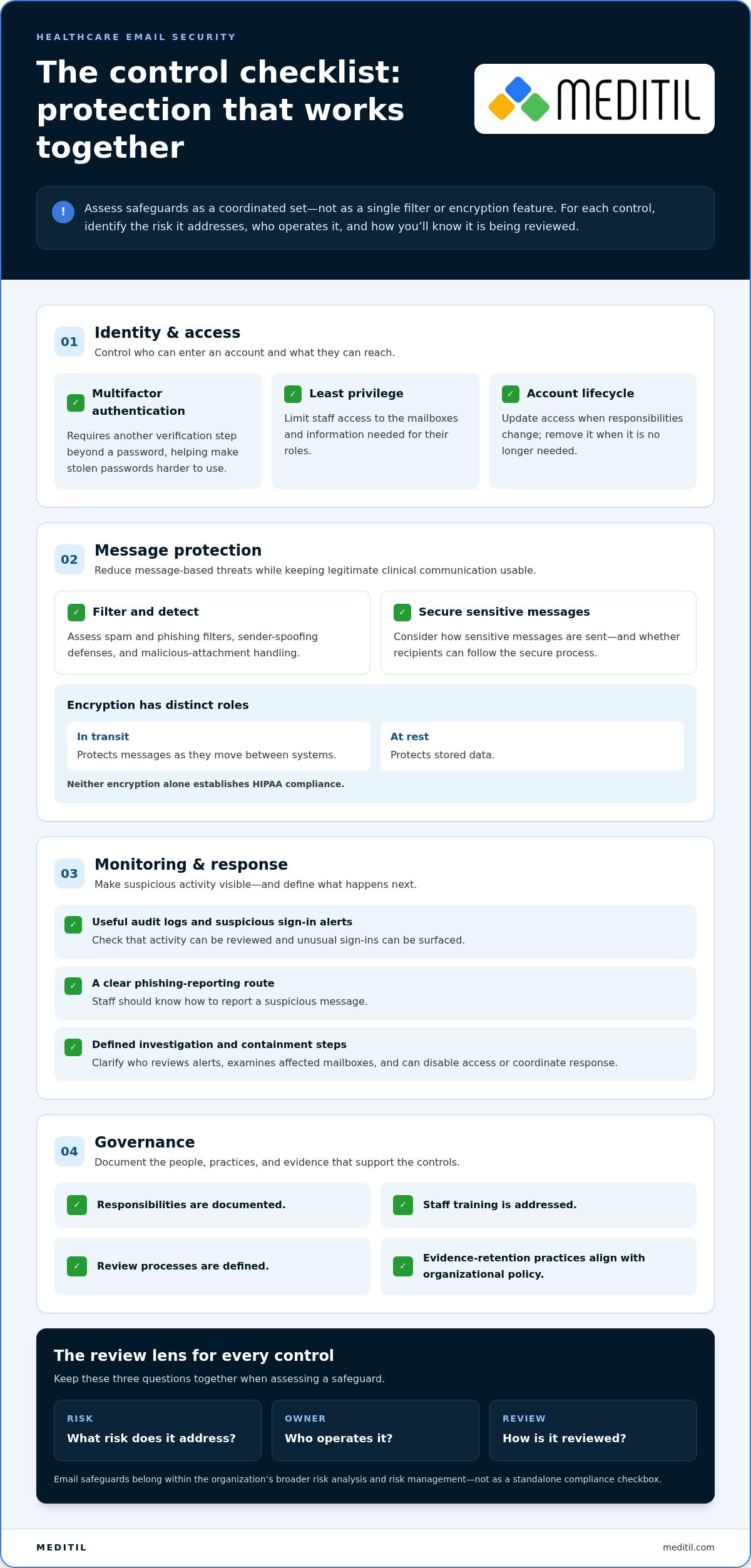
Evaluate healthcare email security services as a coordinated set of controls, not a single filter or encryption feature. The HIPAA Security Rule provides a useful regulatory frame: email safeguards should support the protection of electronic health information as part of the organization’s wider security program. For each control, identify what risk it addresses, who operates it, and how you’ll know it is being reviewed.
- Identity and access: Multifactor authentication (MFA) requires another verification step beyond a password. Least-privilege access limits staff to the mailboxes and information needed for their roles. Account lifecycle controls ensure access is updated when responsibilities change and removed when it’s no longer needed.
- Message protection: Assess spam and phishing filters, sender spoofing defenses, malicious attachment handling, and controls for securely communicating sensitive messages. Consider how the controls handle legitimate messages that contain links or attachments used in clinical and administrative work.
- Monitoring and response: Look for useful audit logs, suspicious sign-in alerts, a clear way for staff to report phishing, and defined steps to investigate and contain incidents.
- Governance: Confirm that responsibilities, staff training, review processes, and evidence-retention practices are documented and aligned with organizational policy.
How should access controls and encryption work together?
MFA helps make stolen passwords harder to use, while role-appropriate mailbox permissions limit what an account can reach. These safeguards address different risks, so one doesn’t replace the other. Encryption in transit protects messages as they move between systems; encryption at rest protects stored data. Neither alone establishes compliance. Consider how patients, staff, and partners will access sensitive messages, whether recipients can follow the secure process, and what staff should do if access fails.
What monitoring and response capabilities matter?
Monitoring should help surface unusual sign-ins and provide a practical path for staff to report suspicious messages. Establish who reviews alerts, who examines affected mailboxes, and who can disable access or coordinate an investigation. Clear escalation procedures help contain a compromised account and reduce uncertainty during response.
Review audit evidence and retention practices against internal policy. Logs are useful only when the organization knows who reviews them, how concerns are escalated, and how findings are recorded. Staff training should reinforce those steps with examples relevant to clinical and administrative workflows, such as verifying unexpected requests for patient information.
These controls work best when email protection is coordinated with broader IT and cybersecurity operations. Healthcare cybersecurity and compliance support can help align security priorities, operational responsibilities, and clinical workflows.
How to compare healthcare email security services and hosting options
Email hosting, added security tools, and managed support can each address different parts of the risk. Compare them by responsibility, not just by feature names. Hosting or encryption alone may leave gaps in configuration, alert review, incident handling, and governance. To compare options, list the tasks your organization needs covered, then map each task to the platform, a security tool, or the team responsible for operating it.
Managed service, email platform, or specialized security layer?
An email platform provides the mailbox environment and the protections included with its configuration. A specialized security layer may add capabilities such as filtering or message controls. Managed-service support can coordinate administration, monitoring, and response, depending on the agreed scope. As HIPAA compliance guidance for email makes clear, security involves more than choosing an encrypted email option. Confirm how responsibilities are divided so important tasks aren’t left unowned.
| Approach | Protection scope | Administration | Monitoring | Incident response | Usability and integration |
|---|---|---|---|---|---|
| Platform-native protections | Features vary by platform and configuration. | Often managed by the organization or its IT team. | Available alerts may require assigned staff to review them. | Internal procedures typically guide investigation and action. | May fit existing mail workflows; assess configuration and connected systems. |
| Specialized security layer | May extend filtering, sender defenses, or sensitive-message controls. | Setup and ongoing administration depend on the service arrangement. | Review whether alerts are provided, interpreted, or escalated. | Define how findings reach the team responsible for containment. | Test message handling and compatibility with existing workflows. |
| Managed-service support | Can coordinate email safeguards with wider IT and security operations. | Scope should specify who configures and maintains controls. | Responsibilities for alert review should be explicit. | Document escalation and coordination with organizational decision-makers. | Support should account for user needs and the current environment. |
These are common distinctions, not universal rules. A platform may include capabilities that overlap with a specialized layer, and managed support may cover only agreed tasks. Map configuration, alert review, user support, and incident handling to named responsibilities. This helps reveal whether a tool adds protection or simply creates another queue for staff to manage.
How can organizations balance security with clinical usability?
Assess how clinicians, administrative teams, patients, and external partners will send, receive, and access sensitive messages. A secure process should protect information without adding unnecessary steps to time-sensitive coordination. Pilot the proposed workflow with representative users before wider changes. Ask them to test common tasks, including accessing a protected message, sending a reply, and confirming a recipient. Gather feedback on access, instructions, and delays, then refine procedures and training.
Healthcare email security services work best when their boundaries align with clinical workflows and broader IT operations. MEDITIL’s healthcare-focused managed IT and cybersecurity support connects these considerations to organizational security planning.
How to evaluate, implement, and review an email security service
A structured rollout helps healthcare leaders connect technical safeguards with actual email use. Begin with the organization’s current environment, then document priorities, assign responsibilities, and review whether controls remain effective as systems and workflows change. This gives decision-makers a practical basis for assessing healthcare email security services and managing implementation as an ongoing task rather than a one-time deployment.
What should an email security readiness assessment cover?
Start by mapping email systems, user groups, connected applications, and workflows that involve sensitive information. Include clinical, administrative, and external communication. For each workflow, note what information is sent, who needs access, and how it is currently protected. Then review existing policies, controls, training practices, prior incidents, and who currently owns security tasks. Record gaps and prioritize remediation according to documented organizational risk.
What should happen after deployment?
Plan for configuration, communication, testing, and review before making changes broadly. A phased rollout can help identify workflow issues and refine staff guidance before expanding to additional teams. Establish clear ownership for configuration changes, user reports, alert review, and incident escalation.
- Assess the current state. Document email environments, access patterns, sensitive-data workflows, existing safeguards, and known risks.
- Set priorities and responsibilities. Rank identified gaps by organizational risk and assign accountable owners for each control and response task.
- Configure and test. Validate security settings and communication workflows with representative users. Check that staff understand how to report concerns and where to get support.
- Deploy in phases. Communicate what is changing, provide relevant guidance, and gather feedback from clinical and administrative teams as the rollout progresses.
- Review and refine. Track useful indicators, such as phishing-reporting patterns, alert and incident handling, completion of scheduled control reviews, and recurring user difficulties.
After deployment, review controls periodically and when a material change affects systems, access, or communication workflows. Use review findings to update procedures, training, and assigned responsibilities. Keep the process practical: a metric is valuable when it helps leaders identify a gap, confirm follow-through, or decide what needs attention next.
MEDITIL connects healthcare-focused managed IT, cybersecurity, and compliance expertise with operational planning, helping organizations align email safeguards with clinical workflows and wider IT priorities. Discuss a healthcare-focused email security approach with MEDITIL.
How MEDITIL can support a coordinated healthcare email security strategy
Email protection is most effective when it fits the organization’s wider IT environment and clinical operations. MEDITIL brings healthcare-focused managed IT, cybersecurity and compliance, infrastructure, and consulting expertise to the planning process. This helps leaders consider how email safeguards relate to identity, networks, cloud services, user support, and the handling of sensitive information.
Why coordinate email protection with healthcare IT operations?
Email rarely operates in isolation. Account access connects to identity controls, mail systems depend on infrastructure and cloud services, and staff need support when security measures affect daily work. Coordination can clarify how responsibilities are shared across IT, security, leadership, and clinical operations. The practical goal is consistent oversight, defined escalation paths, and safeguards that support clinical workflows.
MEDITIL’s consulting and fractional CIO services can help align security priorities with IT strategy and organizational needs. That perspective supports decisions about which risks to address, how to assign ownership, and how email protection fits into broader cybersecurity and compliance work. Healthcare email security services should be part of this coordinated approach, not a stand-alone technology decision.
What are the next steps for healthcare leaders?
Use a short decision checklist to move from evaluation to sustained oversight:
- Define current risks: Document email systems, user groups, sensitive-data workflows, existing controls, and known gaps.
- Set operational priorities: Identify where stronger protection is needed while preserving workable communication for clinical and administrative teams.
- Assign responsibilities: Clarify who manages configuration, reviews alerts, supports users, and coordinates incident escalation.
- Plan implementation: Test proposed changes with relevant users, communicate expectations, and address workflow concerns before broader rollout.
- Review over time: Establish how controls, responsibilities, and security priorities will be revisited as the organization changes.
This framework connects email decisions to healthcare cybersecurity and managed IT planning. MEDITIL’s healthcare IT and cybersecurity services bring these considerations together through ongoing operational support, infrastructure expertise, and strategic guidance tailored to organizational needs.
Build email protection that works across your organization
Choosing healthcare email security services means looking beyond encryption or hosting. Effective protection combines appropriate access controls, message safeguards, monitoring, and clear response responsibilities. It also needs to fit clinical workflows and connect with your organization’s broader IT and compliance priorities.
Start with a grounded assessment of your email environment, sensitive-data workflows, and documented risks. Then compare service models by who configures controls, reviews alerts, supports users, and coordinates incident response. Treat implementation and ongoing review as part of the strategy, not as tasks to leave until after deployment.
MEDITIL brings healthcare-focused managed IT and cybersecurity services together with infrastructure, compliance, and strategic IT support. This coordinated perspective can help align protection decisions with operational needs. Discuss a coordinated healthcare email security strategy with MEDITIL and take a clear, practical next step toward protecting patient information while supporting staff communication.
Frequently Asked Questions
Is encrypted email enough to make a healthcare organization HIPAA compliant?
No. Encryption can help protect electronic protected health information (ePHI) in transit or storage, but it doesn’t make an organization HIPAA compliant by itself. Email security also depends on appropriate access controls, staff practices, risk management, monitoring, and incident response. Organizations should assess safeguards against their documented risks and circumstances, then ensure responsibilities are clear across their IT operations and any vendors that handle ePHI.
What should healthcare email security services include?
Healthcare email security services should address identity and access, message protection, monitoring, incident response, and governance. Examples include multifactor authentication, role-appropriate mailbox permissions, phishing and spoofing defenses, suspicious sign-in alerts, and secure handling of sensitive messages. A complete approach also defines who reviews alerts, how staff report suspicious email, how incidents are escalated, and how controls and staff guidance are reviewed over time.
Can a healthcare organization use Microsoft 365 or Google Workspace for email?
Yes. Healthcare organizations can use Microsoft 365 or Google Workspace when the relevant services and configuration support their obligations. A Business Associate Agreement should be in place where the provider handles ePHI on the organization’s behalf. The organization must also configure and manage appropriate safeguards, review access and retention settings, and address monitoring and response responsibilities. Using a platform alone doesn’t establish HIPAA compliance.
How does HIPAA apply to email containing patient information?
HIPAA’s Security Rule concerns safeguards for electronic protected health information. If an email or attachment contains identifiable patient information, the organization should protect it through safeguards appropriate to its documented risk and circumstances. That includes considering access, transmission, storage, staff practices, and incident handling. Email is one part of the broader security program, so decisions should align with organizational policies and risk management, not rely on encryption alone.
What is the difference between secure email hosting and email security services?
Secure email hosting provides the mailbox environment and the protections available within that platform. Email security services may add or coordinate safeguards such as threat filtering, access oversight, alert review, user support, and incident response. The scope varies by arrangement, so organizations should identify who configures controls, reviews alerts, assists users, and manages escalation. Hosting or encryption alone may leave operational and governance responsibilities unaddressed.
Do healthcare organizations need a business associate agreement for email services?
A Business Associate Agreement is required when an email service provider handles ePHI on behalf of a covered entity or another business associate. The agreement documents the business associate relationship and relevant responsibilities. Before using a service for patient information, determine whether the provider will handle ePHI and ensure the appropriate agreement is in place. A BAA is important, but it doesn’t replace the organization’s own security safeguards and risk management.
How often should a healthcare organization review its email security controls?
Review controls periodically and when material changes affect email systems, user access, connected applications, or sensitive communication workflows. The review schedule should reflect documented organizational risks and policies rather than an assumed universal interval. Check whether access remains appropriate, alerts and reports are handled as intended, staff understand procedures, and assigned reviews are completed. Findings can guide updates to configuration, training, responsibilities, and incident response processes.