
EMR integration connects an electronic medical record system with other applications so information can support coordinated clinical and administrative workflows. The main EMR system integration challenges are exchanging and interpreting data reliably, fitting connections to clinical workflows, and linking tools for billing, scheduling, and patient communication. Even a technically functioning connection can create friction if information arrives incomplete, out of sequence, or in a format staff can’t use.
An integrated system can reduce disconnected steps, but implementation details matter. This article explains EMR integration and how interoperability, data migration, clinical tools, billing, scheduling, and communication can complicate the work. It also covers why workflow planning, accurate data transfers, and staff readiness matter when organizations connect systems, and how to spot issues before they disrupt daily operations.
Key Takeaways
- Map how clinical and administrative systems exchange information to identify where data gaps or workflow delays may occur.
- Plan implementation around governance, infrastructure, staff readiness, and the needs of the people using the system.
- Assess how clinical decision support, laboratory, imaging, and health information exchange connections fit into daily care workflows.
- Validate data moving between the EMR and billing, scheduling, and patient communication applications before go-live.
1. Interoperability with third-party applications and devices
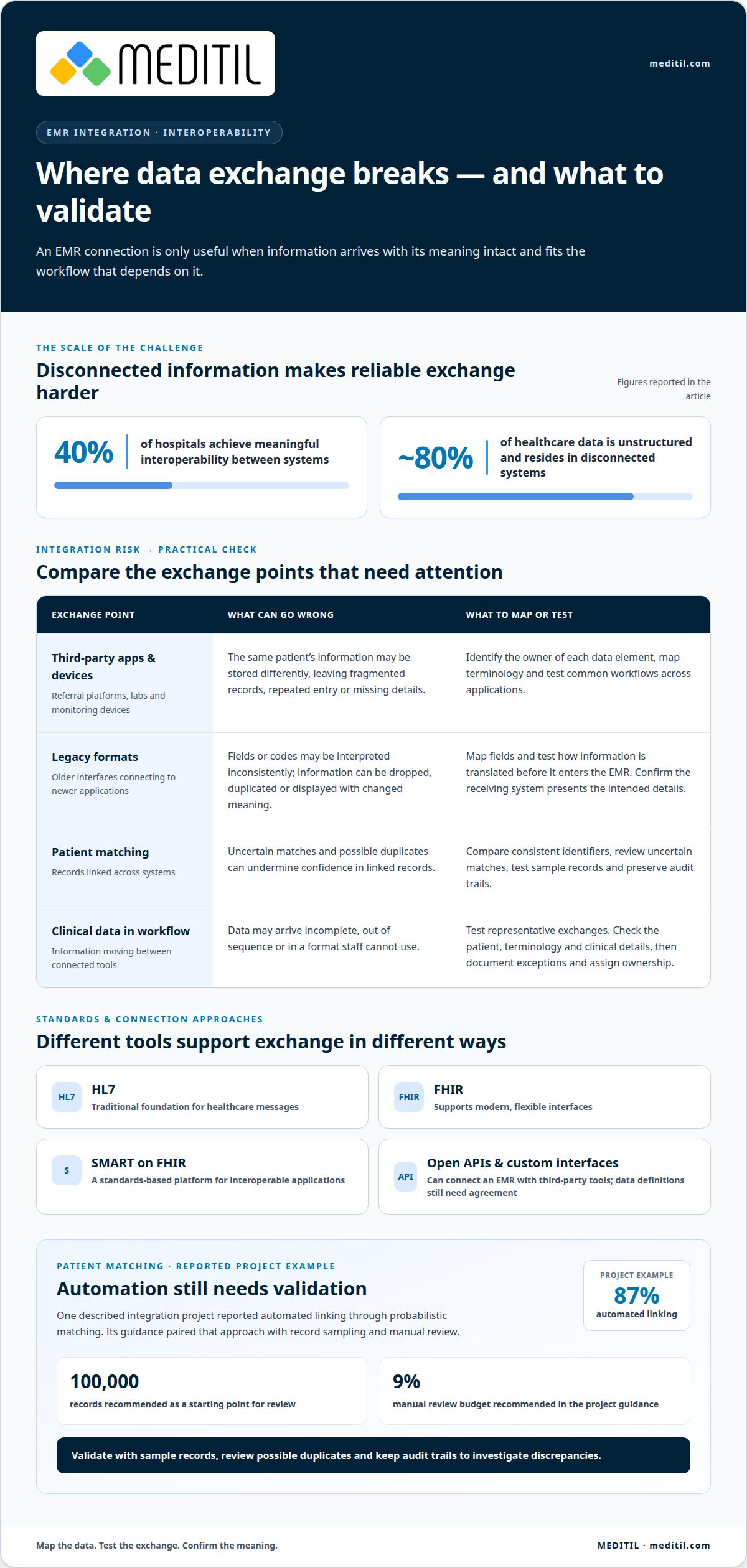
An EMR must exchange information with applications and devices without losing its clinical meaning. Yet only 40% of hospitals achieve meaningful interoperability between systems. A referral platform, laboratory system, and patient monitoring device may each store the same patient’s information differently. Providers then face fragmented records, repeated entry, or missing details. Almost 80% of healthcare data is unstructured and resides in disconnected systems, making accurate exchange harder. These EMR system integration challenges can affect how quickly staff find usable information.
Legacy systems often use older interfaces and formats that newer applications may not interpret consistently. A medication field, for example, might use different codes or labels in different systems. Map those fields and test how data is translated before it enters the EMR. Otherwise, information may be dropped, duplicated, or displayed in a way that changes its meaning. This work also helps organizations account for regulatory and operational requirements.
Standards provide a common structure for exchange. HL7 is a traditional foundation for healthcare messages, while FHIR supports modern, flexible interfaces. SMART on FHIR provides a standards-based platform for interoperable applications. Open APIs and custom interface designs can connect an EMR with third-party tools, but the connection still needs agreed data definitions. Teams should identify which system owns each data element, map terminology, and test common workflows across applications.
Accurate patient matching depends on comparing consistent identifiers and reviewing uncertain matches. One described integration project reported 87% automated linking through probabilistic matching, while its guidance recommended starting with 100,000 records and budgeting for 9% manual review. These figures illustrate why automated matching needs validation, not blind acceptance. Teams can test sample records, review possible duplicates, and preserve audit trails to track changes and investigate discrepancies.
Before rollout, test representative data exchanges from each connected application or device. Confirm that the receiving system shows the correct patient, terminology, and clinical details. Document exceptions and assign responsibility for resolving them. This structured approach helps providers identify data integrity problems before they disrupt routine care.
2. EHR implementation challenges across governance, policy, leadership, staffing, infrastructure, and operations
An EHR rollout changes clinical routines and administrative controls at the same time. Governance should define decision-making, data ownership, escalation paths, and approval authority. Without clear ownership, workflow changes can stall between clinical leadership, IT, and operations. U.S. providers must protect patient information and comply with HIPAA, according to the U.S. Department of Health and Human Services. That makes access controls, staff responsibilities, and change review essential parts of implementation planning.
Evidence reviews help organizations identify recurring barriers, but findings still need to be applied to local conditions. One scoping review screened 5,358 records and included 23 eligible studies published between January 2010 and January 2024. Its selection process provides a broad view of implementation challenges. Each organization must still assess its own staffing, infrastructure, policies, and clinical workflows before setting priorities.
Resource constraints go beyond technology. Plans should account for hardware upgrades, data migration, staff training, and operational support during the transition. Without protected time to learn new workflows, clinical staff may have to divide their attention between documentation and patient care. Role-specific training and designated super-users give staff a clear path to learning and support.
Build the rollout plan around operational dependencies. Set milestones for configuration, data migration, workflow testing, training, and go-live readiness. Include contingencies for downtime, migration errors, and delayed staff readiness. A practice can run old and new EMR systems in parallel during transition to help maintain services, while teams compare records and resolve discrepancies. Define who makes go-live decisions and how issues are escalated. For organizations mapping these responsibilities, implementation planning can be a useful starting point.
3. Clinical decision support, lab, imaging, and HIE integration
Clinical integrations must deliver information in the right context, not merely move a record between systems. A laboratory result should appear with its test name, value, and relevant patient encounter. Imaging connections use DICOM, a standard for exchanging medical images. Health information exchange (HIE) connections can add records from outside providers, but differences in timing and terminology may complicate review. Before deployment, test how each source appears in the clinician’s workflow.
For U.S. integrations, providers must protect patient information and comply with HIPAA, according to the U.S. Department of Health and Human Services. Define who can access connected records, how access is monitored, and how security issues are handled. Apply controls to every connected application, device, and data pathway, rather than treating the EMR as the only point that needs protection.
Connecting labs, pharmacies, billing systems, and medical devices requires interfaces that specify what data moves, where it goes, and how receiving systems interpret it. Map each exchange to a clinical or administrative task, then test representative records from source to destination. For example, confirm that a pharmacy order reaches the correct patient record and that the responsible care team can see a lab result. Keep exceptions visible for review.
Clinical decision support introduces another layer. An alert based on incomplete or delayed information can interrupt care rather than assist it. Test alert logic against relevant patient scenarios, confirm the supporting data reaches the tool, and review whether recommendations fit the clinical workflow. Generative AI integrated into EMRs can cut charting time by up to 70%, but staff still need to review generated documentation for accuracy.
Workflow disruption can fuel resistance. A new imaging viewer or decision-support prompt may add steps if it doesn’t fit established practice. Involve clinicians in testing, collect feedback during a pilot, and adjust the configuration before broader rollout. Track whether the tool supports the clinical task without adding unnecessary documentation or administrative work.
4. Integrating EMR systems with billing, scheduling, and patient communication applications
These connections link a patient’s appointment to the encounter, claim, invoice, and follow-up message. If a scheduling change doesn’t reach the EMR, staff may rely on conflicting appointment details. Completed encounters must also transfer accurately into coding and billing workflows. Integrate billing and coding early, then validate transferred data before go-live.
Vendor-managed and cloud-based systems can differ in how integrations are configured, updated, and accessed. A vendor’s interface may depend on its supported connection methods, while cloud deployments often exchange data through hosted interfaces or APIs. In either case, document which system owns each field, how updates move, and what happens if a connection fails.
Point-to-point integrations may take 4 to 8 weeks, depending on the systems and workflow involved. Before launch, test a complete scenario: book an appointment, record the visit, generate billing information, and send the intended patient communication. Check that cancellations, rescheduling, and corrected claims update the related records rather than creating duplicates.
Integration risks include unauthorized access to patient information, downtime during system changes, and incomplete or delayed data. An outdated schedule can lead to missed appointments; a mismatched encounter can cause billing errors or unsafe clinical decisions. Define access controls, maintain a downtime workflow, and assign staff to reconcile queued transactions after service resumes.
Integrated payment tools can process payments, generate invoices, and update patient records on one platform. To assess performance, track whether encounter details reach billing correctly and patient messages reflect current appointment status. Include front-desk, billing, and clinical staff in testing, since each team may spot different failure points.
For help coordinating these connections and validating the billing workflow, plan your billing integration with focused technical support.
MEDITIL: Managed IT Services (Ongoing)
MEDITIL provides ongoing Managed IT Services for healthcare organizations that need continued support for their technology environment. Consider this support when integration work reveals broader infrastructure, security, or user-support needs affecting daily operations. Infrastructure & Network Services supports the underlying environment, while Cybersecurity & Compliance helps address security and compliance requirements. End-User Support & Help Desk assists staff with technical issues as connected workflows become part of routine work.
These services complement an organization’s integration planning and operational responsibilities. They don’t replace clinical governance or decisions about care workflows. Instead, they help address IT operations and support alongside those decisions. Contact MEDITIL to discuss your healthcare IT needs or visit meditil.com.
Build a sustainable integration plan
Treat integration as an ongoing operational capability, not a one-time technical milestone. As workflows, connected applications, and organizational needs change, assign responsibility for reviewing system performance and resolving issues. Choose practical indicators, such as whether information reaches the right workflow accurately and whether staff can complete key tasks without unnecessary workarounds. This keeps EMR system integration challenges visible as conditions evolve, rather than letting small issues become routine obstacles.
MEDITIL supports the technology foundation through Managed IT Services, Infrastructure & Network Services, and Cybersecurity & Compliance. These services can help healthcare organizations manage ongoing IT operations, support infrastructure, and address security and compliance needs alongside integration work.
Consider the next step: identify the workflow that needs the most coordination, then define who will oversee its ongoing technical support. Discuss your healthcare IT needs with MEDITIL and take a measured step toward more dependable workflows.
Frequently Asked Questions
What is EMR Integration?
EMR integration links an electronic medical record system with external clinical and administrative applications so information can support related care tasks. A referral, for example, can send encounter details into a specialist’s workflow, while a scheduling tool manages appointment status. The scope depends on which records, events, and updates need to move, and which system remains authoritative for each. Defining these boundaries helps prevent conflicting updates during routine use.
What are the most common EMR system integration challenges?
The most common EMR system integration challenges include incompatible interfaces, inconsistent code sets, duplicate records, delayed updates, and unclear responsibility for data. A mismatch can create duplicate orders or leave a staff member viewing an outdated status. Prioritize risks by tracing each failure point to the affected task, then review exception logs and assign responsibility for investigating unresolved records. This makes technical faults easier to distinguish from workflow or data-management issues.
What interoperability standards support EMR integration, such as HL7, FHIR, and DICOM?
HL7, FHIR, and DICOM support different types of healthcare data exchange. HL7 provides a traditional structure for healthcare messages, while FHIR supports modern interfaces and application connections. DICOM is used for medical images, such as imaging studies linked to a patient record. Teams can select standards based on the information and systems involved, then test that receiving applications preserve context rather than merely accepting a data transfer.
How much does EMR system integration typically cost, and what affects the price?
Integration pricing depends on project scope and is provided after a quote request. Cost factors include the number and type of systems, interface complexity, data migration needs, workflow customization, testing, training, and infrastructure requirements. Connecting two applications is different from integrating multiple clinical and administrative platforms. Defining the required workflows and data exchanges helps clarify project scope.
How long does an EMR integration project take, and what are the main implementation steps?
Project duration depends on integration complexity, data quality, organizational readiness, and the rollout approach. Start by documenting workflows and systems, then define data requirements, configure interfaces, migrate needed records, and test end-to-end scenarios. Train affected users before launch, prepare a downtime process, and monitor transactions afterward. For example, confirm that a corrected appointment or claim moves through each connected application as intended.
What are the HIPAA security and privacy requirements for EMR integrations in the United States?
U.S. providers must protect patient information and comply with HIPAA. Define who can access connected records, monitor access, assign staff responsibilities, and establish how security issues are handled. Apply these controls to every connected application, device, and data pathway.