
EMR integration with third-party apps connects an electronic medical record system to tools such as lab systems, pharmacies, patient portals, and clinical decision support applications. These connections let systems exchange information, support online access to records, and give clinicians updated data for care decisions. The key is to design the connection around both the workflow and the protection of patient information.
It’s understandable to focus first on what an integration can do. Its value also depends on how information moves between systems, whether data formats align, and how access and transmission are secured. This article explains common API uses and features, compares integration methods such as FHIR and HL7, and describes the security controls and implementation factors that shape a reliable connection. You’ll see how these decisions affect day-to-day workflows and where integration planning needs careful attention.
Key Takeaways
- Match the integration method to the EMR’s capabilities and the data each workflow needs to exchange, then test compatibility across connected systems.
- Plan for reliable delivery: middleware can route messages, while failure tracking helps identify records that need to be resent.
- Build security into the design with controlled access and protected data transmission; HIPAA is relevant to patient privacy in the United States, according to the U.S. Department of Health and Human Services.
- Use FHIR or HL7 where they meet the requirements, and consider a proprietary API when standard-based methods don’t provide the needed functionality.
How can an EMR Integration API be used in healthcare?
An API connects an EMR with other applications so they can exchange healthcare information. Compatibility testing checks whether those connections support the organization’s workflows and data requirements.
EMR Compatibility and Health System Testing
Compatibility means confirming that an EMR and a connected application can exchange the required data accurately. Testing is important because systems may use different formats or coding systems, which can create data accuracy challenges.
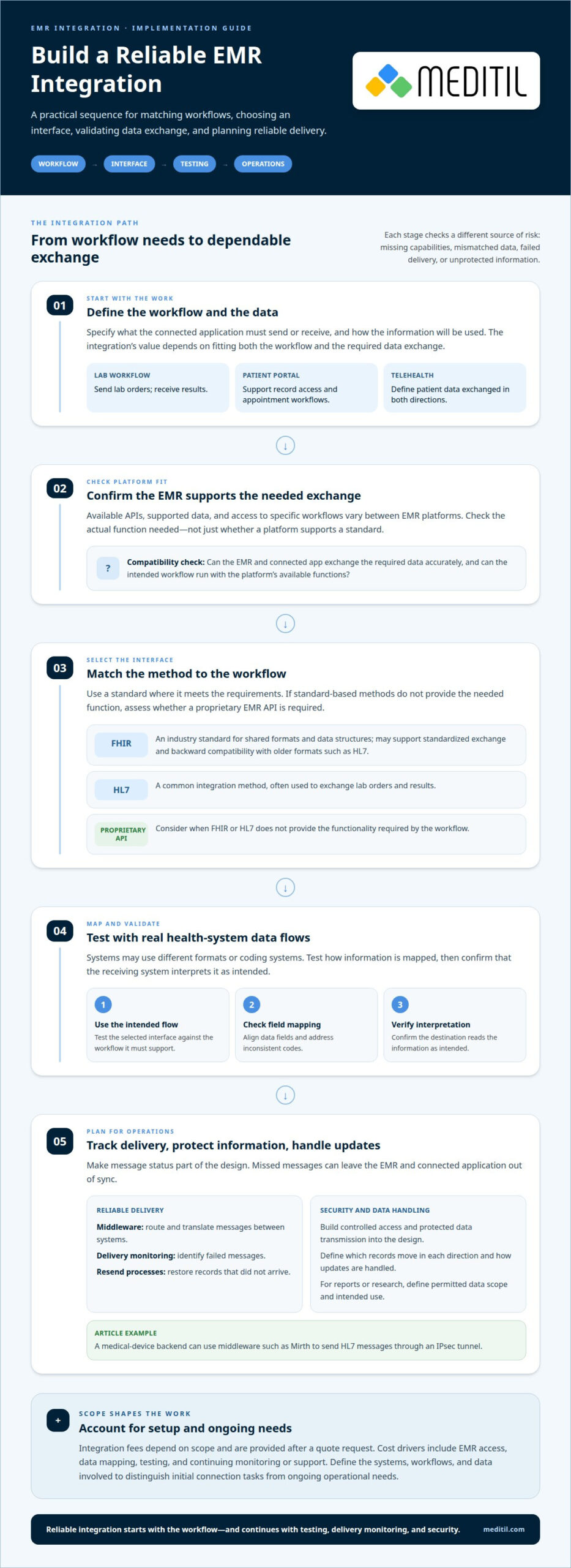
Start by identifying the workflow, such as sending lab orders and receiving results. Then test the selected interface with the health system’s actual data flows, including how information is mapped between systems. HL7 is often used for lab orders and results, while FHIR may support standardized exchange. If the required function is unavailable through these methods, a proprietary EMR API may be needed. Testing should also check that the receiving system interprets the information as intended.
Healthcare API Standardization
Healthcare API standards provide shared formats and data structures so different systems can exchange information consistently. FHIR is an industry standard that uses messages and data types supported by major EMR systems.
Standardization can make it easier to connect applications across a health system without designing every exchange from scratch. For example, a patient portal can connect with an EMR so patients can access records and make appointments online. HL7 remains a common integration method for lab orders and results. Choose a standard according to the workflow and the data each system needs to send or receive. FHIR can support standardized exchange and backward compatibility with older formats such as HL7.
Third-Party Integration Support Across EMR Platforms
Platform support describes the integration methods and functions an EMR makes available to connected applications. Available APIs, supported data, and access to specific workflows vary between platforms.
Compare platforms by checking whether FHIR or HL7 supports the required exchange, such as a lab result or patient record. Then identify gaps that could require a proprietary API. For example, an application may need more than record access to support appointment scheduling through a patient portal. Testing the intended workflow against the EMR’s available functions helps establish compatibility. Avoid treating support for one standard as proof that every integration need is covered.
Integration Setup and Ongoing Costs
Setup and ongoing fees depend on the integration scope and are provided after a quote request. Cost drivers include EMR access, data mapping, testing, and continuing monitoring or support.
For example, connecting an established lab workflow may require different configuration from developing a custom application that exchanges several types of information. Ongoing work can also depend on how the integration handles failed delivery and keeps records synchronized. Before estimating the work, define the systems, workflows, and data involved. This scope helps distinguish initial connection tasks from continuing operational needs.
What are some common features of EMR Integration APIs?
API features support data exchange, analysis, and coordination between EMRs and connected applications. Their practical value depends on how reliably information reaches its destination and how teams use it.
Reliable Data Delivery Through Middleware
Reliable delivery processes track whether messages reach the receiving system and allow failed records to be resent. This matters because missed messages can leave an EMR and a connected application out of sync.
Middleware can route and translate messages between applications and an EMR. For example, a medical device backend can use middleware such as Mirth to send HL7 messages through an IPsec tunnel. Delivery monitoring helps identify failed messages, while resend processes allow teams to restore missing data. These controls make message status part of the integration design, not an afterthought.
Bidirectional Patient-Data Exchange
Bidirectional exchange allows an EMR and another application to send and receive patient information. It matters in workflows where each system needs to contribute data, rather than simply receive a one-way feed.
For example, a telehealth connection can exchange patient data in both directions while supporting virtual care in clinical workflows. The application can send information to the EMR, and the EMR can return relevant patient data to the application. Define which records move in each direction and how updates are handled. This clarifies which system supplies each data element and helps prevent mismatched or incomplete records.
APIs can also query EMR data for reports or track patient information over time. Before reporting, teams can clean and aggregate records by aligning fields and resolving inconsistent codes. EMR integration can face data accuracy challenges when connected applications use different coding systems, so mapping and validation matter. For research intended to improve care or develop treatments, APIs can provide patient data for analysis. Define the permitted data scope and intended use, then structure queries around those needs. A clear data model makes reports easier to interpret and helps researchers work with consistent records. Integration planning also includes systems integration and interoperability to coordinate the exchange across applications.
Integration security and implementation complexity
Every connection creates a path for patient information to move. Plan security and workflow testing from the outset of implementation.
Securing Integrated Data
Integration security protects patient information as applications exchange and access it. An API must control access and safeguard data moving between systems.
For REST-based FHIR APIs, OAuth 2.0 is an authentication mechanism used by major EMR systems. Authentication establishes which application is making a request; access controls then determine what information it can reach. For data in transit, use TLS 1.2 or higher in connected medical device and EMR integrations, and HTTPS for secure web communication. These measures address different parts of the connection, so one does not replace the others.
In the United States, HIPAA is relevant to protecting patient privacy and ensuring compliance during EMR integration, according to the U.S. Department of Health and Human Services. Apply that privacy focus to the entire data flow, including the connected application and any intermediary systems. A secure channel alone does not determine appropriate access to patient records.
Managing Implementation Complexity
Implementation complexity comes from coordinating technical connections, data handling, and security across an EMR and external applications. A working interface must also fit clinical workflows and protect exchanged information.
Start by documenting which systems exchange data, what each application needs, and where information travels. For example, a telehealth application and an EMR may exchange patient data in both directions, so teams need to account for each flow. Different coding systems can create data accuracy challenges, making mapping and validation important alongside access controls.
Next, test the complete workflow, not just whether the API responds. Confirm that intended data reaches the right destination and that failed delivery can be detected and corrected. Include authentication, HTTPS or encrypted transport, and the application’s permitted access in the tests. Plan operational ownership, too: teams need a clear process for reviewing integration errors and keeping connected records aligned. This coordination is essential for managing implementation and ongoing security responsibilities.
What are the common methods for integrating third-party apps with an EMR?
An EMR integration API is a set of programming instructions that lets separate applications communicate and exchange data. For EMR integration with third-party apps, the method depends on the required workflow, available interfaces, and information each system needs to share.
FHIR offers a standards-based option for exchanging healthcare data through compatible APIs. It can suit integrations where the EMR and third-party application support the required data and functions. Before selecting it, map the workflow, such as sending patient information to a portal or retrieving records for an application. Then identify the data fields and actions the interface must support.
HL7 is another common method, particularly when a FHIR API is unavailable or does not meet the integration requirements. Health systems often use HL7 for lab orders and results. That makes it a practical fit for workflows where a lab system sends results to an EMR, or receives orders from it. The message format and data mapping must align with both systems’ expectations.
Some integrations use a proprietary EMR API when standard-based methods such as FHIR or HL7 lack a required function. For example, a third-party application may need access to a specific workflow that the standard interface does not expose. A proprietary API can address that gap, but its requirements need to be considered alongside the application’s data needs and the EMR’s supported access methods.
- Use FHIR when its available functions and data support the intended exchange.
- Use HL7 when a FHIR API is unavailable or insufficient, including lab order and result workflows.
- Consider a proprietary API when standard-based options do not provide a needed function.
Whichever method you select, define the exchange direction, data fields, and expected workflow before configuring the connection. For example, a lab interface needs to handle orders and results, while a patient portal may need record access. Planning EMR integration with third-party apps around those requirements helps align the connection with operational needs. To coordinate these requirements across systems, explore healthcare integration support.
MEDITIL: Managed IT Services (Ongoing)
MEDITIL helps healthcare organizations manage IT operations that support EMR integrations and connected applications. Managed IT Services (Ongoing) provide consistent oversight of the technology environment, while Infrastructure & Network Services support the systems and connectivity integrations rely on. Cybersecurity & Compliance helps manage security across the IT environment, and End-User Support & Help Desk assists staff using connected systems. These services fit when integration work creates ongoing infrastructure, security, or user-support needs beyond the initial connection. The right focus depends on the organization’s systems, workflows, and operational priorities. Contact MEDITIL to discuss HIPAA-compliant IT support for your healthcare environment.
Make Integration Part of Ongoing IT Planning
Before expanding an integration, assign an operational owner and document who reviews changes to connected applications. This gives technical and clinical teams a shared point of coordination as workflows evolve. It also connects integration decisions to broader IT planning, rather than treating each new application as an isolated project.
For healthcare organizations that need support beyond initial planning, MEDITIL provides Managed IT Services (Ongoing), Infrastructure & Network Services, and Cybersecurity & Compliance. These services can support operational oversight, infrastructure needs, and security considerations for EMR integration with third-party apps.
Contact MEDITIL about EMR integration to discuss the IT support your organization needs. With clear ownership and a considered plan, your team can move forward with greater confidence.
Frequently Asked Questions
Which EMR integration standards and APIs are commonly used, including HL7, FHIR, and SMART on FHIR?
HL7 and FHIR are common standards for exchanging healthcare data, while EMR-specific APIs can address functions standard interfaces don’t provide. HL7 is commonly used for lab orders and results. FHIR supports standardized exchange through APIs. SMART on FHIR refers to an app integration approach built around FHIR; OAuth 2.0 is an authentication mechanism used by major EMR systems’ REST-based FHIR APIs.
How can a third-party app connect to an EMR, and what are the implementation steps?
A third-party app connects through an interface supported by the EMR, such as FHIR, HL7, or a proprietary API. First, define the workflow and data the app needs. Next, select a compatible interface, map fields between systems, and configure access. Then test representative data flows, including failed-message handling, before using the connection in live workflows. For example, a lab interface must support both orders and results.
What HIPAA and other U.S. privacy and security requirements apply to EMR integrations?
HIPAA is a relevant U.S. regulation for protecting patient privacy and ensuring compliance during EMR integration, according to the U.S. Department of Health and Human Services. Security planning should address application authentication, permitted data access, and protected transmission. OAuth 2.0 supports authentication for REST-based FHIR APIs, while HTTPS and TLS 1.2 or higher protect data in transit. Organizations should also align integration controls with their privacy policies and agreements.
How do EMR vendors manage app authorization, patient consent, and access controls?
Vendors can use authentication and access permissions to control which applications connect and what data they can reach. For REST-based FHIR APIs, OAuth 2.0 is an authentication mechanism. Consent is a separate workflow: the organization should define how patient choices are recorded and applied to each app’s access. For example, an app needing appointment information should not automatically receive broader record access than its workflow requires.
What data can third-party apps access or write back to an EMR?
Available data depends on the EMR interface, its supported functions, and the permissions granted to the application. An app may retrieve records for a patient portal or exchange patient information within a telehealth workflow. Write-back may include information the receiving EMR supports, such as lab orders sent through an interface. Specify each data element and direction, then test how the EMR interprets incoming information.
What are the common technical, workflow, and data-quality risks of EMR integrations?
Common risks include failed message delivery, mismatched coding systems, and data that does not fit the clinical workflow. A lab result might fail to reach the EMR, or two applications might interpret a code differently, leaving records incomplete or inconsistent. Define how teams detect delivery failures, correct field mappings, and handle exceptions. Testing real workflow examples can uncover issues that a basic connection test may miss.