
Replacing an EHR isn’t the only way to improve how it supports care. EHR performance optimization means assessing and improving how an existing system, its workflows, and its connections work together. The right changes can address friction in daily tasks while helping teams decide whether to optimize, upgrade, migrate, or consider replacement.
It’s reasonable to expect an EHR to support clinical work, not slow it down. Workflow inefficiencies, difficult integrations, and gaps in staff training can all affect how effectively teams use the system. This article explains what EHR performance optimization involves, how to assess workflows and user experience, and which measures can guide decisions. It also distinguishes optimization from upgrades, migration, replacement, and ongoing support so you can choose a practical path forward.
Key Takeaways
- Map where clinical workflows slow down, then identify whether the cause lies in system configuration, integrations, data quality, or staff training.
- Compare optimization, upgrades, migration, and replacement against your organization’s needs before deciding on a system change.
- Use workflow observations, user feedback, operational data, and security and interoperability reviews to guide improvements.
- Ongoing IT support can help healthcare organizations address infrastructure, security, and end-user support needs as workflows evolve.
1. Workflow efficiency and clinician productivity
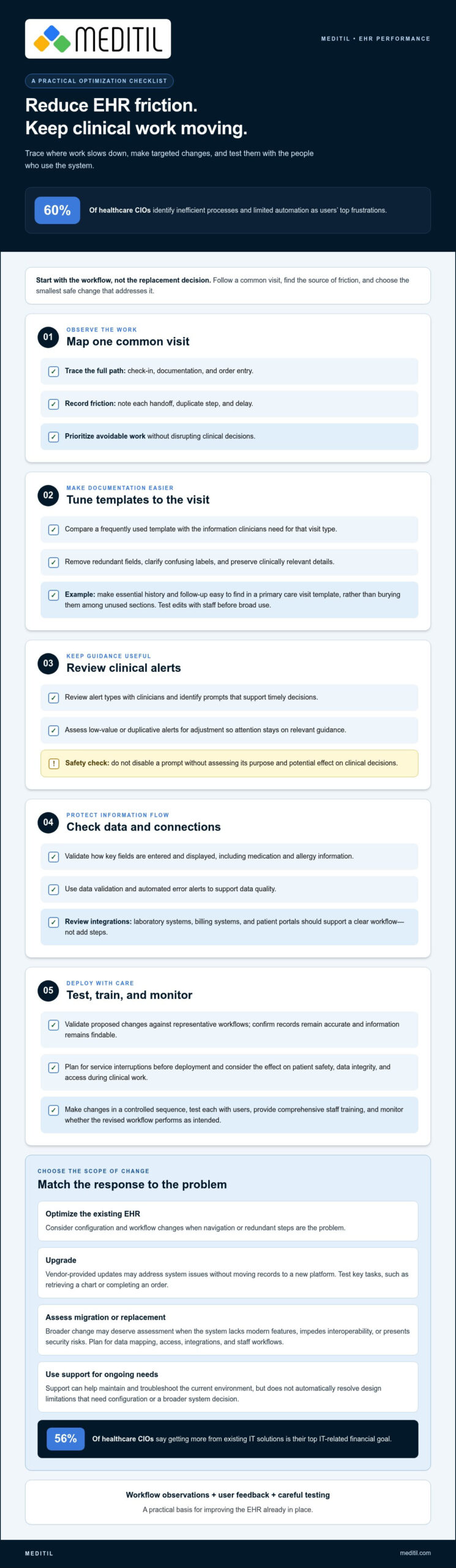
Among healthcare CIOs, 60% identify inefficient processes and limited automation as users’ top frustrations. For clinicians, friction can appear in repeated data entry, unnecessary navigation, or tasks that interrupt patient conversations. Start by tracing a common visit from check-in through documentation and order entry. Record each handoff, duplicate step, and delay, then prioritize changes that remove avoidable work without disrupting clinical decisions.
Documentation templates deserve the same practical review. Compare a frequently used template with the information clinicians need for a specific visit type. Remove redundant fields, clarify confusing labels, and preserve clinically relevant details. For example, a primary care visit template should make essential history and follow-up information easy to find, rather than burying it among unused sections. Test proposed edits with staff before applying them broadly.
Clinical decision support can create workflow friction when alerts appear too often or lack useful context. Review alert types with clinicians and identify which prompts support timely decisions. Adjusting low-value or duplicative alerts can help keep attention on relevant guidance. Don’t disable a prompt without assessing its purpose and the potential effect on clinical decisions.
Accurate information supports sound decisions. EHR data validation and automated error alerts can improve data quality, while centralized patient information can help providers make quicker, informed decisions and reduce medical errors. Check how key fields are entered and displayed, including medication and allergy information. Interoperability can connect a legacy EHR with laboratory systems, billing systems, and patient portals, but integrations should support a clear workflow rather than add steps.
What risks can EHR performance changes create for patient safety, data integrity, and downtime? A poorly tested configuration change could make information harder to find, alter how data appears, or interrupt access during clinical work. Validate changes against representative workflows, confirm records remain accurate, and plan for service interruptions before deployment.
For U.S. healthcare organizations, practical strategies include mapping workflows, simplifying templates, reviewing alerts, validating data, and providing comprehensive staff training. Assess how integrations with laboratories, billing systems, and patient portals affect productivity. Make changes in a controlled sequence, test each one with users, and monitor whether the revised workflow performs as intended.
2. EHR optimization versus replacement, migration, upgrades, and support
Improving an existing EHR can be a practical alternative to replacing it. Among healthcare CIOs, 56% say getting more from existing IT solutions is their top IT-related financial goal. Begin by separating workflow problems from system limitations. If clinicians struggle with navigation or redundant steps, configuration changes may help. If the system lacks modern features, impedes interoperability, or presents security risks, broader changes may deserve assessment.
Upgrades apply vendor-provided changes to an existing system. Work with your EHR vendor to identify and apply the latest software updates and upgrades. This may address system issues without moving records to a new platform. Test key tasks, such as retrieving a chart or completing an order, and review results before deploying changes across clinical teams.
Migration transfers records and related information to another environment, while replacement introduces a different EHR. Both require careful planning for data mapping, access, integrations, and staff workflows. For example, account for any laboratory connection that depends on a legacy system before migration. Support helps maintain and troubleshoot the current environment, but it does not automatically resolve design limitations that require configuration or a broader system decision.
How can organizations optimize an EHR while meeting HIPAA and other regulatory requirements? Treat privacy, security, and record integrity as design constraints for every change. Document proposed changes, assess their effect on access and data handling, and test safeguards alongside clinical workflows before deployment.
How can database, network, and server infrastructure be optimized? Review database performance, server capacity, and network bottlenecks together, since delays can originate at different points. Use system monitoring and user reports to locate slow transactions, then test targeted adjustments under representative workloads. Infrastructure and network performance support can help address technical bottlenecks that affect EHR access.
3. EHR workflow assessment and performance metrics
Start by defining the clinical tasks and system behaviors that matter. Track login delays, chart retrieval, order entry, page errors, and interruptions during common workflows. Pair system logs with staff observations: a screen may load quickly yet still require unnecessary navigation. EHR data analytics can help examine patient outcomes, care quality, and operational efficiency. Compare results across relevant workflows to find where technical delays or process bottlenecks affect care.
How do cloud-hosted and on-premises EHR systems compare for performance and cost? Cloud performance depends on the hosted environment and the organization’s network connection. On-premises performance depends on local server capacity, maintenance, and network conditions. Compare the full operating requirements, including infrastructure management, connectivity, backup needs, and support responsibilities, rather than treating hosting location as a performance guarantee.
Before changing infrastructure to improve speed or reduce latency, pinpoint where delays occur. Compare response times over local network access and remote connections, then review server, database, and application logs around slow tasks. Check whether delays coincide with high system demand, large record searches, or an integration call. Address the identified bottleneck and retest the same workflow to ensure the change fixes the cause rather than shifting delays elsewhere.
What performance benchmarks and response-time targets are recommended? Establish task-specific baselines rather than relying on one universal target. Record typical and slow response times for chart opening, search, and order submission, then compare results across locations and busy periods. Set internal thresholds based on clinical impact, workflow requirements, and user experience. Monitor both average response times and unusually slow transactions, since an acceptable average can conceal frustrating delays for some users.
Use a repeatable cycle: assess functionality, user feedback, performance metrics, security measures, and interoperability before making changes. Prioritize issues by clinical and operational impact, implement a focused adjustment, and test it with representative users. After deployment, monitor the same workflows and review analytics for changes in care quality and operational efficiency. Systems integration and interoperability work can help teams examine connection points when data exchange contributes to delays.
4. How can organizations measure EHR performance and user experience?
Build a measurement plan before changing the EHR. Assess functionality, user feedback, performance metrics, security measures, and interoperability. Select representative tasks, such as opening a patient chart, reviewing results, and completing an order. Record where users encounter delays, errors, or extra navigation, then compare findings across roles and care settings.
Pair technical indicators with clinicians’ experience. System logs can reveal failed transactions, recurring errors, and slow application responses. Short staff surveys and structured observation can show whether those issues disrupt work. For example, compare a clinician’s report of delayed chart access with the corresponding system event. This helps distinguish a network issue from a confusing screen or inefficient workflow.
Choose measures that reflect how the EHR is used. Track successful task completion, repeated entries, help requests, and the time required for key actions. Establish a baseline for each measure, then compare results after a change. Don’t rely on a single average: it can conceal intermittent delays or problems affecting one department. Review results by task and user group to locate patterns.
Review security and interoperability alongside usability. Federal EHR reporting criteria must include measures of security, usability and user-centered design, interoperability, and conformance to certification testing, according to the U.S. Government Publishing Office. Include these areas in the assessment alongside relevant operational measures. A faster workflow is not an improvement if it weakens data safeguards or disrupts an essential connection.
Set review points before and after each change. Document the affected workflow, expected benefit, test results, and any new issues. Ask users to repeat the same tasks after deployment, then review system data and feedback together. This creates a clear basis for deciding whether to retain, adjust, or reverse a change.
Use the findings to prioritize the next improvement, not just to create a scorecard. If measurement shows recurring infrastructure or application issues, get support assessing EHR performance and translating the results into practical next steps.
MEDITIL: Managed IT Services (Ongoing)
MEDITIL helps healthcare organizations address IT issues affecting EHR workflows, from infrastructure concerns to end-user support. Managed Services (Ongoing) provides ongoing IT management, while Infrastructure & Network Services supports assessment of connectivity and systems that affect application access.
Turn to MEDITIL when performance reviews point to network or infrastructure bottlenecks, recurring user support needs, or cybersecurity and compliance priorities. End-User Support & Help Desk can assist staff with technical issues, while Healthcare Application Support can help address application-related challenges. These services support the environment around an EHR, helping teams act on findings without treating every workflow problem as a reason to replace the system.
Contact MEDITIL to discuss IT support for your healthcare organization’s EHR environment.
Turn performance findings into a practical next step
Make the next improvement a focused operational decision. Choose a workflow issue with a clear clinical or staff impact, assign ownership, and define how you’ll assess the change after implementation. This keeps EHR performance optimization connected to day-to-day care instead of treating it as a one-time technical project. As workflows, integrations, and organizational needs change, revisit priorities and keep improvements aligned with how teams work.
Security should remain part of that process. MEDITIL’s Cybersecurity & Compliance offering can support healthcare organizations as they consider security priorities alongside their IT environment. For a discussion about the technology and operational needs surrounding your EHR, contact MEDITIL to discuss your EHR. A measured next step can help your organization move forward with greater clarity and purpose.
Frequently Asked Questions
What is EHR Optimization?
EHR optimization adapts an electronic health record environment to better support an organization’s clinical and operational needs. It can involve refining how staff use existing features, improving connected systems, or addressing technical constraints. For example, a clinic may adjust a referral workflow so staff can identify incomplete information before sending a referral, without changing the underlying EHR.
What does EHR performance optimization involve?
EHR performance optimization means examining how system behavior affects real tasks, then making and evaluating targeted changes. A practical review might trace a referral from clinician request to scheduling, noting where information is re-entered or delayed. The team can then determine whether the cause is an application setting, an interface, or an infrastructure issue, and choose a change that addresses that specific source.
How can EHR workflows and clinical documentation be streamlined without compromising care?
Start with one documentation scenario, such as a follow-up visit, and ask clinicians which fields support decisions and continuity. Remove duplicative prompts only after confirming the information remains available where staff need it. Test the revised workflow with representative users, including unusual cases, and review completed records for missing or unclear details. This keeps efficiency improvements grounded in clinical content, not just fewer clicks.