
A successful EHR migration is more than moving files: it is a controlled transfer of clinical information into a new system. EHR data migration services typically cover data mapping, secure transfer, validation, and reconciliation so records are organized correctly and checked for completeness. Planning also includes monitoring the transition and preparing a rollback approach if the migration does not go as planned.
It is understandable to focus on whether patient records will arrive intact and remain accessible. Those outcomes depend on more than the transfer itself. Teams need to understand how the source and destination systems structure information, protect data in transit and at rest, and test records before relying on the new environment. For large or complex organizations, planning also needs to account for interfaces, workflows, and system load while patient care continues.
This guide explains what EHR data migration involves and how its goals shape the work. You will learn how teams map and transfer data, validate records, reconcile discrepancies, protect sensitive information, monitor progress, and plan for rollback. It also covers factors that influence project scope and how healthcare IT support can help organizations coordinate technical and operational steps.
Key Takeaways
- Define which clinical, administrative, and historical records need to move, then map source fields to the destination before transfer begins.
- Choose bulk transfer, real-time synchronization, or a planned combination based on data volume, system capacity, and the need to keep workflows current.
- Use validation and reconciliation to identify missing, duplicated, or mismatched records, and monitor the transfer so issues can be addressed promptly.
- Protect sensitive information with controlled access, secure transfer and storage practices, and a documented rollback plan for the final migration.
- Include infrastructure, security, and operational support in migration planning so technical changes stay coordinated with healthcare workflows.
What is EHR Data Migration?
EHR data migration is the planned transfer of patient records from one electronic health record system to another. The work can include extraction, conversion, field mapping, secure transfer, validation, and staff transition.
Bulk Transfer and Real-Time Streaming
Bulk transfer moves a prepared dataset from the source system into the destination, often during a scheduled migration. Real-time data streaming synchronizes new or changed records during the transition, helping keep both systems current. Zero-downtime migration describes this synchronization approach, which is intended to avoid service interruption.
Vendor-led migration generally uses the vendor’s supported import tools and processes. A migration team can coordinate broader work across source and destination systems, including data conversion and interface dependencies. Compare the approaches by reviewing which records, interfaces, and workflows each plan covers, and how updates entered during the transfer are handled.
Choose a transfer method based on data volume, system capacity, and clinical workflow. For example, a team might load historical records in bulk, then stream new updates until staff begin using the destination EHR system. Scheduling extraction and import around system load helps manage data transfer while patient care continues.
Data Conversion and Field Mapping
Conversion changes source data into formats the destination can accept. Field mapping connects each source field to its intended destination, such as matching a medication field or encounter date. EHR data migration services may include planning, extraction, conversion, mapping, secure transfer, validation, and transition support.
Legacy records can include scanned documents and images when the systems support exporting and importing those files. Treat them as unstructured data and review customized export options with the migration team. Mapping document labels and patient identifiers helps associate each file with the correct record.
Common challenges include mismatched fields, duplicates, missing values, and unsupported formats. A practical approach is to map representative records first, then check how a source example appears in the destination. Staff training should also explain where to find transferred records and how to follow changed workflows in the new EHR system.
Encryption During Data Transfer
Protect information both while it moves and when it is stored. Use TLS 1.2 or higher for data transfers, and AES-256 or stronger encryption for data at rest. Secure protocols such as SFTP provide a controlled method for moving files between systems.
Before transfer, define who can access migration files and where temporary copies will be stored. After transfer, confirm that files are in encrypted locations and temporary copies follow the organization’s handling procedures. These steps help teams transfer patient information securely without treating encryption as a substitute for field mapping or validation.
Data validation, rollback, reconciliation, and monitoring
Validation checks whether migrated records remain accurate, complete, and usable in clinical workflows. A defined test plan gives technical teams and hospital staff clear evidence to resolve discrepancies before the new database becomes the working record.
Data Validation and Interface Testing
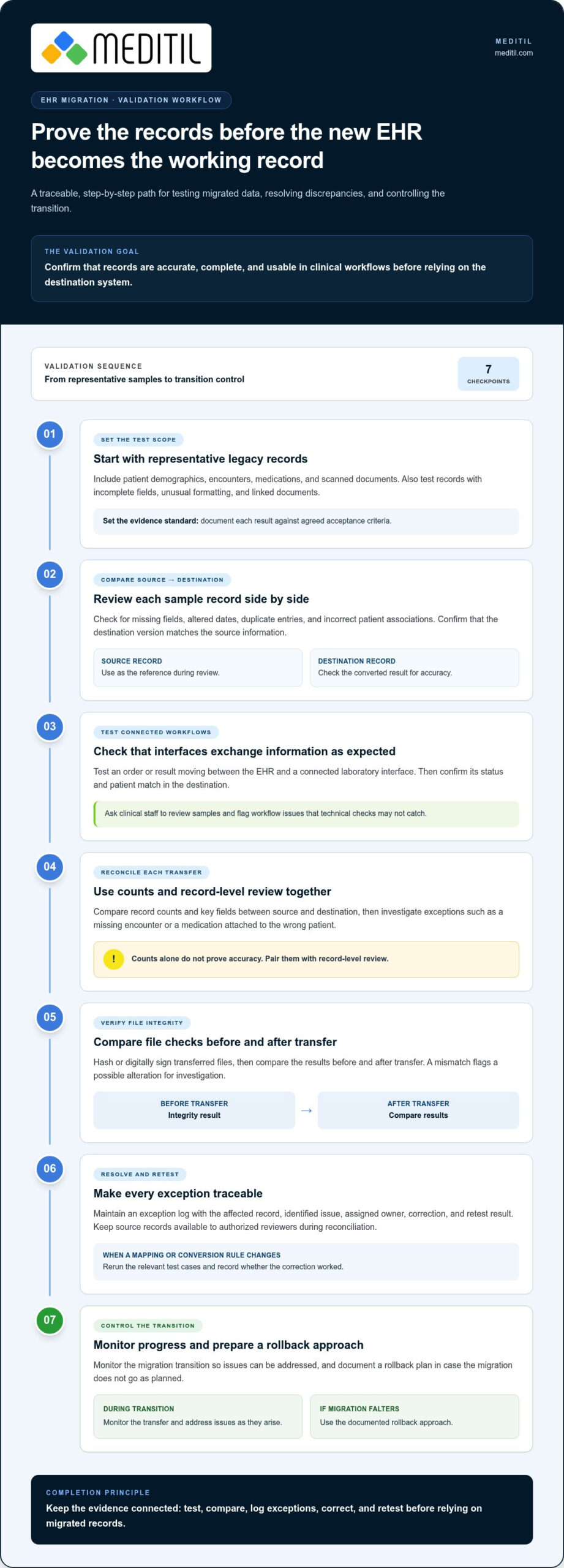
Start migration testing with representative samples from the legacy system, including patient demographics, encounters, medications, and scanned documents. Compare each source record with its destination version for missing fields, altered dates, duplicate entries, and incorrect patient associations. Document each result against agreed acceptance criteria.
Interface testing checks whether connected systems exchange information as expected. For example, test an order or result moving between the EHR and a connected laboratory interface, then confirm its status and patient match in the destination. Ask clinical staff to review samples and report workflow issues that technical checks may miss.
Test more than a successful import. Include records with incomplete fields, unusual formatting, and linked documents, then record how the destination handles each case. This helps distinguish a conversion issue from an interface failure and directs corrections to the right workflow.
Data Integrity and Reconciliation
Reconciliation compares source and destination data to identify gaps after each transfer. Teams can compare record counts and key fields, then investigate exceptions such as a missing encounter or a medication attached to the wrong patient. Counts alone do not prove accuracy, so pair them with record-level review.
To check file integrity, hash or digitally sign transferred files and compare the results before and after transfer. A mismatch flags a possible alteration for investigation. Maintain an exception log recording the affected record, identified issue, assigned owner, correction, and retest result.
Keep source records available during reconciliation so authorized reviewers can resolve discrepancies against the original information. For each corrected mapping or conversion rule, rerun the relevant test cases. This creates a traceable record of what changed and whether the correction worked.
Rollback and Migration Monitoring
Monitoring tracks transfer progress, errors, interface activity, and system load while migration runs. Set thresholds for pausing work, such as repeated import failures or a growing queue of unsent messages. Notify stakeholders when an issue affects clinical workflows, and record actions in the migration log.
A rollback plan defines the conditions, decision authority, and technical steps for returning to the prior environment. Specify how teams will preserve new clinical entries made during the transition, prevent conflicting updates, and restore access to the legacy system. Rehearse the sequence in a test environment before final cutover.
After cutover, reconcile outstanding transactions and review monitoring logs with technical and clinical leads. Tie the rollback decision to clear evidence, such as unresolved record mismatches or failed interfaces. This structured review helps hospitals respond consistently rather than improvise during a migration issue.
How To Ensure Compliance And Security During Migration?
Build privacy, access control, and auditability into every migration phase, from extraction through archival. Assign owners for access approvals, security review, and record-retention decisions.
Privacy and Access Control
Before extraction, identify which migration roles need access to protected health information (PHI). Give each role only the permissions required for its task, such as extracting records, reviewing mappings, or approving test results. Remove temporary access when the task ends.
Use de-identified records for migration testing where practical, and securely dispose of test records afterward. Keep a list of approved personnel and review it when project responsibilities change. For example, a staff member checking demographic mappings may not need access to every clinical document.
These controls help healthcare providers protect patient privacy without blocking essential migration workflows. Include access decisions in the migration plan so technical teams know who can handle each dataset.
Auditability and Regulatory Compliance
Assess the destination EHR system against the organization’s compliance requirements before moving production records. The U.S. Department of Health and Human Services identifies HIPAA as an industry standard to consider when assessing a destination EHR system’s compliance during migration.
Maintain an audit trail recording who accessed migration data, which files moved, when transfers occurred, and how exceptions were resolved. Pair activity logs with change records for mapping rules and approvals. This gives reviewers a clear path from a source record to its destination and any correction.
Include applicable retention and archival requirements in the migration process. Decide which records move into the active system and how older records remain accessible under organizational policy. HITECH Act requirements are also relevant to healthcare compliance planning, including breach notification procedures and penalties for non-compliance.
PHI Security and Data Integrity
Protect PHI throughout extraction, staging, testing, and transfer. Limit access to staging areas, document file handling, and review security audit records during the project. Hashing or digitally signing transferred files can help teams detect changes and investigate integrity concerns.
Plan for infrastructure that held PHI after the new EHR is operational. The National Institute of Standards and Technology recommends sanitizing old servers that contained PHI according to NIST SP 800-88. Record the sanitization process so the organization can track how retired equipment was handled.
For archived healthcare records, document the storage location, access process, and retention decision. A clear archive plan helps staff retrieve legacy information when needed while keeping it separate from active workflows. Review these controls alongside migration documentation before closing the project.
Final migration backup and rollback planning
A final migration plan sets the cutover sequence, protects the latest records, and defines how teams will respond if a step fails. It should connect technical decisions with clinical operations, billing workflows, and vendor responsibilities.
Small to mid-sized healthcare organizations may take 3-6 months to complete a migration. A large health system or multi-facility network with extensive data and third-party integrations may need six months or more.
To plan for downtime and continuity of care, schedule extraction and import around system load, and establish how staff will access essential information during cutover. Assign owners for backup access, urgent workflow questions, and communication with clinical teams.
Backups and Rollback Planning
Before final cutover, back up migrated data files and keep those backups in line with organizational data-retention policies. Record where each backup is stored, who can access it, and which migration stage it represents. This provides a clear reference if teams need to compare records or restore a prior state.
Document rollback triggers, decision authority, and the steps for reverting to the previous environment. Include how teams will capture records created during cutover, prevent conflicting updates, and resume work in the legacy system. Rehearse the plan before production migration.
Vendors and internal teams should agree on cutover responsibilities, escalation routes, and when rollback remains practical. A signed decision log can record approvals and actions during the final migration window.
Downtime and Continuity of Care
Plan the migration window around clinical workflows, system load, and the timing of data extraction and import. Hospital EHR migrations require careful coordination because care continues during migration work. Keep stakeholders informed and identify how staff will access necessary information if a system becomes unavailable.
Prepare a downtime workflow for patient documentation, orders, and urgent handoffs, then define how staff will reconcile those activities after service resumes. Assign clinical leads to communicate the procedure and route questions. This makes continuity steps operational rather than dependent on informal workarounds.
Billing needs a separate transition plan: billing data does not migrate, so practices need workflows for billing services and a plan to access and work legacy accounts receivable. Include billing staff and vendors in planning before cutover.
Project planning should define scope, data volume, interfaces, archive needs, and staff responsibilities before teams estimate the effort. Project pricing depends on these factors and is provided after a quote request; complexity increases with legacy formats, third-party connections, and multiple facilities. A phased strategy can deliver essential records first, then archive remaining data when that approach fits operational needs.
EHR data migration definition and goals
EHR data migration transfers healthcare information from a source platform into a destination platform. Its goal is to preserve useful patient information and make it accessible within the receiving organization’s clinical and operational workflows.
The work is broader than copying database files. Teams identify records, map source fields to destination fields, convert formats, transfer data, and verify how it appears. For example, an encounter may include structured diagnosis information, a scanned document, and associated patient details. Each part needs a defined destination and a way to stay connected to the correct record.
Scope is a strategic decision. Migration projects more typically move the last three years of data, while organizations may archive older, deceased, or inactive patient records. A two-phase approach can move essential information first and archive remaining data afterward. The right scope depends on clinical use, records-access needs, retention policies, and what the destination platform can support.
Data alignment also matters. HL7 FHIR, CDA, ICD, LOINC, and SNOMED CT are standards or formats teams may consider when aligning healthcare data models. They help frame how information is represented, but they don’t remove the need to map fields between systems. A diagnosis field, for instance, must retain its intended meaning after conversion, not merely arrive in a similarly named field.
For providers, the central goal is usable information that supports patient care after cutover. Organizations can define this through practical acceptance criteria: authorized staff can locate a patient’s relevant history, clinical documents remain associated with the correct record, and connected workflows receive the data they need. These criteria turn a broad migration objective into specific checks for the destination platform.
Migration planning should connect technical scope with operational ownership. Bring the Data Governance team into early planning, assign a project manager, and include technical resources and subject matter experts. Clinical staff can identify records that support current workflows, while technical teams assess formats and interfaces. This partnership helps organizations set priorities before extraction begins and gives each decision an accountable owner.
A smooth transfer is not the sole measure of success. The result should be a destination environment where information is organized for its intended use, older records remain accessible through a defined archive approach, and staff understand changed workflows. To plan a migration strategy around your organization’s systems and priorities, discuss your EHR migration needs.
MEDITIL: Managed IT Services (Ongoing)
MEDITIL supports healthcare organizations that need coordinated IT operations alongside an EHR transition. Its Managed Services (Ongoing) can support the technology environment after cutover, while Infrastructure & Network Services address the systems staff rely on. Cybersecurity & Compliance helps organizations manage security priorities, and End-User Support & Help Desk gives staff a channel for technical issues affecting daily workflows.
Consider ongoing healthcare IT support when internal teams need help coordinating infrastructure, security, and user support around a system change. MEDITIL provides HIPAA-compliant services for the broader technology environment, rather than selling an EHR platform. Contact MEDITIL to discuss your healthcare IT needs.
Prepare the Next Step With a Clear IT Plan
An EHR migration also shapes how your organization will support its technology environment afterward. Before moving forward, identify who will coordinate infrastructure, cybersecurity, and staff support as responsibilities shift from project planning to daily operations. That continuity keeps technical decisions connected to healthcare teams’ needs.
MEDITIL’s Managed Services (Ongoing), Infrastructure & Network Services, and Cybersecurity & Compliance support the broader healthcare IT environment surrounding an EHR transition. These HIPAA-compliant offerings address ongoing technology operations, infrastructure, and security priorities. They complement an organization’s migration planning without replacing its EHR platform or the decisions its clinical and technical teams must make.
If your organization is assessing EHR data migration services, consider how the project will fit into its wider IT priorities. A conversation can help clarify where ongoing support may fit and which areas need coordination. Contact MEDITIL about EHR migration to discuss your organization’s needs and plan a considered next step.
Frequently Asked Questions
How Is the Data Loaded into the New System?
Data is loaded through an import process supported by the receiving EHR, often using structured files or an approved system connection. The migration team prepares the export in a format accepted by the destination, then loads records in planned groups. For example, a test batch can include patient demographics and encounters from different departments. Review import logs and rejected-record reports after each batch so teams can address specific failures before proceeding.
How To Transfer Data From One EHR To Another?
Transfer data through a documented sequence that coordinates source access, destination requirements, and clinical review. First identify the needed record categories, such as allergies, medications, and encounter history. Then prepare a representative test batch and assess how its information appears in the new EHR. Once the results are reviewed, schedule the larger transfer and assign staff to handle exceptions, including records that do not match expected formats.
How is Data Extracted?
Data extraction retrieves selected records from the source EHR using an available export method, such as a structured file or system interface. The extraction scope should specify record categories, date ranges, and associated documents. A manifest listing exported files and record groups helps the team compare what was requested with what arrived. Preserve the original export in a controlled location while import and review proceed in the receiving system.
What If the Legacy Data Is Encrypted or Vendor-Hosted?
Encrypted or vendor-hosted records require an authorized export pathway and access to the appropriate decryption process. Plan who can approve access, where decrypted working files can be handled, and how temporary copies will be protected. For hosted data, coordinate the export format and timing with the migration plan. If a data category cannot be exported as structured information, determine whether documents or another supported archive format can preserve access.
Why Do Medical Practices Migrate EHR Systems?
Practices may migrate when their current platform no longer fits clinical workflows, reporting needs, or connections with other systems. A change may also follow organizational growth, consolidation, or a shift in care delivery. Before deciding, document the specific problem, such as staff re-entering information between disconnected systems. Then compare that need with the target platform’s workflows, available interfaces, and approach to retaining historical records.
How much do EHR data migration services cost in the United States?
Project pricing depends on the project and is provided after a quote request. Key cost factors include the number and types of records, source formats, destination requirements, connected interfaces, archival scope, and the level of testing and reconciliation needed. Multiple facilities or complex billing workflows can add coordination work. A clear inventory of systems, data categories, integrations, and migration responsibilities helps define project scope for a tailored estimate.
What are the steps for migrating data between EHR systems?
Use a sequenced plan so technical work and clinical review stay aligned:
- Set scope, roles, and record priorities.
- Inventory source data, interfaces, and documents.
- Prepare exports and test a representative batch.
- Review exceptions and approve the import approach.
- Load production data, reconcile results, and support staff adoption.
Keep an owner and decision log for each stage, including approvals to proceed.
What HIPAA and other US regulations apply to EHR data migration?
HIPAA is a key standard to consider when assessing the destination system’s compliance, according to the U.S. Department of Health and Human Services. The HITECH Act expands upon HIPAA with more stringent penalties for non-compliance and formal breach notification procedures. During planning, document how the organization will control access, audit migration activity, and handle security incidents. Applicable obligations depend on the organization and the information involved.