
Could a workflow designed to standardize documentation make specialist care harder to deliver? When templates, handoffs, and data entry don’t reflect how a specialty works, staff may face unnecessary steps, duplicate documentation, or uncertainty about where information belongs. Customizing EHR workflows for specialists starts with a closer look at the care pathway, not simply a change to screens or forms.
Effective changes need to support clinical and administrative work. Identify who handles each step, where information should be recorded, and how the workflow connects to billing, reporting, and other systems. Then test proposed changes with the people who use them before they become part of routine care.
This guide explains how to assess current workflows, map them to specialty needs, and plan practical EHR adjustments. You’ll learn how to define staff responsibilities, test and refine proposed changes, and recognize when implementation, training, integration, or strategic IT support may help. The goal is a workflow that fits how your team delivers care while remaining usable and maintainable.
Key Takeaways
- Observe how care and administrative work happen today, then document each step’s trigger, owner, information needs, decisions, and handoffs.
- Choose the least complex workflow option that meets a verified need, and weigh its dependencies and ongoing maintenance before making changes.
- When customizing EHR workflows for specialists, validate requirements with clinical, operational, and technical stakeholders before configuration begins.
- Test routine visits, exceptions, handoffs, and downstream effects with staff before expanding a workflow across the practice.
- Assess whether internal capacity is sufficient for implementation, integration, training, and ongoing ownership, and identify where outside support may help.
Why customizing EHR workflows for specialists starts with the work itself
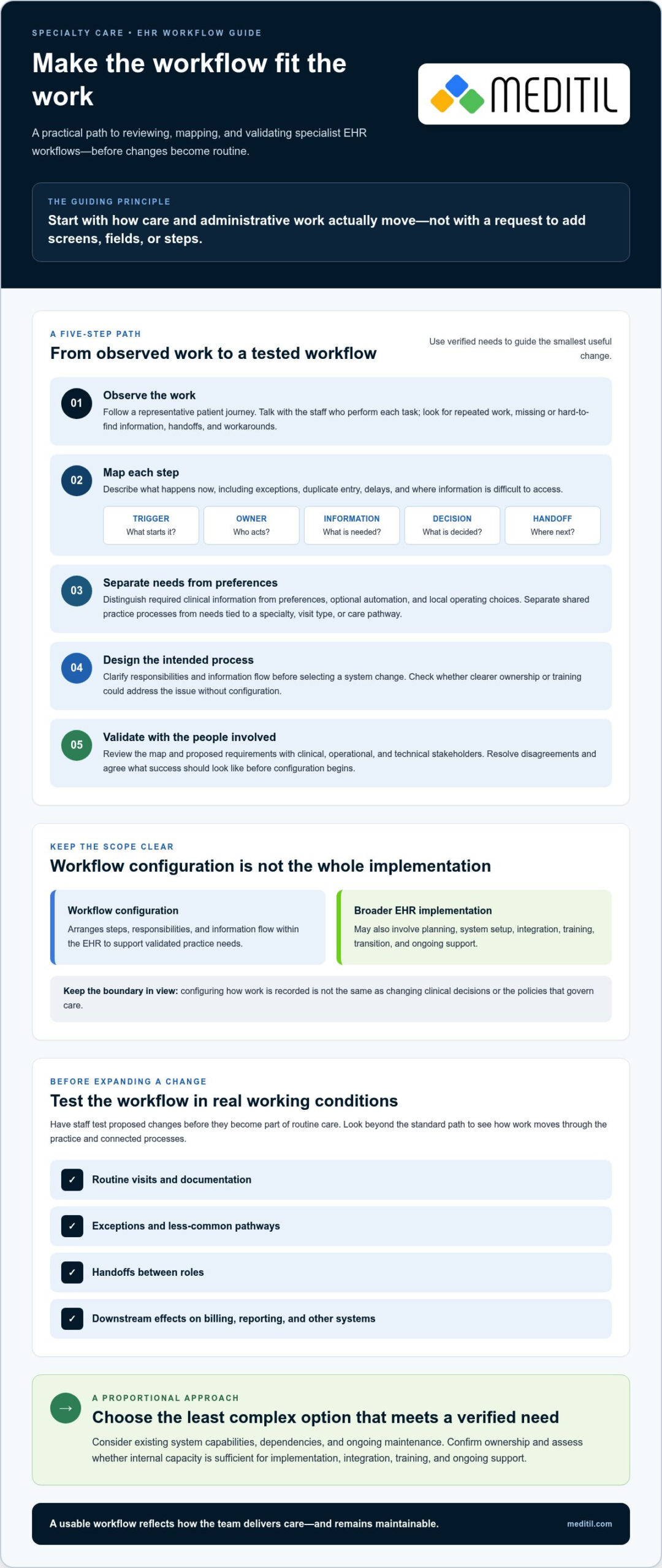
Customizing EHR workflows for specialists should start with how care and administrative work actually move through the practice, not with a request to add fields or steps. A generic template may suit routine documentation but create friction if staff must re-enter information, switch systems, or rely on informal workarounds. That doesn’t mean every specialty needs extensive customization. The right level of change depends on verified needs, existing system capabilities, and the people responsible for each part of the process.
Workflow configuration is the arrangement of steps, responsibilities, and information flow within an EHR to support validated practice needs. It is not the purchase of software or a change to clinical policy. This distinction keeps the work focused. An Electronic health record (EHR) provides a digital record and related information-management functions, while configuring a workflow means deciding how people use available system capabilities in their work. Broader EHR implementation may also involve planning, system setup, integration, training, and transition to ongoing support.
Which specialist workflows are worth reviewing first?
Choose a representative patient journey and trace it from scheduling and intake through the visit and follow-up. Include documentation, orders, referrals, results, and administrative handoffs where they apply. At each step, ask clinicians and staff: Where do you repeat work? Which details are hard to find? When do you leave the EHR or use a workaround? These observations help distinguish an actual workflow gap from a preference or one-off exception.
How specialty needs differ without assuming one standard workflow
Separate processes shared across the practice, such as scheduling or routing results, from requirements that may depend on a particular specialty, visit type, or care pathway. Treat potential differences as discovery prompts, not universal standards. Ask the people who perform and oversee the work to confirm whether a pathway is needed, what information it requires, and who owns each handoff. Document the agreed process before considering system changes.
This evidence-first approach keeps customization proportional. Clearer responsibilities or staff training may resolve a problem without a system change. If configuration is warranted, a documented workflow gives clinical, operational, and technical teams a shared basis for evaluating options. It also helps maintain the distinction between changing how work is recorded and changing the clinical decisions or policies that govern care.
Map specialist EHR workflows into clear roles, steps, and requirements
A useful workflow map describes what happens in practice, including who acts, what information they need, and how work moves to the next person. For each step, record five elements: the trigger, the owner, the information required, any decision point, and the next handoff. This turns broad complaints such as “the process is slow” into requirements a clinical and technical team can assess.
Document current-state and future-state workflows
Observe work across the roles involved rather than relying only on written procedures. Note exceptions, duplicate entry, handoffs, and moments when information is missing or difficult to access. Then sketch the intended future state before discussing EHR changes. For additional reference, the Office of the National Coordinator for Health Information Technology offers EHR and health information exchange guidance for specialists.
Use a consistent sequence to move from observation to requirements:
- Observe: Follow a representative workflow and speak with the staff who perform each task.
- Map: Record triggers, owners, information, decisions, handoffs, exceptions, and points of re-entry or delay.
- Separate: Distinguish required clinical information from staff preferences, optional automation, and local operating choices.
- Design: Draw the desired future process, clarifying responsibilities and information flow before selecting a system change.
- Validate: Review the map with the people who use and oversee the workflow, resolve disagreements, and agree on what success should look like.
Workflow requirements are reliable only when the people who perform the work confirm that the map reflects real tasks, exceptions, and handoffs. End-user review can surface gaps that a process document alone may miss, while keeping preferences from being mistaken for clinical requirements.
Translate requirements into EHR configuration decisions
Describe each proposed change in practical terms: which user needs to complete which task, what information is needed, and what result should follow. For example, a requirement might clarify who reviews incoming results and how that work is handed off, without prescribing a clinical decision. Prioritize requests by clinical relevance, operational value, and dependencies such as system capabilities or connected applications.
Some requests may need vendor input to confirm what the EHR supports. Changes involving information exchange may require integration expertise, while questions that affect clinical practice should go through the organization’s clinical governance process. This keeps configuration aligned with approved workflows instead of using system settings to make policy decisions. If requirements reveal gaps in implementation planning or staff readiness, EHR implementation and training support may help coordinate the work.
Compare workflow options without over-customizing the specialist EHR
Customizing EHR workflows for specialists doesn’t mean every gap needs a custom build. First confirm the need, then select the simplest approach that addresses it. Existing settings may be enough. Added complexity can create maintenance demands, confuse users, or affect connected processes if changes aren’t tested and governed.
| Option | Best fit | Dependencies and maintenance | Questions to resolve |
|---|---|---|---|
| Standard configuration | Existing steps, roles, or permissions can be adjusted to meet the requirement. | Depends on available EHR settings. Document changes and review them as workflows evolve. | Can current settings support the task without extra steps or custom development? |
| Specialty template | A validated visit type or documentation pathway needs a clearer structure. | Depends on system capabilities and clinical review. Templates need an owner to keep them relevant. | Does each field serve a purpose, and does the template fit actual practice? |
| Automation | A repeatable task has a clear owner and predictable exceptions. | Depends on configuration and defined exception handling. Monitor whether the process remains appropriate. | Who reviews exceptions, and what happens if the expected information is missing? |
| Integration | Information needs to move between the EHR and another system to support a documented handoff. | Depends on technical coordination and ongoing oversight of the connection. | What information must move, who owns the connection, and how will issues be identified? |
When standard configuration or templates may be sufficient
Check the EHR’s existing settings and role permissions against the mapped requirement before pursuing a more complex change. Assess a template for clinical fit, clarity, and unnecessary documentation burden. If configuration meets the verified need, custom development may add effort without meaningful value. The ONC’s EHR implementation guidance provides broader planning context for evaluating system and workflow decisions.
When automation or integration deserves consideration
Automation may suit a repeatable task, but only when ownership and exceptions are clear. Integration is worth exploring when a documented handoff depends on information moving between systems. For billing handoffs, identify where information is re-entered or delayed, then assess whether billing automation or integration could address that specific gap.
Unmanaged changes can add complexity. Keep a record of approved changes, assign an owner, and test the workflow with affected staff before wider use. Confirm that the change addresses an observed need and review its effects on connected steps. A disciplined approach makes it easier to maintain useful changes and reconsider those that no longer fit.
Implement and validate customized EHR workflows with staff
A workflow can appear complete in a configuration review and still create confusion during a real task. Introduce changes in phases so staff can verify that each step works, responsibilities are clear, and connected processes remain intact. For customizing EHR workflows for specialists, approval is the start of validation, not the finish line.
- Approve requirements. Confirm the intended workflow, affected roles, and expected result with clinical and operational owners. Resolve open questions before making changes.
- Configure the agreed changes. Keep a record of what changed, why it changed, and who is responsible for reviewing it.
- Test representative scenarios. Cover routine visits, exceptions, handoffs, and downstream effects, including whether the next person receives the information needed to continue their task.
- Train affected users. Connect each role’s training to the tasks they’re expected to perform and the workflow’s purpose.
- Review after rollout. Gather feedback, examine issues, and decide whether to retain, adjust, or revisit the workflow.
Test workflows before they reach routine use
Use representative roles and realistic, non-identifiable scenarios. Follow each scenario from start to finish, checking required information, task ownership, and transitions at every handoff. Include an exception, such as missing information or a result that needs follow-up, to confirm staff know what to do next. Log each issue, assign an owner, and retest affected steps before approving broader use.
A workflow isn’t proven because it’s configured. It’s proven when staff can complete it reliably in practice. Before rollout, agree on what the practice will monitor. Useful measures may include user feedback, incomplete tasks, repeated entry, or delays at a handoff. Select measures that reflect the original requirement, and interpret them in context rather than assuming every change should produce the same result.
Train users and manage change over time
Training should reflect role-specific tasks, not just demonstrate available features. Show users where their responsibilities begin and end, how to handle exceptions, and how work moves to the next person. Provide a clear route for reporting friction so feedback can be reviewed and assigned instead of becoming an informal workaround.
Set review points after rollout and after meaningful clinical or operational changes. A workflow that once fit may need reassessment when responsibilities, connected systems, or practice processes shift. Keep ownership clear so staff know who evaluates a request and who approves changes. Explore EHR implementation and training support to help coordinate workflow changes, testing, and user readiness.
When specialist practices need EHR implementation and IT support
Internal teams may need additional support when workflow decisions span clinical operations, EHR capabilities, connected systems, and staff training. Signs include unclear ownership of changes, limited time to coordinate testing, uncertainty about how information moves between applications, or no agreed process for reviewing issues after rollout. These gaps don’t mean the practice lacks expertise. They may indicate a need for defined coordination and technical capacity.
For workflows that depend on information moving between systems, assess exchange requirements alongside the clinical and operational process. Consider what information needs to be available, which systems are involved, and who will oversee dependencies. MEDITIL supports healthcare organizations with EHR implementation and training, healthcare application support, systems integration, and advisory services. It supports EHR systems; it does not sell EHR software. Clinical leaders retain responsibility for clinical decisions, and the EHR vendor remains responsible for its product and vendor-specific support.
What to expect from an implementation and advisory partner
Look for healthcare context, disciplined discovery, clear responsibilities, and documented decisions. A partner can help coordinate requirements, configuration planning, testing, integration dependencies, and user readiness, while the practice maintains clinical ownership. Confirm how training will address different roles, who will manage questions after changes are introduced, and which issues must be referred to the EHR vendor. For cross-system workflows, review the organization’s healthcare interoperability support needs as part of the plan.
Clarify the scope before work begins. Which workflows are included? Who approves requirements? How will proposed changes be tested? Who maintains the decisions and coordinates follow-up? These questions help the practice distinguish implementation assistance from clinical governance and vendor responsibilities. They also help identify whether the main gap is technical, operational, or related to staff readiness.
Prepare for a focused workflow discovery conversation
Bring a representative workflow example, known friction points, and a list of the staff roles involved. Note the systems and handoffs connected to the process, but don’t share unnecessary patient information. A focused discussion can establish the scope, decision-makers, dependencies, and practical next steps without presuming that every issue requires EHR customization.
Customizing EHR workflows for specialists is a coordinated clinical, operational, and technical effort. If your practice is weighing workflow changes or implementation support, discuss the current process, internal capacity, and priorities with an experienced healthcare IT advisor.
Build a Specialist Workflow Your Team Can Rely On
Effective customizing EHR workflows for specialists begins with verified practice needs. Map how work moves across roles, distinguish essential requirements from preferences, and choose the least complex change that addresses the gap. Then test routine scenarios, exceptions, and handoffs with staff before making the workflow part of daily practice.
Keep the process coordinated and accountable. Clear clinical ownership, documented decisions, role-specific training, and planned review help changes remain usable as practice needs evolve. When internal capacity or connected systems add complexity, experienced implementation and IT support can help align requirements, integration, testing, and staff readiness. MEDITIL supports healthcare organizations with EHR implementation and training, systems integration and interoperability services, and fractional CIO and project-based consulting. It supports EHR systems rather than selling EHR software.
If your team is planning a workflow change or needs help clarifying implementation requirements, discuss your EHR workflow and implementation needs with MEDITIL. A clear, practical plan can help your team move forward with confidence.
Frequently Asked Questions
What does customizing an EHR workflow for a specialist mean?
It means arranging the steps, responsibilities, and information flow in an EHR around a specialist practice’s verified needs. The work may involve reviewing how staff document care, manage handoffs, or complete administrative tasks, then determining whether existing settings can support the process. It doesn’t automatically require extensive changes, custom development, or a change to clinical policy. The practice’s clinical and operational leaders remain responsible for validating the intended workflow.
How do you customize an EHR workflow for a specialty practice?
Begin by observing a representative patient journey and asking the staff involved where work is repeated, delayed, or handled outside the expected process. Map each step by its trigger, owner, information needs, decision point, and next handoff. Separate essential requirements from preferences, then assess available configuration options. Before routine use, test realistic scenarios with affected roles, train users on their tasks, and establish a way to review issues after rollout.
Should a specialist practice use standard EHR templates or custom workflows?
Use standard settings or templates if they meet the practice’s verified needs without adding unnecessary steps or documentation. Consider a tailored workflow when a clearly defined requirement remains unmet. Assess template clarity, clinical fit, role responsibilities, and ongoing maintenance before deciding. Customization isn’t automatically better: an added template or automation can introduce complexity. The practice should validate the need with end users and check what the EHR system supports before approving changes.
Can customizing EHR workflows improve practice efficiency?
It can help address specific sources of friction, such as repeated entry, unclear task ownership, or avoidable handoff gaps. However, customization alone doesn’t guarantee greater efficiency. Define the problem first, then choose practical measures to review, such as user feedback, incomplete tasks, repeated documentation, or delays in a handoff. Compare those observations with the original need after the change, and adjust the workflow if testing or routine use reveals new issues.
How can a practice prevent EHR workflow changes from disrupting care?
Use a phased process: approve requirements, configure the agreed changes, test routine and exception scenarios, train affected staff, and review the workflow after rollout. Test handoffs and downstream effects with representative roles before making the change part of routine work. Use realistic, non-identifiable scenarios, record issues, assign owners, and retest fixes. Clear clinical oversight and a defined route for reporting friction help the practice respond to problems systematically.
Does MEDITIL sell EHR software?
No. MEDITIL supports healthcare organizations with EHR implementation and training, healthcare application support, systems integration, and related IT and advisory services, but it doesn’t sell EHR software. Its role is to help organizations plan and support EHR-related work, including staff readiness and connected systems, in coordination with the practice and its EHR vendor. Clinical decisions and governance remain with the healthcare organization, while vendor-specific product responsibilities remain with the vendor.
When should a specialist practice seek help with EHR workflow customization?
Consider outside support when the practice lacks internal capacity to coordinate requirements, testing, or staff training; when workflow changes depend on information exchange between systems; or when ownership of ongoing review is unclear. Bring representative workflow examples, known pain points, affected roles, and a list of connected systems to an initial discussion. Project-based IT consulting, EHR implementation and training, or fractional CIO support may help clarify scope, dependencies, decision-makers, and next steps.