
FHIR gives healthcare systems a shared standard for structuring and exchanging clinical data, while custom healthcare software integration connects that standard to an organization’s existing applications and workflows. Used alongside HL7, FHIR can support data exchange among systems such as EHRs, laboratories, billing platforms, and telehealth tools. The goal is not simply to connect software, but to make relevant information usable across care and operational workflows.
Disconnected systems can create extra work and make it harder for healthcare teams to access information where they need it. The right custom healthcare software integration approach depends on which systems must communicate, what data they exchange, and how that data must be protected. This guide explains FHIR’s role, compares custom integration with SaaS options, and outlines key security and development considerations for healthcare providers. It also shows how tailored integration can reduce manual administrative work and make information more accessible for reporting and care coordination.
Key Takeaways
- Understand how FHIR and HL7 can help healthcare systems exchange structured information across clinical and operational workflows.
- Compare custom integration with SaaS by weighing workflow fit, control, maintenance, and the systems your organization needs to connect.
- Identify security practices for protecting sensitive health information throughout data exchange and system development.
- Explore how connected tools can support administrative workflows, reporting, and access to useful operational data.
- Use practical criteria to assess integration expertise, security planning, and ongoing support for your healthcare environment.
Healthcare software integration and interoperability
Healthcare integration connects applications so clinical, administrative, and analytics teams can use consistent information. HL7 and FHIR provide standards that help systems exchange structured data.
Interoperability-First Modular Architecture
An interoperability-first architecture treats data exchange as a core design requirement, not a feature added after launch. For example, a modular system can connect laboratory results, prescriptions, billing, and telehealth through defined interfaces. Each module has a clear function while sharing agreed data structures.
During planning, map the workflows and applications that need to exchange information. Then define which standards and data formats each connection requires. HL7 and FHIR can guide those decisions, while DICOM supports medical imaging exchange. A modular design also helps teams update one integration without rebuilding unrelated functions. Review how errors, duplicate records, and changes to an interface will be handled.
EHR Integration Layers
An EHR integration layer manages data movement between the EHR and other systems. It can translate formats, route messages, and apply workflow rules, allowing applications to exchange information without a separate point-to-point design for every connection. For example, a laboratory result can move from a lab system to an EHR and then become available to an authorized clinical workflow.
Assess each layer by the tasks it performs: connectivity, data mapping, validation, routing, and monitoring. FHIR APIs can support structured exchanges, while HL7 interfaces may connect systems using established message formats. The design should identify which application owns each data element and how updates return to the source. Clear ownership reduces conflicting records and supports reliable analytics.
Hospital Interoperability Architecture
A hospital architecture must account for connected departments and varied systems, including EHRs, laboratories, pharmacies, billing, revenue cycle management, and telehealth. A shared integration layer can route data between these applications, while defined standards make each exchange more predictable. DICOM and PACS are relevant to imaging workflows, alongside HL7 and FHIR for other health data exchanges.
Investment reflects the operational importance of these connections: more than 85% of healthcare CIOs plan to increase spending on interoperability and integration services. Around 92% of healthcare leaders consider these capabilities critical for reducing administrative burden. For a hospital, start by prioritizing workflows with repeated manual handoffs, then map their systems, data formats, and access needs. This gives architecture teams a practical basis for sequencing integrations and evaluating efficiency.
Why should I choose custom healthcare software instead of SaaS solutions?
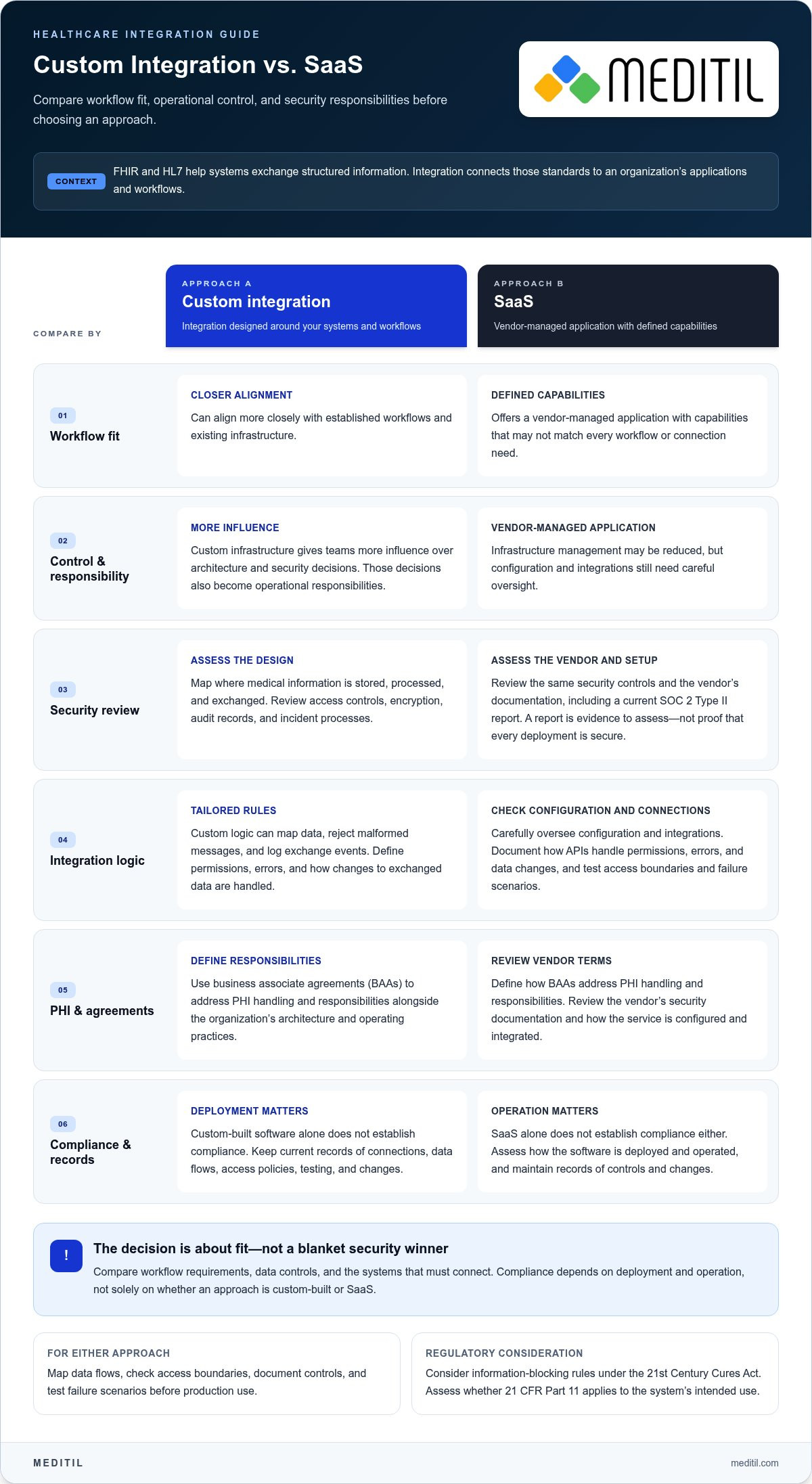
Custom integration can align more closely with established workflows and infrastructure, while SaaS provides a vendor-managed application with defined capabilities. The right choice depends on workflow requirements, data controls, and the connections your healthcare organization needs.
Healthcare Architecture and Security Controls
Start by mapping where medical information is stored, processed, and exchanged across the organization. Compare each option’s access controls, encryption approach, audit records, and incident processes against those workflows. For SaaS, review the vendor’s security documentation, including a current SOC 2 Type II report. A report provides evidence to assess, not proof that every deployment is secure.
Define how business associate agreements (BAAs) address PHI handling and responsibilities. Custom infrastructure gives teams more influence over architecture and security decisions, but those decisions also become part of their operational responsibilities. SaaS can reduce infrastructure management, though its configuration and integrations still need careful oversight.
Secure APIs and Custom Integration Logic
Secure APIs need clear authentication, authorization, and data-validation rules. For example, an interface moving a patient record between an EHR and billing application should expose only the fields required for that workflow. Custom integration logic can map data, reject malformed messages, and log exchange events for review.
Document how each API handles permissions, errors, and changes to exchanged data. Test access boundaries and failure scenarios before production use. These steps clarify how information moves through the system and where an audit trail can support an investigation. They also make integration behavior easier to review as applications change.
Compliance depends on how software is deployed and operated, not solely on whether it is custom-built or SaaS. In the United States, the 21st Century Cures Act includes information-blocking rules relevant to healthcare software compliance, according to the Assistant Secretary for Technology Policy/Office of the National Coordinator for Health Information Technology. Architecture decisions should therefore consider how authorized information can be exchanged, alongside security and workflow needs.
For audit readiness, maintain current records of system connections, data flows, access policies, testing, and changes. Map each control to the application or interface it covers. In regulated environments, assess whether 21 CFR Part 11 applies to the system’s intended use. That assessment should inform design and documentation rather than be added after implementation.
Custom integration is a stronger fit when workflows require tailored logic or existing applications need specific connections. SaaS may suit organizations whose processes align with its capabilities and configuration options. If security governance and infrastructure planning are part of the decision, healthcare cybersecurity and compliance support can help structure those considerations.
How do you protect PHI and ensure data security during development?
Protecting PHI starts with mapping every system that creates, receives, stores, or transmits patient information. In the United States, healthcare software development must account for the HIPAA Privacy, Security, and Breach Notification Rules. HITECH adds breach-notification provisions, so security planning should cover development, testing, deployment, and ongoing operations.
Map Data Flows Before Building Connections
Document the information exchanged among EHR or EMR systems, revenue cycle management platforms, payers, clearinghouses, laboratories, pharmacies, imaging systems, devices, CRM applications, and patient engagement tools. For each connection, record what data moves, which system sends it, and which receives it. A laboratory interface, for example, may send results to an EHR, while billing data follows a separate path to a clearinghouse.
Use this map to define access by role and workflow. A patient engagement platform may need appointment details, but not every clinical note. Limit development and support access to information required for assigned tasks. Keep test environments separate from production, and protect test data to prevent unnecessary exposure of live PHI.
Build Security Into Integration Work
For each interface, define how identity is verified, permissions are applied, and data is validated. An API connecting an EHR with a pharmacy application should reject unauthorized requests and record relevant exchange activity. Include encryption in transit and at rest, access logging, secure secrets management, and vulnerability testing in the design and deployment plan.
Test more than successful exchanges. Simulate invalid data, expired credentials, interrupted connections, and duplicate messages. Confirm that failures generate actionable logs without exposing sensitive patient details. Keep a change record for interface updates and review it alongside test results before releasing changes into production.
Connect Security to Patient and Operational Outcomes
Patient portals and digital front-door applications can bring appointment scheduling, forms, reminders, and selected health information into one patient-facing experience. Define which system owns each item and how updates return to the EHR. This helps prevent conflicting appointment details and gives teams a clear way to investigate discrepancies.
Well-planned connections can reduce manual re-entry across clinical and financial workflows. For example, linking eligibility information, claims processing, and billing can help staff identify missing data earlier. Patient engagement tools can make relevant information easier to access, while analytics can reveal workflow bottlenecks. Assess outcomes through measures such as rework, claim corrections, appointment completion, and time spent reconciling records. Set a clear baseline and assign an owner to each measure.
Custom healthcare software benefits
Custom healthcare software can align workflows with how a hospital or clinic delivers care and manages operations. Its value comes from addressing specific friction points, such as repeated data entry between a clinical application and billing system. Before designing a solution, identify the workflow, its users, and the outcome to improve. This keeps the architecture focused on operational needs instead of adding features without a clear purpose.
Administrative workflows offer practical opportunities for improvement. Software can automate billing, coding, and claims management, reducing manual handoffs between clinical and revenue teams. For example, a billing workflow can transfer relevant encounter details into claims processes and flag incomplete information for staff review. Dashboards and reporting tools can consolidate data for analytics, helping teams track quality metrics and identify operational patterns. Benefits depend on accurate source data and clear definitions for each measure.
For patient care, tailored applications can organize information around a specific service or care pathway. A telehealth workflow, for instance, may bring appointment details and relevant patient information together for a virtual visit. Remote monitoring tools can support review of incoming patient data within defined workflows, much like specialized health platforms such as Keys to Health structure laboratory data for focused biomarker and hormone analysis. These capabilities are useful when an organization needs a specific process, but they require clear ownership, appropriate access, and a plan for exceptions.
Reported results from Sunrise Family Health Clinic illustrate possible workflow gains. A&I reports a 38% reduction in documentation time, 22% faster patient throughput, and 47% fewer after-hours charting minutes. These are results reported for that clinic, not a forecast for every organization. They show why teams should define a baseline before implementation, then compare the same measures after changes. Documentation time, throughput, and charting are distinct measures, so each needs a consistent method of collection.
Build an evaluation around operational, financial, and patient-care outcomes. For operational performance, track duplicate entry, manual corrections, or time spent reconciling records. For financial workflows, examine claim rework and billing process completion. For care delivery, assess whether teams can access the information their workflows require. A custom solution is most useful when its architecture supports these priorities and connects with existing applications without adding unnecessary complexity.
- Operational: Measure manual steps, corrections, and time spent on repeat tasks.
- Financial: Review billing workflow completion and claim rework.
- Care delivery: Assess access to relevant information and changes in selected quality metrics.
These measures help healthcare organizations determine whether a tailored application addresses the original problem. For example, if billing corrections remain unchanged after an integration, review data mapping and workflow ownership before expanding the system. A clear baseline and targeted follow-up make outcomes easier to evaluate and guide future improvements.
How can healthcare organizations choose a custom integration vendor?
Choose an integration vendor by assessing its healthcare experience, technical approach, security practices, and ongoing support model. Start with a defined workflow, such as moving laboratory results into an EHR or connecting billing with claims processing. This use case gives your team a practical basis for comparing proposed designs, deliverables, and testing plans.
Assess Healthcare Integration Experience
Look for experience with the systems and data exchanges your project requires. A vendor reporting more than 10 medium-to-large-scale medical projects can describe its delivery processes and lessons from comparable work. Ask for examples involving systems such as EHRs, laboratories, pharmacies, or revenue cycle platforms. Relevant examples should clarify the vendor’s role, integration scope, and how teams handled data mapping and interface changes.
Standards knowledge matters, too. Ask how the proposed architecture accounts for HL7 and FHIR exchanges, and how it handles imaging workflows involving DICOM and PACS. If a product might qualify as a medical device, ISO 13485 may be a relevant quality certification to assess. The intended purpose and product context shape that consideration.
Review the Proposed Delivery and Security Plan
A useful proposal explains discovery, system mapping, development, testing, deployment, and support. For example, an EHR-to-laboratory integration plan should identify the data exchanged, responsible system owners, validation rules, and failure handling. It should also specify how teams will test incomplete results, duplicate messages, and interrupted connections before production use.
Review security as part of the design, not as a final checklist. The plan should address access controls, encryption, audit records, and PHI handling across development and operations. A current SOC 2 Type II report can provide security evidence to review, while a business associate agreement clarifies responsibilities where applicable. Compliance depends on deployment and operation, so evaluate how controls will be maintained after launch.
Confirm Ownership and Ongoing Support
Integration work continues after deployment as applications, workflows, and interfaces change. Establish who monitors connection failures, manages updates, documents changes, and coordinates troubleshooting. For instance, a payer interface may need attention when a data format changes or a transaction fails validation. Clear ownership helps teams route issues and maintain operational continuity.
Set project acceptance criteria before work begins. These might include successful message validation, accurate field mapping, documented recovery procedures, and user sign-off for key workflows. Define how progress and risks will be reported and how knowledge will be transferred to internal staff. Concrete measures make vendor performance easier to assess than broad claims about seamless connectivity.
For a structured discussion of your healthcare integration requirements, discuss your integration needs.
MEDITIL: Managed IT Services (Ongoing)
MEDITIL supports healthcare organizations that need ongoing oversight of the IT environment surrounding connected clinical and administrative systems. Managed Services (Ongoing) can help maintain day-to-day operations, while Infrastructure & Network Services support the connectivity those systems rely on.
Turn to MEDITIL when security controls, compliance processes, user support, or infrastructure management need coordinated attention alongside integration work. MEDITIL’s HIPAA-compliant Cybersecurity & Compliance services support security and compliance needs, while End-User Support & Help Desk helps staff resolve technology issues affecting their workflows. These services complement integration planning and ongoing healthcare IT operations.
To discuss your healthcare IT needs, contact MEDITIL or visit meditil.com.
Make the Next Integration Decision Deliberate
The next step is to turn an integration goal into a clear operational plan. Identify the workflow that needs attention, the systems involved, and the teams responsible for the data and its ongoing use. This gives stakeholders a shared basis for setting priorities and deciding how custom healthcare software integration fits the organization’s broader technology direction.
MEDITIL can support the surrounding environment through Managed Services (Ongoing), Infrastructure & Network Services, and HIPAA-compliant Cybersecurity & Compliance. These capabilities are relevant when integration planning connects to wider infrastructure, security, or day-to-day IT responsibilities. Start with a focused conversation about your organization’s priorities and current systems.
Contact MEDITIL about your integration to discuss a practical next step. A carefully scoped plan can help your team move forward with greater clarity and purpose.
Frequently Asked Questions
What role does the HL7 FHIR standard play in modern healthcare software development, and how does it facilitate data exchange?
FHIR provides a consistent framework for exchanging healthcare information between applications. It represents information as defined resources, such as patient or appointment data, and supports exchanges through APIs. For example, a scheduling application can request appointment information from an EHR using a shared format. Teams still need to map fields, permissions, and workflows so the data is interpreted correctly and reaches the appropriate destination.
What interoperability standards do you support (HL7, FHIR, DICOM, etc.)?
Healthcare integration projects may involve HL7, FHIR, or DICOM, depending on the systems and information being exchanged. HL7 and FHIR are used for health data exchange, while DICOM relates to medical imaging. MEDITIL provides Systems Integration & Interoperability services to help healthcare organizations plan system connections. The project’s standards and interface design should reflect the applications involved and the workflows those connections need to support.
Do you provide ongoing support and maintenance after launch?
Yes. MEDITIL provides Managed Services (Ongoing) and Healthcare Application Support for continuing healthcare technology needs. After an integration launches, organizations may need help coordinating application issues, infrastructure concerns, and user support. For example, if staff cannot access a connected application, support can help determine whether the issue involves the application environment or underlying IT operations. Ongoing support can also help manage technology needs as workflows evolve.
What is custom healthcare software integration?
Custom healthcare software integration connects healthcare applications through interfaces and data rules tailored to an organization’s workflows. It can link existing systems, such as an EHR and a billing platform, so relevant information moves between them without manual re-entry for every task. The integration defines how data is mapped and exchanged, and how errors or application changes are handled.
Which healthcare systems and standards can custom software integrate with, such as EHR, HL7, FHIR, and DICOM?
Integration can connect EHR or EMR platforms with revenue cycle management, payer, clearinghouse, laboratory, pharmacy, imaging, CRM, and patient engagement systems. The standards depend on the systems and data involved. For example, an imaging workflow may involve DICOM, while clinical data exchange may use HL7 or FHIR. Start by identifying source and destination applications, the information exchanged, and which system owns each record.
What are the steps in a custom healthcare software integration project?
A project typically follows a defined sequence from discovery to deployment: document workflows and systems, map data and interface requirements, design the integration, build and configure connections, test expected and failure scenarios, then deploy and support the work. For example, an EHR-to-laboratory project needs agreed result fields and ownership before interface testing. User validation confirms whether exchanged information supports the intended workflow.
How much does custom healthcare software integration cost in the United States?
The price depends on the project and is provided after a quote request. Key cost factors include the number and complexity of interfaces, data mapping, legacy application constraints, security requirements, testing needs, and ongoing support expectations. A connection between two well-documented systems has different requirements from a project involving several applications and complex workflows. Defining scope and outcomes helps clarify the work involved.
How long does a healthcare software integration project typically take?
The schedule depends on integration scope, system access, interface documentation, data quality, testing requirements, and stakeholder coordination. A project connecting two applications with clear data definitions has different planning needs from one involving multiple departments and legacy systems. Discovery, approvals, and user validation also shape the timeline. Mapping dependencies early helps teams sequence work and identify decisions that could affect deployment planning.