
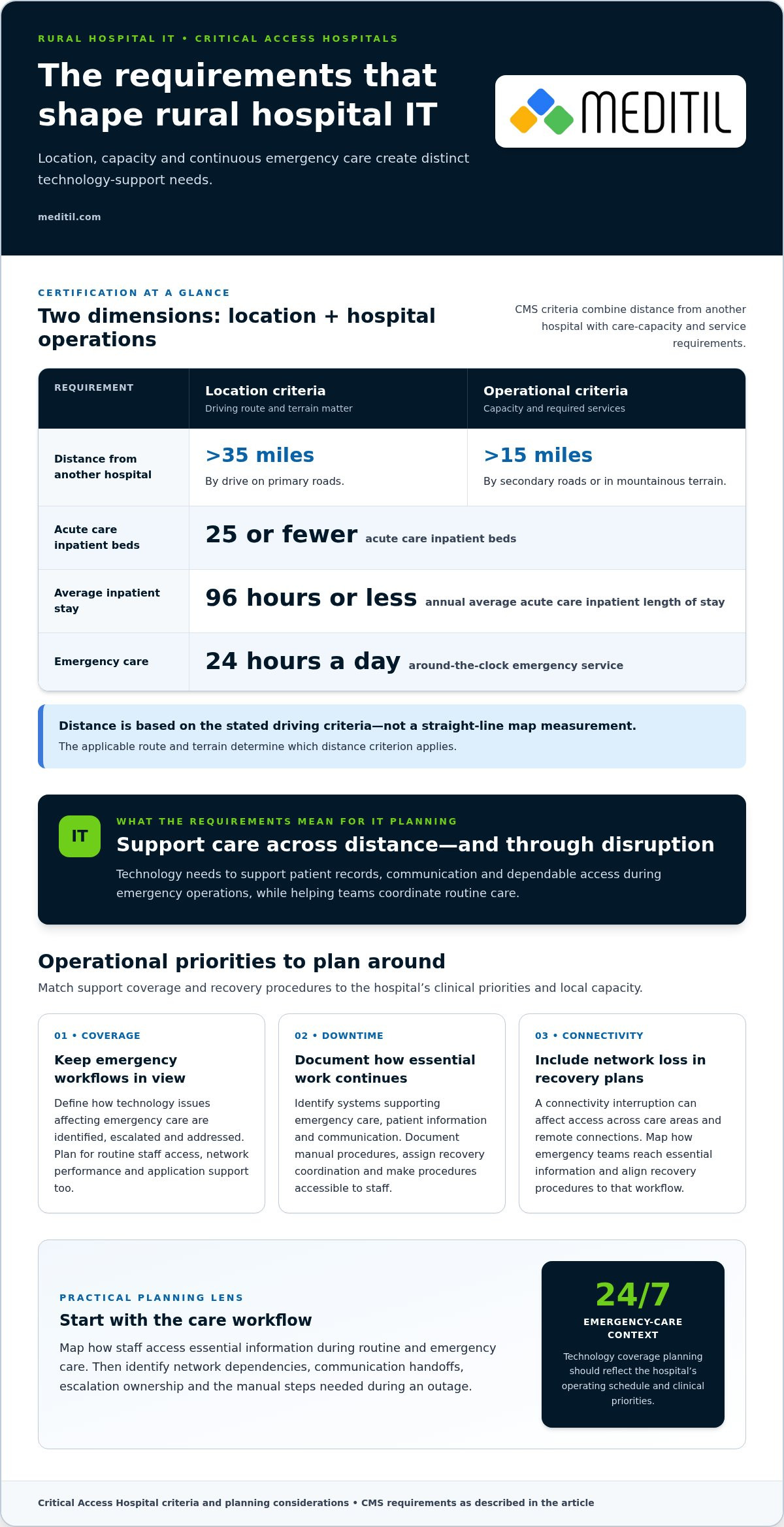
Rural hospital IT has to support a distinct care model, not simply a smaller version of an urban hospital. According to the Centers for Medicare & Medicaid Services, a Critical Access Hospital has 25 or fewer acute care inpatient beds and must provide emergency care 24 hours a day. Its technology needs must also account for distance: the location criterion can include a drive of more than 35 miles on primary roads from another hospital, or more than 15 miles by secondary roads or in mountainous terrain.
That combination makes dependable systems essential to daily operations. Clinical teams need technology that supports patient care and communication, while administrators must manage infrastructure, security, and compliance with limited rural resources.
This article explains how location and service requirements shape critical access hospital IT support, and how technology initiatives can address connectivity, care delivery, and operational efficiency. It also outlines the federal rules that influence hospital operations, including the Conditions of Participation, so you can understand how IT planning fits into broader requirements.
Whether you’re assessing current systems or planning an initiative, the sections ahead connect the regulatory and practical considerations that matter to rural care.
Key Takeaways
- Assess how rural distances and service responsibilities affect connectivity, system access, and support needs across your facility.
- Prioritize technology initiatives around patient care and operational efficiency, including how teams communicate and deliver services remotely.
- Understand how federal Conditions of Participation shape hospital operations and the technology processes that support compliance.
- Compare in-house and outsourced IT by considering internal capacity, infrastructure needs, cybersecurity, and end-user support.
- Use a managed support model when ongoing coordination across networks, security, and staff assistance would strengthen your IT operations.
Rural hospital location and service requirements
Critical Access Hospital certification combines location criteria with operational requirements. These conditions influence how rural hospitals plan reliable systems for care services and ongoing operations.
According to the Centers for Medicare & Medicaid Services, a rural hospital may meet a location criterion when it is more than a 35-mile drive on primary roads from another hospital. A Critical Access Hospital may also meet the distance criterion when it is more than 15 miles from another hospital by secondary roads or in mountain terrain, according to the Centers for Medicare & Medicaid Services. The applicable route and terrain matter: a map’s straight-line distance alone does not describe the stated driving criteria.
Distance is only one element of certification. According to the Centers for Medicare & Medicaid Services, a Critical Access Hospital has 25 or fewer acute care inpatient beds and must maintain an annual average acute care inpatient length of stay of 96 hours or less. It must also provide emergency care around the clock, 24 hours a day, according to the Centers for Medicare & Medicaid Services. These requirements frame the care model that technology must support, from patient records and communications to dependable access during emergency operations.
Choosing a Managed IT Provider
A managed IT provider coordinates technology operations and support through an ongoing service arrangement. For a rural hospital, the right fit depends on whether the support addresses its infrastructure, clinical workflows, and distance-related constraints. Assess how the provider would maintain network access between departments, support remote connections, and coordinate issue resolution when local technical capacity is limited. Start by evaluating the systems and workflows the hospital relies on for emergency and routine care.
IT Staffing and Support Coverage
Critical Access Hospitals need IT coverage aligned with the hospital’s operating schedule and clinical priorities, rather than a staffing model based only on office hours. The Centers for Medicare & Medicaid Services requires emergency care 24 hours a day, so hospitals should define how technology issues affecting emergency workflows are identified, escalated, and addressed. Coverage planning should also account for routine needs, such as staff access, network performance, and application support. The required mix depends on local staff capacity and the systems in use.
Downtime and Disaster Recovery Planning
Downtime and disaster recovery planning define how a hospital continues essential work when systems or connectivity become unavailable. Identify the technology that supports emergency care, patient information, and communication, then document manual procedures for affected workflows. Assign responsibility for escalation and recovery coordination, and make sure staff know where procedures are kept. For a rural hospital, include loss of network connectivity in the scenarios, since it can affect access across care areas and remote connections.
Location and service requirements also shape ongoing infrastructure decisions. A rural community may depend on one hospital across a broad area, making connectivity between care teams and facilities operationally important. Reimbursement is tied to the Critical Access Hospital designation, but technology planning should first focus on supporting required services and dependable workflows. For example, map how an emergency team accesses essential information during a network interruption, then align recovery procedures with that workflow. Clear guidance helps staff respond consistently while systems are restored.
Technology initiatives for patient care and efficiency
Technology initiatives should address specific care-delivery problems, not add systems without a clear clinical purpose. For a rural hospital, begin by mapping how a patient moves from primary care to emergency care, follow-up, or a skilled service. That workflow shows where staff need timely information, where handoffs occur, and which communication gaps can delay care. Each proposed system should serve a defined patient care need.
Hybrid care and telehealth can help clinicians reach patients located far from a facility. The need is practical: an estimated 5.8 million Americans have delayed medical care because of transportation barriers. A hospital can assess which appointments suit remote visits, how patients connect, and what information clinicians need before each consultation. Remote monitoring can also support follow-up when a care team needs patient readings between appointments.
To meet EHR, interoperability, and telehealth requirements, hospitals should align system configuration with applicable federal rules and clinical workflows. Map what information must move between systems, identify where staff enter or retrieve it, and test representative handoffs. Interoperability planning should focus on accurate, usable information exchange, while telehealth workflows should account for scheduling, documentation, and follow-up.
Start with primary care pathways. For example, a clinician treating a chronic condition may need to review recent visits, test results, and medication information before a remote follow-up. When connected systems present these details through a consistent workflow, staff spend less time reconciling records. Systems integration should address data definitions, access permissions, and how corrections appear across connected applications.
Preventive care also benefits from deliberate information workflows. A care team can use its EHR to identify patients due for follow-up, assign outreach, and record the outcome. Specify who reviews the work queue, how completed outreach is documented, and how unresolved needs return to a clinician. A defined workflow makes preventive activity visible instead of relying on individual memory.
Efficiency depends on matching technology to the hospital’s services and staffing. A small facility may need clear role-based access, reliable network connections, and application support that helps clinicians resolve workflow problems. Document the systems used for registration, clinical documentation, diagnostics, and billing. Then identify duplicate entry, delayed handoffs, and repeated troubleshooting as priorities for improvement.
Measure initiative performance using operational indicators tied to the original problem. For a telehealth project, review completed visits, connection failures, documentation completion, and follow-up coordination. For an EHR workflow change, examine whether staff can find the information they need during routine care. Keep the review practical, and use the findings to refine training, system configuration, or escalation procedures.
CMS requirements also give technology planning a compliance context. Critical Access Hospitals must maintain an annual average acute care inpatient length of stay of 96 hours or less, according to the Centers for Medicare & Medicaid Services. A federal survey evaluates applicable requirements, so clear documentation and consistent workflows help staff demonstrate how care processes operate. Keep initiative records aligned with the hospital’s actual practices.
Applicable federal laws and regulations
The Balanced Budget Act of 1997 established the Critical Access Hospital designation. That designation identifies a separate Medicare provider type, with its own payment method and Conditions of Participation. For a facility, these rules connect rural health status with operating requirements, not simply its distance from another hospital. Federal requirements therefore influence policy, staffing, documentation, and the technology workflows used to support care.
Medicare Critical Access Hospitals must comply with the Conditions of Participation in 42 CFR 485 subpart F. The applicable regulations are also identified as 42 CFR Sections 485.50 – 485.74. These requirements form the basis for federal compliance review. CMS surveyors use Critical Access Hospital survey protocols and interpretive guidelines when assessing compliance. A survey evaluates applicable statutory and regulatory requirements to determine whether noncompliance should be cited.
Survey readiness depends on connecting written policy with actual practice. For example, map each relevant procedure to the staff role, record, or system that supports it. If a nursing workflow depends on access to patient information, document how access is authorized and how staff follow the process. Deficiencies are based on violations of statutes or regulations supported by observations of hospital performance or practices. Clear records help demonstrate how the facility operates.
Congress has amended the Critical Access Hospital program through several laws. The Balanced Budget Refinement Act made changes to the program in 1999. The Medicare Prescription Drug, Improvement, and Modernization Act of 2003 expanded bed-size flexibility. The Medicare, Medicaid, and SCHIP Benefits Improvement and Protection Act of 2000 is Public Law 106-554. The Medicare Improvements for Patients and Providers Act of 2008 is Public Law 110-275.
Other laws belong in the broader legislative context. The American Recovery and Reinvestment Act of 2009 is Public Law 111-5. The Patient Protection and Affordable Care Act is Public Law 111-148. These identifiers help administrators distinguish changes to the program from the current Conditions of Participation. When evaluating a policy or system change, trace the operational requirement to its governing regulation and maintain a record of the hospital’s implementation.
Cybersecurity risks include unauthorized access, compromised accounts, and interruptions to systems used for care. Practical safeguards include role-based access, strong authentication, protected backups, and documented incident procedures. Assign responsibility for reviewing access and testing recovery processes, then record the results as part of the facility’s ongoing compliance work.
For IT planning, translate each applicable requirement into a practical control: define who can access information, document how staff follow procedures, and retain evidence of the process. This approach supports participation requirements while giving administrators a usable framework for reviewing technology changes. Distance and rural health designation may shape the hospital’s operating context, but federal participation requirements still guide its compliance responsibilities.
How can a critical access hospital choose a managed IT service provider?
A managed IT service provider coordinates defined technology operations and support for a hospital. The right arrangement aligns technical work with clinical priorities, existing staff capacity, and the facility’s operating model. For example, map who supports network access, user accounts, clinical applications, and escalations before setting the scope. This helps ensure essential tasks do not fall between internal teams and external support.
Start with the systems staff depend on during routine and emergency care. A useful scope can include network infrastructure, cloud services, end-user support, and healthcare application support. For each area, define the operational responsibility, internal owner, and how incidents move toward resolution. If a clinician cannot access a patient record, staff should know how to report the issue and who coordinates the response.
Healthcare workflow knowledge matters because technical changes affect clinical and administrative processes. A network change, for instance, can affect access to records or communication between departments. Support should account for application dependencies, user roles, and planned maintenance. Map a representative workflow, such as registration through clinical documentation, to clarify which systems and teams need to stay coordinated.
Security and compliance responsibilities also belong in the service scope. Define how access permissions are managed, how security concerns are escalated, and how system changes are documented. For example, review access when an employee changes roles, then record the approved change. Clear responsibility helps hospital leadership understand how cybersecurity work fits alongside everyday IT operations.
Support coverage should reflect the hospital’s needs, not rely on vague availability language. Document the channels staff use to report issues, how requests are prioritized, and which operational problems are escalated. For example, distinguish an interruption affecting clinical access from a routine workstation request. The arrangement should also explain how progress and unresolved issues are communicated to hospital leadership.
Infrastructure planning is another important measure of fit. A provider’s work may involve maintaining network configuration, coordinating cloud services, and documenting dependencies between systems. The hospital benefits from an accurate technology inventory, clear ownership of each component, and a defined process for changes. These details support continuity when staff, applications, or infrastructure needs shift.
Governance turns support into an ongoing operating relationship. Establish regular reviews of incident patterns, recurring user difficulties, planned projects, and unresolved risks. A repeated login problem, for example, may point to a training or configuration issue rather than an isolated help desk request. A shared record of decisions gives hospital leadership and technical staff a consistent basis for prioritizing work.
Finally, plan the transition into service. Document system access, current configurations, open issues, key contacts, and internal approval responsibilities. Agree on how existing work will be handed over and how staff will learn the support process. A structured transition clarifies responsibilities from the start and keeps technology decisions connected to patient care and operational needs.
What is the difference between in-house IT staff and outsourced IT support for a critical access hospital?
In-house IT staff are hospital employees, while outsourced support comes from an external service provider. This difference affects who handles daily requests, retains system knowledge, and coordinates technical projects. For example, an employee may know how a registration workflow operates, while external specialists may support infrastructure or applications. The hospital must define responsibilities so staff know where each issue belongs.
An in-house team offers direct access to local knowledge. Staff can learn the hospital’s workflows, understand department priorities, and work face-to-face with clinical and administrative teams. That familiarity can help when a recurring issue involves a specific workstation or user process. However, the team’s available skills and capacity depend on its staffing structure and the range of systems it supports.
Outsourced IT support can provide defined assistance with end-user support, help desk requests, or healthcare applications. It gives hospital staff a clear route for reporting problems without making every technical task an internal responsibility. For example, the hospital may assign application issues to external support while retaining internal ownership of department workflows and decisions.
A hybrid model combines internal ownership with external technical support. An internal lead can prioritize work, communicate with department managers, and approve changes. An external team can handle agreed infrastructure or help desk responsibilities. This arrangement works best when responsibilities are documented, including who manages account access, application troubleshooting, vendor coordination, and escalation of incidents affecting care operations.
Compare the models by mapping actual tasks, not relying on labels. List recurring requests, planned projects, and responsibilities that require local context. Then identify which tasks need an employee’s direct involvement and which can be handled through external support. For instance, a clinician’s workflow question may need local coordination, while a technical application issue may require specialized troubleshooting.
- Local workflow knowledge: Identify decisions that require close coordination with clinical departments.
- Technical capacity: Match network, application, and user-support tasks to available skills.
- Responsibility: Document ownership for requests, approvals, and incident escalation.
- Continuity: Keep system records and procedures accessible to internal and external teams.
Review the arrangement when systems or operating needs change. A new application, department workflow, or infrastructure project can shift support demands. For example, a hospital expanding remote care may need clear coordination between application support and staff assisting patients. Documenting the change and updating task ownership helps prevent gaps between internal staff and outsourced specialists.
For hospitals assessing help desk coverage or healthcare application support, review IT support options that align with the responsibilities and workflows identified in this comparison.
MEDITIL: Managed IT Services (Ongoing)
MEDITIL provides ongoing managed IT services for healthcare organizations that need coordinated support for daily technology operations. Critical access hospitals can use this model when internal teams need added capacity or when infrastructure, security, and user support need clearer coordination.
MEDITIL’s Infrastructure & Network Services support the foundation staff rely on to access systems and communicate across the facility. Cybersecurity & Compliance supports security and compliance work, while End-User Support & Help Desk gives staff a defined channel for technical issues. These HIPAA-compliant services can be aligned with the hospital’s operational needs and existing responsibilities.
If your hospital is reviewing IT coverage or planning a change, contact MEDITIL to discuss the support your team needs.
Build a Clear Path for Your Hospital’s IT
The next step is to turn priorities into an actionable plan. Identify the systems and workflows that need attention first, assign an internal owner, and define how progress will be reviewed. This gives hospital leadership a practical basis for aligning technology decisions with patient care and daily operations.
Strong critical access hospital IT support should fit the facility’s needs, internal capacity, and compliance responsibilities. MEDITIL offers Managed IT Services (Ongoing), Infrastructure & Network Services, and Cybersecurity & Compliance to support those areas. A practical starting point may be ongoing operational support, infrastructure planning, or a focused review of security and compliance priorities.
To discuss your hospital’s IT needs and possible next steps, contact MEDITIL about hospital IT. A focused conversation can help clarify priorities and shape a thoughtful path forward for your team.
Frequently Asked Questions
What IT support services do critical access hospitals need?
Critical access hospital IT support should cover network operations, cybersecurity, user assistance, and healthcare application troubleshooting. Useful additional work includes managing staff account changes, tracking technology assets, and monitoring connections between systems. For example, when a clinician changes roles, access should be updated to match their responsibilities. Hospitals can assign these tasks internally, externally, or across a coordinated team, with clear ownership for each request and change.
What HIPAA, HITECH, and CMS requirements apply to critical access hospital IT?
HIPAA and HITECH inform how hospitals protect health information and manage security and incident processes. CMS requires Medicare Critical Access Hospitals to comply with the Conditions of Participation in 42 CFR Part 485, Subpart F. CMS surveyors use Critical Access Hospital survey protocols and interpretive guidelines when assessing compliance. Maintain policies, access records, and incident documentation that reflect actual practices, so staff can explain how safeguards operate during a review.