
What good is a backup if your team can’t restore patient information when systems are disrupted? Choosing HIPAA compliant data backup solutions means looking beyond storage capacity. Recovery speed, protection against unauthorized access, and clear responsibility for safeguarding electronic protected health information all matter.
A backup strategy should help limit downtime after ransomware, system failure, or another incident. But a solution alone doesn’t establish HIPAA compliance. Your organization must assess risks, maintain appropriate safeguards, and understand how each business associate handles its responsibilities.
This guide offers a practical framework for comparing cloud, on-premises, and hybrid architectures against your recovery needs. Learn which security controls and documentation to examine, how to assess restoration readiness through recovery objectives and testing, and what to clarify about vendor roles and agreements. The goal is a backup approach that fits your healthcare IT environment and supports a broader infrastructure and cybersecurity strategy.
Key Takeaways
- Assess backup suitability by both security safeguards and documented recovery capability, not by a vendor’s compliance label alone.
- Evaluate encryption, identity controls, monitoring, retention, and recovery procedures as configured responsibilities, not assumptions.
- Compare cloud, on-premises, and hybrid architectures against your organization’s recovery priorities, operational capacity, and technology dependencies.
- Use a step-by-step vendor review to clarify control evidence, incident processes, agreement terms, and who owns each recovery task.
- Choose HIPAA compliant data backup solutions as part of a broader healthcare IT strategy that aligns infrastructure, cybersecurity, and recovery ownership.
What makes a data backup solution appropriate for HIPAA-regulated healthcare?
A backup is appropriate for a healthcare organization when it protects sensitive information and supports a documented, workable path to restore access. Storage alone isn’t enough. Your organization needs to know what is copied, how the copies are safeguarded, and which systems and people are needed to recover clinical and administrative operations.
A vendor’s “HIPAA compliant” label doesn’t make a covered entity compliant. HIPAA responsibilities depend on the organization’s own safeguards, risk management, decisions, and oversight of business associates. If a vendor handles protected health information (PHI) on the organization’s behalf, the parties’ responsibilities should be addressed in the applicable business associate arrangements. The Health Insurance Portability and Accountability Act (HIPAA) provides the broader context. The backup plan itself must fit the organization’s environment and obligations.
Which healthcare data and systems should backup planning cover?
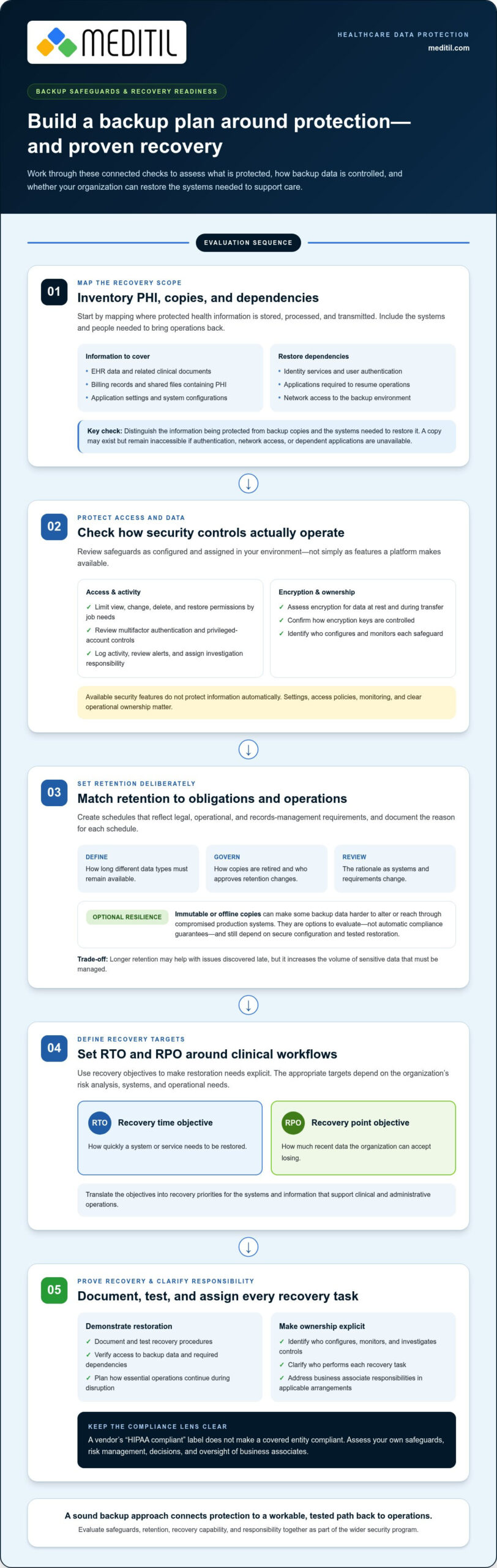
Start by mapping where PHI is stored, processed, and transmitted. Include direct patient records and the less obvious information and systems that support care. A useful inventory may include:
- EHR data and related clinical documents
- Billing records and shared files that contain PHI
- Application settings, system configurations, and other recovery-critical data
- Identity services, applications, and network access required to restore operations
Distinguish the data being protected from the backup copies and the systems needed to restore it. A copy may exist but remain inaccessible if your organization can’t authenticate users, reach the backup environment, or bring dependent applications back online. Map these connections before choosing an architecture.
What does HIPAA require organizations to consider?
In practical terms, contingency planning means preparing to protect and regain access to electronic PHI when normal systems are unavailable. Organizations should plan for backup and restoration, define how essential operations will continue during disruption, and document and test recovery procedures. The appropriate plan depends on the organization’s risk analysis, systems, and operational needs.
HIPAA establishes safeguard responsibilities, while organizations make implementation choices based on their circumstances. Encryption, access controls, monitoring, retention periods, recovery priorities, and testing practices need to be evaluated and configured as part of the wider security program. A specific technology or architecture is not, by itself, proof of compliance. These healthcare cybersecurity services considerations connect backup planning to broader protection of systems and data.
Ultimately, HIPAA compliant data backup solutions should support privacy and clinical continuity together. Evaluate whether your organization can protect backup copies, assign responsibility for each recovery task, and restore the information and services needed to resume care. Confirm detailed requirements and citations through current legal and compliance review.
Which backup safeguards and recovery capabilities should healthcare buyers assess?
Evaluate a backup plan across three connected areas: security, retention, and recovery. A control that exists on paper may not protect data if it isn’t configured, monitored, and assigned to an accountable owner. When assessing HIPAA compliant data backup solutions, look at how safeguards operate in your environment and whether recovery has been demonstrated in practice.
Security: control access and protect backup data
Review who can view, change, delete, or restore backups. Role-based access should limit permissions to job needs. Multifactor authentication and controls for privileged accounts can help reduce the risk of compromised credentials. Check that activity is logged, alerts are reviewed, and responsibility for investigating suspicious actions is clear.
Assess encryption for data at rest and during transfer, including how encryption keys are controlled. Confirm which party configures and monitors each safeguard. A platform’s available security features don’t protect your information automatically. Settings, access policies, and operational ownership matter.
Retention: keep what operations and obligations require
Retention should reflect your organization’s legal, operational, and records-management requirements. Establish how long different data types must remain available, how backup copies are retired, and who approves changes to retention settings. Longer retention may support recovery from issues discovered late, but it also increases the volume of sensitive data that must be managed. Document the rationale for each schedule and review it as systems and requirements change.
Immutable or offline copies can add resilience by making some backup data more difficult to alter or reach through compromised production systems. They are options to evaluate, not automatic compliance guarantees. Their value depends on secure configuration, access restrictions, retention choices, and tested restoration procedures.
Recovery: define targets and prove restoration
Set two measures around clinical workflows. The recovery time objective (RTO) is how quickly a system or service needs to be restored. The recovery point objective (RPO) is how much recent data the organization can tolerate losing, measured as the time between the latest recoverable copy and an interruption. For example, a scheduling system may need a shorter RTO during clinic hours, while the acceptable RPO for billing records may differ. Set targets by workflow, not by a general promise of “fast recovery.”
Schedule restoration tests and record what was recovered, how long it took, any data gaps, and the corrective actions assigned. Confirm that each test covers usable information and dependencies, not just a successful copy operation. Recovery may require applications, identity services, configurations, and network access to function together.
These criteria turn backup requirements into an operational plan. Healthcare teams aligning safeguards with broader IT oversight can use healthcare IT and cybersecurity support to connect recovery priorities with infrastructure and security responsibilities.
Cloud, on-premises, or hybrid: which healthcare backup approach fits?
Architecture affects how quickly a healthcare organization can access backup data, which systems it controls directly, and what it must operate during a disruption. No deployment model is universally best. Compare each option against recovery targets, staffing capacity, network dependencies, and the systems needed to resume clinical work.
| Approach | Potential strengths | Dependencies to assess |
|---|---|---|
| Cloud | Scalable storage and access to copies outside the local site | Internet connectivity, account security, provider responsibilities, and recovery bandwidth |
| On-premises | Direct local control and access that may be less dependent on an external connection | Local infrastructure, physical security, maintenance, and exposure to site-level incidents |
| Hybrid | Copies across different environments can provide alternative recovery paths | Synchronization, access coordination, monitoring, and testing across environments |
When might cloud or on-premises backups suit a practice?
Cloud backup may suit organizations seeking storage that can scale with changing data needs or provide a remote recovery location. Restoration still depends on connectivity, identity access, available bandwidth, and the process for retrieving data. A large restore over a constrained connection may not meet operational targets, so test recovery pathways under realistic conditions.
On-premises backups can offer local control and may remain reachable when external connectivity is interrupted. They also depend on the organization’s infrastructure, physical safeguards, maintenance, and capacity to manage recovery. A copy kept at the same site as production systems may share exposure to a building incident or a destructive attack. Neither cloud nor local storage is inherently HIPAA compliant. Safeguards and governance still require deliberate configuration and oversight.
What does a hybrid strategy add, and what does it require?
A hybrid approach can place copies in separate environments, reducing reliance on a single location or access path. For example, a local copy may support restoration within the organization while a separately managed copy provides another option if local systems are unavailable. Separation only helps if attackers or routine administrative credentials can’t easily affect every copy.
More environments also mean more coordination. Define which copy is authoritative, how updates are synchronized, who can access or delete each copy, and how monitoring covers the full arrangement. Recovery procedures should specify the order for bringing systems back and how teams verify that restored data is usable.
A 3-2-1-style approach, commonly framed as maintaining multiple copies on different media with one kept separately, can be assessed as a resilience practice. It isn’t a HIPAA mandate or a guarantee. The right design depends on data criticality, infrastructure, staffing, and demonstrated restoration results. Evaluate HIPAA compliant data backup solutions by whether their architecture supports your recovery objectives and can be governed consistently, not by whether it carries a cloud, local, or hybrid label.
How to evaluate backup vendors, agreements, and recovery readiness
A structured evaluation moves from internal requirements to documented evidence and, finally, a recovery test. This sequence helps healthcare organizations compare HIPAA compliant data backup solutions based on operational performance and accountability, not promises alone.
What should a healthcare backup evaluation checklist include?
Begin by documenting the systems and data in scope, the people responsible for each, required retention periods, recovery objectives, and technical dependencies. Use that inventory to define the capabilities your organization needs before reviewing proposals or agreements.
Next, request evidence showing how controls work in practice. Review access and privileged-account controls, monitoring and alert escalation, incident procedures, and records from restoration tests. Evidence should relate to the service and environment under consideration. A policy summary or general assurance statement may not show who responds to an alert, how an incident is reported, or how data is restored.
Map responsibilities across your organization and the vendor. Contract language and operating procedures should clarify who configures safeguards, reviews alerts, coordinates recovery, and communicates during an incident. If a vendor creates, receives, maintains, or transmits electronic protected health information on your organization’s behalf, a business associate agreement may be required. Determine whether the relationship meets that standard and review the agreement with qualified counsel.
Also address the full service lifecycle. Document how the vendor handles subcontractors, returns data, and securely disposes of copies when the relationship ends. Clarify how access is removed and how your organization can retrieve information in a usable form. These details reduce uncertainty during a transition, when an incomplete handoff could affect continuity.
How should organizations test recovery before relying on it?
Plan a controlled restoration exercise before relying on the backup arrangement. Choose representative clinical and administrative workflows, then test the steps needed to make them usable. Include the staff who will carry out recovery, not only technical personnel.
- Select a representative system, data set, and workflow, and define the recovery target for the exercise.
- Restore into an appropriate test environment and verify that users can access the application and required information.
- Record elapsed recovery time, missing dependencies, access problems, and data validation results.
- Assign remediation actions, owners, and review dates, then retest any material gaps.
Repeat testing after material changes to infrastructure, applications, integrations, or recovery procedures. A revised system may introduce dependencies or permissions that an older test never covered. Keep results and remediation records with the recovery documentation so decision-makers can see what worked, what failed, and whether issues were addressed.
Aligning vendor oversight and recovery responsibilities with day-to-day healthcare IT operations is part of effective managed IT services for healthcare. MEDITIL’s managed IT and consulting capabilities help organizations connect technology operations with recovery priorities. Learn about healthcare IT support for recovery planning.
How MEDITIL can align backup planning with healthcare IT operations
Backup decisions affect more than storage. A recovery plan must account for the infrastructure, applications, network connections, and security controls that support patient care and administration. MEDITIL’s healthcare-focused managed IT, cloud, cybersecurity, and consulting services help organizations consider backup planning within that broader operating environment. No single service or tool guarantees HIPAA compliance.
For example, restoring clinical information may depend on application availability, identity services, integrations, and network access. If ownership of those dependencies is unclear, a backup may be available while staff still can’t resume a workflow. Coordinated planning can identify relationships between systems, assign recovery responsibilities, and connect technical decisions to the organization’s operational priorities.
How can managed IT and strategic consulting support backup planning?
Infrastructure and data management expertise can help map dependencies and inform a recovery plan across systems. Cybersecurity oversight brings access controls, monitoring, and incident readiness into the same discussion, so recovery steps account for both service restoration and protection of sensitive information.
Fractional CIO guidance can help leadership weigh technology decisions against clinical needs, operational risk, and available capacity. That perspective is useful when prioritizing systems, setting recovery objectives, or deciding how cloud services fit with existing infrastructure. The result is a coordinated planning process, not an assumption that HIPAA compliant data backup solutions work effectively without organizational oversight.
What are sensible next steps for a healthcare organization?
Start with a current inventory, then use it to identify ownership and recovery gaps. A focused planning session can organize the work into practical stages:
- List critical data, applications, infrastructure, and the people accountable for each.
- Map recovery dependencies, including identity, network access, integrations, and cloud services.
- Set measurable recovery objectives based on clinical and administrative priorities.
- Review existing safeguards, agreements, procedures, and test documentation to identify unresolved responsibilities.
- Document a restoration exercise, record results, and assign follow-up actions for any gaps.
These steps give technology and leadership teams a shared basis for decisions. MEDITIL’s managed IT and consulting services support alignment between infrastructure, cybersecurity, and recovery ownership as your organization refines its approach. Planning should reflect the environment in place today and adapt as applications, workflows, and operational priorities change.
To discuss your healthcare IT environment and recovery priorities, discuss healthcare IT priorities with MEDITIL.
Make recovery readiness part of your next IT decision
Your backup strategy should evolve alongside your healthcare organization. As workflows, applications, and infrastructure change, revisit whether recovery priorities and responsibilities still reflect how care and operations depend on technology. This ongoing attention keeps HIPAA compliant data backup solutions connected to real organizational needs, rather than treating backup as a one-time purchasing decision.
MEDITIL brings healthcare-focused managed IT and infrastructure services together with cybersecurity, cloud, data management, and consulting capabilities. This broad perspective helps your team plan technology decisions around continuity and operational priorities, while keeping compliance responsibility with the organization.
Ready to identify the next step for your environment? Discuss your healthcare IT priorities with MEDITIL and move forward with a recovery plan grounded in your organization’s needs.
Frequently Asked Questions
Is any data backup solution automatically HIPAA compliant?
No. A product label alone doesn’t establish an organization’s HIPAA compliance. Suitability depends on how the solution is configured, used, governed, and documented alongside the organization’s policies and other safeguards. For example, review who can change backup settings, whether access activity can be audited, and how recovery is authorized. Assess applicable business associate responsibilities, too, and have compliance counsel review obligations and agreements for your organization’s circumstances.
Does HIPAA require healthcare organizations to back up electronic protected health information?
Yes. HIPAA Security Rule contingency planning includes a data backup plan for retrievable exact copies of electronic protected health information. That requirement doesn’t prescribe one universal product or architecture. Organizations should assess the applicable rule in context, document how their approach addresses it, and confirm current language and implementation expectations through authoritative HHS resources and qualified compliance counsel. A written plan should reflect the organization’s systems and recovery responsibilities.
Can cloud backup be used for protected health information?
Yes, cloud backup can be considered if the arrangement and safeguards fit the organization’s obligations. Before relying on it, map how staff access data, how the provider handles it, and how recovery works if normal access is disrupted. The provider’s claims don’t replace the organization’s risk analysis or policies. Determine whether a business associate agreement applies, document shared responsibilities, and review the arrangement with compliance counsel.
How often should healthcare organizations test data backup recovery?
There’s no single testing frequency that fits every organization or system. Set a schedule based on risk, operational importance, the rate of change, and recovery objectives. A focused exercise might restore a representative data set and verify that authorized staff can use it in a workflow. Document results and corrective actions. Repeat testing after material changes to infrastructure, applications, access controls, or recovery procedures.
What is the difference between RTO and RPO for healthcare backups?
RTO is the target time to restore a system or service after disruption. RPO is the acceptable amount of data loss, expressed as the time between the latest recoverable data and the interruption. A clinic might set different targets for appointment scheduling and less time-sensitive administrative records. Define each target by its impact on care and operations, then test recovery under realistic conditions to see whether the design can meet it.
Are immutable backups required by HIPAA?
HIPAA shouldn’t be interpreted as specifically requiring immutable backups without authoritative support. Immutability may be evaluated as one ransomware-resilience measure, alongside restricted access, monitoring, separate recovery copies, and restoration testing. For example, consider whether compromised production credentials could also alter backup copies. Select safeguards through risk-based planning, verify that recovery works in practice, and confirm legal interpretations against current HHS guidance and counsel.
What should a business associate agreement cover for a backup provider?
Whether a business associate agreement is required depends on the provider’s role and its handling of protected health information. Where applicable, the agreement should address permitted uses and disclosures, safeguards, incident or breach reporting, subcontractors, and return or destruction of information, consistent with applicable rules. Have qualified counsel review the agreement and compare its terms with technical settings and operating procedures, so responsibilities remain clear during routine service and at contract end.