
More connected access doesn’t automatically mean better-controlled access. Federated identity management in healthcare can let clinicians use a trusted identity to reach multiple applications without managing a separate password for each one. For that to work safely, systems must be configured to trust one another, and access must stay aligned with each person’s role.
That distinction matters in busy clinical environments, where repeated logins can interrupt work and delayed access changes can leave former staff or people in new roles with inappropriate permissions. Federation connects identities across systems, but it isn’t the same as single sign-on, and neither approach replaces sound identity governance. Authentication, authorization, account lifecycle processes, and oversight all need to work together.
This practical guide explains identity federation components, trust relationships, and authentication flows. It compares federation with single sign-on and centralized identity management, then covers security, governance, role changes, departures, and rollout planning. Use it to assess how infrastructure, integration, and clinical workflows can support reliable access without adding unnecessary friction.
Key Takeaways
- Understand how identity providers authenticate users and establish trusted access to connected healthcare applications.
- Follow the authentication flow and learn what identity providers, service providers, assertions, and trust configuration each contribute.
- Compare federated identity management in healthcare with single sign-on and centralized identity management, including the boundaries of each approach.
- Use a phased planning process to inventory users, applications, identity sources, owners, and existing authentication methods before rollout.
- Clarify ongoing ownership for identity data, access approvals, federation configuration, and incident handling to support dependable operations.
What Federated Identity Management Means in Healthcare
Federated identity management in healthcare lets an organization use a trusted identity source to authenticate workforce users across connected applications, while each application still controls what its users can access.
In practice, connected applications can rely on a shared verification of who someone is instead of maintaining a separate sign-in for every user. The identity provider, the system responsible for authenticating a user, verifies their credentials. A connected application can accept that verification under an agreed trust relationship. The What is Federated Identity? overview explains the broader concept of separate identity systems relying on established trust.
Federation concerns authentication and access across systems. It isn’t the same as patient identity matching, which determines whether records from different sources belong to the same person. Federation doesn’t link or reconcile patient records. Those are separate identity and data-management challenges.
Who and what participates in a healthcare federation?
In a workforce federation, participants include clinicians and staff, an identity provider, and the applications they need to use. Those relying applications, also called service providers, may include an EHR, laboratory system, telehealth platform, or cloud application.
The organization and each participating application establish a trust relationship. In practical terms, the application is configured to accept authentication from the identity provider and interpret the identity information it receives. Trust should be deliberate: approve the identity sources an application can rely on, document the participating systems, and understand what information they exchange.
What changes for clinicians and staff?
After authenticating through the identity provider, a user may be able to access connected applications without entering separate credentials for each one. This can reduce repeated sign-ins and credential handoffs while giving the organization a more consistent point for authentication controls.
Federation doesn’t mean every user receives the same access. A clinician, laboratory worker, and administrative employee may authenticate through the same identity provider but have different permissions in each application. Each system’s authorization rules still determine which functions and information a person can use.
Reliable access depends on more than sign-in. Identity information, application connections, and access rules must stay aligned as staff join, change roles, or leave. Healthcare-focused infrastructure, cybersecurity, and integration planning can help coordinate these elements around clinical workflows and organizational priorities.
How Healthcare Identity Federation Works Across Systems
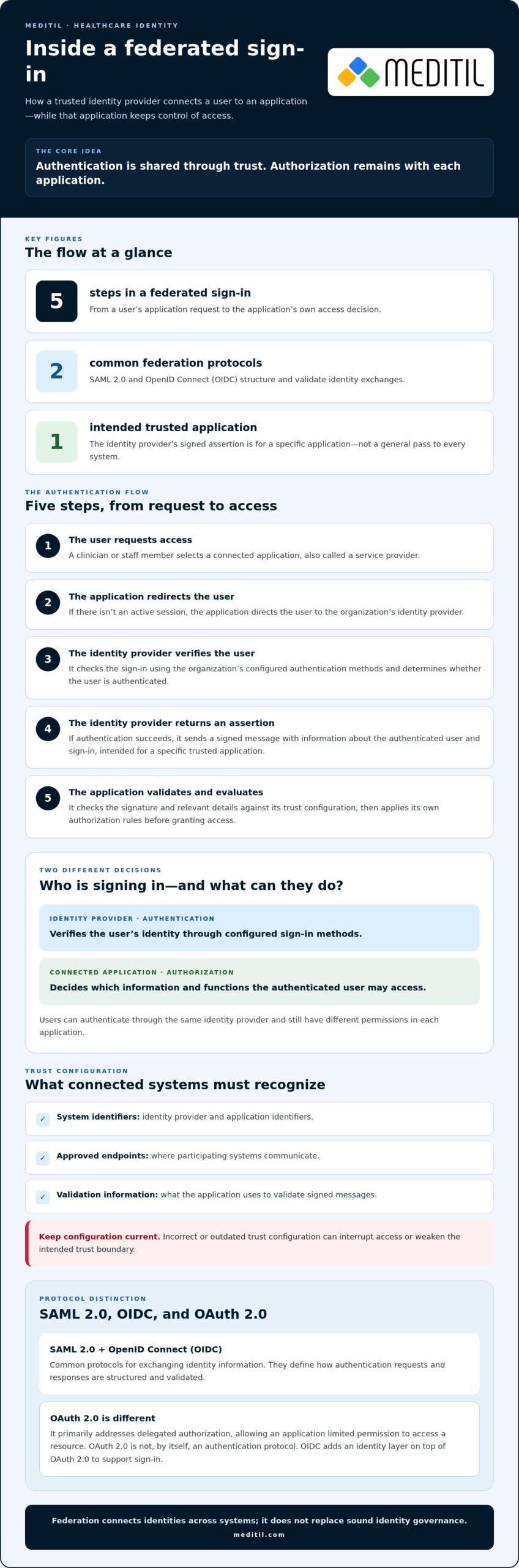
A federated sign-in involves more than passing a username from one system to another. The identity provider makes the authentication decision, then sends a connected application information it can validate. The application checks that information and applies its own access rules.
Follow a federated sign-in from user to application
Consider a staff member opening a connected clinical application. The sequence typically works like this:
- The user requests access. A clinician selects a connected application, also known as a service provider, such as a clinical or administrative system.
- The application redirects the user. If the user doesn’t have an active session, the application directs them to the organization’s identity provider.
- The identity provider verifies the user. It checks the sign-in using the organization’s configured authentication methods and determines whether the user is authenticated.
- The identity provider returns an assertion. If authentication succeeds, it sends a signed message containing information about the authenticated user and the sign-in. This assertion isn’t a general pass to every system. It’s intended for a specific, trusted application.
- The application validates and evaluates the response. It checks the signature and relevant details against its trust configuration, then applies its own authorization rules before granting access.
Trust configuration defines how the two systems recognize and communicate with each other. It can include identifiers for the identity provider and application, approved endpoints, and the information used to validate signed messages. Incorrect or outdated configuration can interrupt access or weaken the intended trust boundary.
Protocols set the terms for the exchange
SAML 2.0 and OpenID Connect (OIDC) are common protocols for exchanging identity information across systems. They define how authentication requests and responses are structured and validated. The protocol an organization uses depends on the capabilities and configuration of its identity provider and participating applications.
OAuth 2.0 is different: it primarily addresses delegated authorization, allowing an application to obtain limited permission to access a resource. It isn’t, by itself, an authentication protocol. OIDC builds an identity layer on top of OAuth 2.0 to support sign-in.
Where MFA, roles, and session controls fit
Multifactor authentication (MFA) strengthens verification at the identity provider by requiring additional evidence beyond a password. After sign-in, role-based access control can limit application permissions according to a user’s assigned role. Neither control replaces the other.
Session expiry limits how long an authenticated session remains usable. Revocation can invalidate access when it’s no longer appropriate, while logging supports review of authentication and access events. These controls complement federation. They don’t happen automatically simply because systems are connected.
Reliable federation depends on coordinated infrastructure and system connections. Healthcare systems integration planning can help align technical decisions with clinical workflows and organizational priorities.
Federated Identity Management vs. SSO and Centralized Identity
Federation and single sign-on (SSO) are related, but they aren’t synonyms. SSO describes an access experience: a user authenticates once and can reach multiple applications without signing in separately to each. Federation establishes trust across identity domains, allowing separately managed systems or organizations to accept an identity provider’s authentication.
Federation can enable SSO across an organization’s applications and, where configured, across organizational boundaries such as an affiliate or partner. But a federated connection doesn’t automatically create seamless SSO. Applications may require separate sessions, additional verification, or their own sign-in steps. SSO can also operate entirely within one organization and one identity domain, without federation.
Compare the approaches
| Approach | Purpose | Trust boundary | Operating model |
|---|---|---|---|
| Federation | Enable identity-based access across distinct systems or domains. | Between an identity provider and a relying application or organization. | Separate parties maintain their systems and configure agreed trust. |
| SSO | Reduce repeated sign-ins across applications. | May remain within one identity domain or use federation across domains. | A shared sign-in experience depends on connected applications and session settings. |
| Centralized identity | Manage accounts and authentication through a common identity authority. | Generally within an organization’s centrally governed identity environment. | Accounts and policies are administered through a common identity structure. |
When might centralized identity fit better?
Centralized identity can suit environments where applications and users fall under one organization’s governance and can work with a common identity authority. It can simplify consistent account administration. However, legacy applications may not support the required connection or may need a different access approach.
Federation may be a better fit when distinct identity domains need to cooperate without merging account administration. This can apply to affiliates, partner access, or systems managed by separate organizations. The right design depends on governance, application capability, and operational requirements, rather than a universal preference for one architecture.
Federation also concentrates authentication decisions at the identity provider. If that service is unavailable or compromised, connected access may be disrupted or put at risk. Include resilient infrastructure, monitored authentication activity, protected administrative access, and a clear response process in planning. The broader federated identity management in healthcare design should align trust boundaries with accountability for each application and identity source.
How to Plan a Secure Healthcare Federation
A secure federation starts with clinical access needs and organizational accountability, not a protocol choice. Planning federated identity management in healthcare means understanding who needs access, which systems they use, and how permissions should change as their responsibilities change.
Phase 1: Map users, systems, and ownership
Build an inventory of workforce groups, applications, identity sources, system owners, and existing authentication methods. Document which source is authoritative for each type of identity, such as employee or clinician accounts, and who creates, updates, and disables those accounts.
Classify applications by clinical criticality, federation readiness, and dependencies. Record legacy systems that can’t use standard federation patterns, along with any separate sign-in or access process they require. This makes exceptions visible instead of allowing them to become undocumented gaps.
Phase 2: Align access with clinical roles and workflows
Before choosing a protocol or deciding what to migrate, map user groups to their tasks and the applications those tasks require. A role should support appropriate access without assuming that every person with a similar job title needs identical permissions. Include workflow owners in the review so access controls support care delivery and administrative responsibilities.
Then assess each application’s capabilities and dependencies to define a realistic migration scope. HIPAA Security Rule alignment is an ongoing risk-management responsibility. Federation protocols can support authentication, but they don’t certify an organization’s overall compliance or replace review of access controls, safeguards, and operational practices.
Phase 3: Pilot, test, and expand deliberately
Start with a defined user group and representative applications. Test the full access lifecycle before broadening the rollout:
- Confirm multifactor authentication, role-based permissions, and least-privilege access behave as intended.
- Verify that access is removed when accounts are deprovisioned or a user’s role changes.
- Test emergency access procedures and confirm how that access will be reviewed.
- Check monitoring and incident-response workflows, including who investigates unusual sign-in activity.
- Document rollback steps and user-support procedures in case the pilot disrupts clinical or administrative work.
Use pilot findings to resolve configuration issues and clarify responsibilities before expanding to more applications or user groups. Healthcare-focused infrastructure, cybersecurity, and systems integration planning can help align technical dependencies with operational needs. Plan healthcare IT integration and security with clinical workflows and organizational priorities in view.
Governance and Ongoing Operations for Healthcare Federation
Federation needs clear operational ownership after launch. In federated identity management in healthcare, a technical connection can keep working while staff roles, application settings, or organizational relationships change. Governance makes those changes visible and keeps identity data and access decisions accountable.
Assign ownership and maintain oversight
Define who is responsible for each part of the federation. Responsibilities may sit across IT, security, human resources, application teams, and clinical or administrative leaders. Assign a clear owner to each task:
- Identity data: Maintain authoritative workforce information and coordinate updates when staff join, change roles, or leave.
- Federation configuration: Control approved connections and configuration changes, and retain the records needed to understand each trust relationship.
- Access approval: Have appropriate managers or application owners authorize permissions based on job responsibilities and workflow needs.
- Incident handling: Establish who investigates suspicious access, coordinates containment, and communicates with affected system owners.
Regular access reviews can help identify permissions that no longer fit a user’s responsibilities. Configuration monitoring and lifecycle testing can also show whether changes to identity data, access rules, or application connections are producing the intended results.
Measure whether federation is working as intended
Review operational indicators such as authentication failures, access exceptions, completion of account deprovisioning, and recurring support issues. These signals can help teams distinguish a configuration problem from an account or workflow issue. Use approved monitoring processes to review logs for unusual access patterns and unplanned configuration changes.
Assess the effect on staff workflows and application availability, too. The goal isn’t to pursue an arbitrary benchmark, but to identify friction or disruption, understand its cause, and refine the design. For broader security context, see healthcare cybersecurity services.
Connect identity decisions to broader IT leadership
Stable identity operations depend on infrastructure, application connectivity, security oversight, and coordinated decision-making. Managed IT operations can support the underlying environment, while systems integration and interoperability planning address connections between applications. Explore managed IT services for healthcare for related operational planning.
Strategic IT leadership can align identity priorities with clinical workflows and organizational plans. Fractional CIO services can help with roadmap alignment. MEDITIL’s healthcare-focused infrastructure, cybersecurity, integration, and strategic consulting capabilities can support the broader environment around an identity program. Discuss your healthcare IT priorities.
Build a More Reliable Access Strategy
Federated identity management in healthcare can connect workforce identities to trusted applications without making every account or permission identical. Its value depends on clear trust boundaries, access rules that reflect clinical roles, and dependable processes for changing or revoking access.
Federation, single sign-on, and centralized identity solve related but different problems. Choosing an approach requires understanding your applications, identity sources, organizational relationships, and operational responsibilities. Ongoing access reviews, configuration monitoring, and lifecycle testing help keep the design aligned as systems and workflows change.
MEDITIL supports healthcare organizations with managed IT, infrastructure, and cybersecurity services, alongside systems integration and fractional CIO consulting. These capabilities can help align identity decisions with technical dependencies, security priorities, and clinical operations.
Discuss your healthcare IT priorities and take a considered next step toward secure, workable access. With clear ownership and thoughtful planning, your organization can strengthen oversight while supporting the people who rely on connected systems every day.
Frequently Asked Questions
What is federated identity management in healthcare?
Federated identity management in healthcare lets a trusted identity provider authenticate workforce users for connected applications, such as clinical or administrative systems. Each application can rely on that authentication through an established trust relationship while retaining its own access rules. This can reduce separate sign-ins, but it doesn’t combine patient records or determine whether records from different sources belong to the same person.
How is federated identity management different from single sign-on?
Federation establishes trust between separate identity domains; single sign-on (SSO) describes a user experience in which one authentication can provide access to multiple applications. Federation can support SSO across separately managed systems, but the terms aren’t interchangeable. An organization can also provide SSO within one identity domain, and a federated connection may still require additional sign-ins or verification depending on application and session configuration.
Is federated identity management HIPAA compliant?
Federation alone doesn’t make an organization HIPAA compliant. It can support identity verification and access control, but compliance depends on the organization’s broader safeguards, policies, risk management, and operating practices for protecting electronic protected health information. Evaluate how authentication, permissions, account changes, monitoring, and incident handling work together. Treat federation as one part of a security program, not as a certification or substitute for compliance review.
What protocols are used for healthcare identity federation?
SAML 2.0 and OpenID Connect (OIDC) are common protocols for exchanging authentication information between identity providers and applications. The appropriate option depends on the systems’ capabilities and configuration. OAuth 2.0 is often used for delegated authorization, which lets an application obtain permission to access a resource. OAuth 2.0 by itself isn’t an authentication protocol; OIDC adds an identity layer to support sign-in.
Can federated identity management work with legacy EHR systems?
It depends on the EHR system’s authentication capabilities and the surrounding technical environment. Some legacy applications may support a federation standard, while others may require a carefully governed alternative, such as retaining a separate sign-in process. Assess application dependencies, access controls, and user workflows before setting migration scope. Document exceptions and review them periodically so they remain visible and don’t become unmanaged security gaps.
What happens if a healthcare identity provider becomes unavailable?
Users may be unable to start new federated sign-ins while the identity provider is unavailable. Whether existing application sessions continue depends on the application’s session behavior and configuration. Organizations should plan for this dependency with resilient infrastructure, monitoring, incident-response procedures, and tested continuity arrangements. Any emergency access process should be controlled, documented, and reviewed, rather than relying on informal workarounds that could weaken oversight.
Does identity federation automatically give clinicians access to every connected system?
No. Federation verifies identity across connected systems; it doesn’t automatically grant identical permissions everywhere. Each application evaluates the authentication information and applies its own authorization rules. For example, a clinician might be permitted to view specific clinical functions, while an administrative user has a different set of permissions. Role-based access, approvals, and regular reviews help keep access aligned with responsibilities and changing job duties.