
What matters most in diagnostic center IT support? It is not just how quickly a single issue is fixed. It is whether imaging, laboratory, and administrative workflows stay connected when staff need to access systems, images, or results. A problem with one connection can disrupt several steps in a patient’s visit.
Diagnostic operations depend on more than individual devices or applications. They rely on connected systems, dependable infrastructure, and clear coordination when something goes wrong. Sensitive health information also needs appropriate protection, while staff must be able to access the tools required for their work.
This guide explains how to evaluate support against your center’s actual workflows. You’ll learn what to ask about healthcare application support, system integrations, cybersecurity, infrastructure, help desk responsibilities, escalation paths, and service scope before signing an agreement.
It also compares managed IT services, an augmented team, and strategic IT guidance, and explains how to assess support for your existing systems. MEDITIL provides healthcare-focused IT services, including infrastructure, cybersecurity, end-user support, and systems integration. Use the guidance below to compare providers and define the responsibilities your center needs covered.
Key Takeaways
- Evaluate diagnostic center IT support by how it connects workflows, systems, user assistance, and security, not just how it resolves individual issues.
- Map the networks, applications, and diagnostic systems your center relies on before comparing provider capabilities.
- Compare service scope, healthcare experience, integration approach, security practices, and reporting to identify a support model that fits your needs.
- Before signing, clarify onboarding, documentation, access permissions, escalation paths, and coordination with existing technology vendors.
- Assess how a healthcare-focused partner such as MEDITIL could support your existing applications and integration needs without replacing your software or device vendors.
What diagnostic center IT support needs to keep connected workflows moving
Diagnostic center IT support coordinates technology operations, user assistance, cybersecurity, and system connectivity so staff can access the information and applications they need. It is not the same as repairing medical devices or selling software. Instead, support helps maintain the infrastructure and connections around the center’s existing systems. Software and device vendors remain responsible for their own products and services.
Which diagnostic center workflows depend on reliable IT?
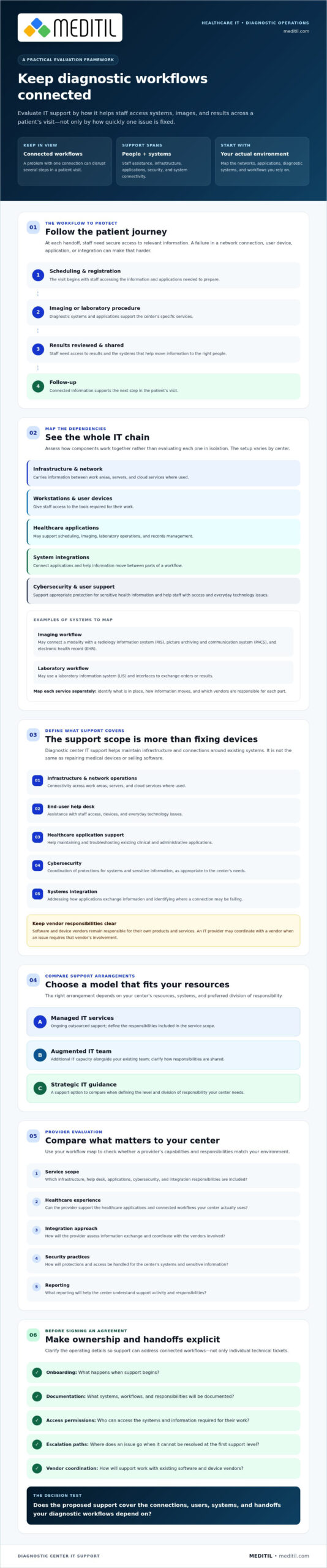
A patient’s path may begin with scheduling and registration, continue through an imaging or laboratory procedure, and end with results being reviewed, shared, and followed up. At each handoff, staff need secure access to the relevant information. If a network connection, user device, application, or integration fails, staff may have difficulty finding records, entering information, or accessing images and results.
The systems behind these steps vary by center. An imaging center may use a Picture Archiving and Communication System (PACS) to store and retrieve images; this Picture Archiving and Communication System (PACS) overview explains the system’s role. A laboratory may rely on different applications and interfaces. If your center offers multiple diagnostic services, map each workflow separately so support is based on the systems and processes actually in use.
What is included in diagnostic center IT support?
Scope can include the technical layers staff rely on, such as:
- Infrastructure and network operations: Supporting connectivity across work areas, servers, and cloud services where used.
- End-user help desk: Assisting staff with access, devices, and everyday technology issues.
- Healthcare application support: Helping maintain and troubleshoot existing clinical and administrative applications.
- Cybersecurity: Coordinating protections for systems and sensitive information as appropriate to the center’s needs.
- Systems integration: Addressing how applications exchange information and identifying where a connection may be failing.
Application support does not mean the IT provider owns or sells the application. The provider may coordinate with the software or device vendor when an issue requires that vendor’s involvement. Before engaging support, clarify which party handles each system, what is included, and how unresolved issues are escalated.
Support may be handled by an internal team, supplemented with an augmented IT team, or outsourced through ongoing managed IT services. The right arrangement depends on your center’s resources, systems, and preferred division of responsibility. Define the scope so diagnostic center IT support addresses connected workflows, not just individual technical tickets.
How diagnostic center IT connects networks, applications, and diagnostic systems
A diagnostic center’s technology environment is a chain of dependencies. Network infrastructure carries information between systems and locations. Workstations and other user devices give staff access. Cloud services may host applications or store data, while healthcare applications support tasks such as scheduling, imaging, laboratory operations, and records management. Effective diagnostic center IT support accounts for how these components work together rather than assessing each one in isolation.
The specific setup depends on the center’s services and technology. An imaging workflow may connect a modality with a radiology information system (RIS), a picture archiving and communication system (PACS), and an electronic health record (EHR). A laboratory may use a laboratory information system (LIS) and interfaces to exchange orders or results. Confirm which systems are in place, how information moves between them, and which vendors are responsible for each part. The American College of Radiology’s ACR Technical Standard for PACS is a useful reference for understanding PACS considerations.
How do diagnostic applications exchange information?
Applications exchange information through configured interfaces. A connection may transfer a specific message or file, but that does not ensure full interoperability. Systems also need to interpret the data consistently and support the intended workflow. DICOM is associated with medical imaging, while HL7 messaging and FHIR-based exchange may be relevant to clinical or administrative data. Their use depends on the systems and requirements involved. Before implementation, clarify vendor coordination, data mapping, testing responsibilities, and how changes will be documented.
Interoperability depends on the systems involved, their configuration, the information being exchanged, and the workflow the exchange must support. Standards can guide connections, but teams still need to validate that information reaches the right destination in a usable form.
How should support address infrastructure and cybersecurity together?
Security starts with understanding the environment being protected. Ask how the provider approaches network visibility, identity and access practices, endpoint management, and security monitoring in relation to your center’s systems and risks. For example, access permissions should reflect staff roles, while endpoints and network connections need oversight appropriate to how they are used. Clarify how the support team coordinates with application and device vendors when troubleshooting a security or connectivity issue.
Safeguards should be risk-based and aligned with the center’s responsibilities. Applicable obligations can depend on the organization’s role and circumstances, so verify them with qualified compliance counsel rather than relying on a provider’s general assurance. To explore support for existing healthcare applications and system connections, review MEDITIL’s healthcare IT and integration services.
How to compare diagnostic center IT support providers
Compare providers against the same operational criteria, not just their service descriptions. Ask each candidate to define what its team will handle, how it will coordinate with your application vendors and internal IT staff, and what information you’ll receive about ongoing work.
| Evaluation area | General help desk | Healthcare-focused managed services | Augmented internal IT team |
|---|---|---|---|
| Healthcare experience | Verify familiarity with healthcare workflows and applications. | Assess experience supporting healthcare organizations and connected systems. | Confirm the added team’s relevant skills and how they complement existing staff. |
| Service scope | Check which user and technical issues are included and where support ends. | Define the ongoing operational responsibilities covered by the agreement. | Specify which duties the augmented team takes on and which remain internal. |
| Security approach | Ask how security issues are recognized, reported, and escalated. | Review how security support fits into the agreed services and your organization’s processes. | Clarify how added staff follow existing access and security procedures. |
| Integrations | Establish whether the team can troubleshoot connections or only route issues. | Discuss coordination across applications, interfaces, and vendors. | Confirm how the team will work with application owners and internal technical staff. |
| Reporting | Ask what issue and resolution details are documented. | Agree on reporting content and frequency in the service scope. | Determine how work, open issues, and decisions will be recorded for internal teams. |
What healthcare-specific experience should buyers verify?
Ask for examples of comparable workflows and system environments without requesting protected client information. Have the provider explain how it supports healthcare applications, handles sensitive data, and coordinates with software and device vendors. Request a clear account of support boundaries, escalation steps, and incident communication. Look for a process your team can evaluate rather than broad claims about healthcare expertise.
How do managed, augmented, and project-based support differ?
Ongoing managed services establish a continuing operational relationship with an agreed scope. An augmented IT team adds capacity alongside your employees, with responsibilities coordinated between both teams. Project-based consulting is time-bounded work, such as planning or implementation. Confirm deliverables, ownership, and completion criteria in writing. The appropriate model depends on your current team, priorities, and the level of responsibility you want a provider to assume.
Buyer principle: Evaluate documented responsibilities and operational fit, not broad capability claims alone. For diagnostic center IT support, a proposal should make clear who owns each task, how issues move between teams, and how work is recorded. Use those details to compare providers and identify gaps before signing.
What to verify before choosing diagnostic center IT support
Before comparing proposals, document what your center needs supported and how you will assess the proposed approach. This gives providers a consistent basis for describing their services and helps reveal gaps before responsibilities are assigned.
- Map workflows. Trace key steps from scheduling and registration through testing, result access, and follow-up. Note where staff depend on technology and where delays or handoffs create operational risk.
- Inventory systems. List the applications, networks, user devices, cloud services, and integrations in use. Identify system owners and vendors, and record which connections are essential to each workflow.
- Identify risks. Consider access, security, continuity, and support dependencies. Ask how the provider will review these risks and distinguish its responsibilities from those of your staff and other vendors.
- Define scope. Specify included and excluded services, third-party work, onboarding, documentation, access permissions, escalation, and vendor coordination. Clarify how system changes will be reviewed and recorded.
- Validate the proposal. Check that the proposed approach reflects your actual applications and workflows. Review service levels, reporting, incident processes, and responsibilities in writing. Confirm any targets the provider proposes rather than assuming specific thresholds.
Which questions should a diagnostic center ask during provider evaluation?
Ask which services are delivered directly, which are excluded, and which depend on third-party vendors. How will systems be documented? Who approves changes? How will staff be informed about service issues, and how will open problems be escalated? Ask the provider to explain how its proposal fits your environment instead of relying on a generic service description. For broader provider-scope considerations, see this healthcare managed IT services guide.
How can a center assess security and continuity planning?
Request a clear explanation of risk review, access management, monitoring, and incident coordination. Ask who is responsible for backup oversight, recovery planning, and continuity tasks, including any responsibilities retained by your center or other vendors. Have the provider explain how plans are documented and reviewed. Do not treat general assurances as recovery commitments. Security obligations depend on your organization’s role and circumstances, so verify them with qualified compliance counsel. This healthcare cybersecurity services guide offers additional evaluation considerations.
Use these questions to turn a proposal into a practical accountability plan. If you’re reviewing how ongoing support might fit your environment, explore MEDITIL’s healthcare IT support options.
How MEDITIL can support a diagnostic center’s IT environment
MEDITIL provides healthcare-focused IT services that can help a diagnostic center coordinate infrastructure, users, security, and application connections. Its capabilities include managed IT services, network and infrastructure services, cybersecurity and compliance support, end-user help desk support, healthcare application support, and systems integration.
That support is distinct from supplying the center’s clinical technology. MEDITIL can work with existing healthcare applications and help address integration needs, but it does not sell EHR software or medical devices. Before discussing an engagement, confirm which systems are in scope, what support is available for each, and when coordination with the application or device vendor is required.
When might a diagnostic center consider MEDITIL?
MEDITIL may be worth evaluating if your organization needs healthcare-focused operational support across its infrastructure and users, or guidance coordinating existing applications and technology vendors. The right scope depends on your services, systems, current IT responsibilities, and operational priorities. Defining those factors helps establish where a provider could complement your team and where vendor support remains necessary.
Different engagement models can address different needs:
- Managed IT services may suit centers seeking ongoing support for agreed operational responsibilities.
- An augmented IT team can add capacity alongside existing staff, with roles and decision-making defined in advance.
- Project-based IT consulting can focus on a defined planning or implementation need, with deliverables and ownership clarified before work begins.
- Fractional CIO guidance may help centers seeking strategic IT planning without assigning that function solely to operational support staff.
These options are not interchangeable. Match the model to the gap you need to address, and confirm the service scope with MEDITIL before relying on a specific capability.
What are the next steps for evaluating fit?
Prepare a concise overview of your diagnostic center’s workflows, systems, existing support arrangements, and recurring technology concerns. Include key applications and integrations, who currently manages them, and where staff experience friction. Then identify whether your priority is ongoing managed operations, added team capacity, strategic guidance, or a defined project. This preparation makes it easier to discuss responsibilities and determine whether the proposed support aligns with your needs.
For a practical discussion about your current systems, operational priorities, and support gaps, review MEDITIL’s healthcare IT services.
Choose support that fits your center’s next steps
Effective diagnostic center IT support should fit the workflows your staff depend on and connect the systems behind them. Compare providers by documented scope, healthcare experience, security approach, integration capabilities, and clear accountability. Before deciding, map your systems and priorities, then confirm how onboarding, escalation, reporting, and vendor coordination will work.
MEDITIL offers healthcare-focused managed IT and infrastructure services, along with cybersecurity, application support, and interoperability capabilities. Depending on your needs, support may take the form of managed services, augmented IT team capacity, project consulting, or fractional CIO guidance. A good fit starts with a clear discussion of your current environment and the responsibilities you want support to address.
Discuss your diagnostic center’s IT requirements with MEDITIL and explore an approach aligned with your systems and goals. With clear expectations and a suitable support model, your center can plan its next steps with greater confidence.
Frequently Asked Questions
What does IT support for a diagnostic center include?
Diagnostic center IT support can include network and infrastructure services, end-user help desk assistance, healthcare application support, cybersecurity, and systems integration. The exact scope depends on the center’s services and technology. For example, support might address user access to clinical applications, network connectivity, or information exchange between systems. Before engaging a provider, clarify which systems and tasks are included, what remains your team’s responsibility, and when an application vendor must be involved.
Why does a diagnostic center need healthcare-specific IT support?
Healthcare-specific support can account for the applications, information flows, and operational needs found in clinical environments. A diagnostic center may depend on staff accessing appropriate information across administrative and diagnostic workflows, with systems supported by different vendors. A provider familiar with healthcare IT can discuss application support, sensitive data, interoperability, and vendor coordination in that context. Assess relevant experience and documented processes rather than relying on broad claims of expertise.
Can an IT support provider work with our existing EHR, imaging, or laboratory systems?
An IT provider may support existing applications and help address integration needs, depending on its agreed scope and the systems involved. Support can include investigating connectivity or coordinating with an application vendor when that vendor must resolve an issue. Ask which systems the provider can support, what access or documentation it needs, and how interface changes are tested. An IT provider may support EHR systems, but that does not mean it sells the software or diagnostic devices.
How should a diagnostic center compare IT support providers?
Compare providers using the same criteria: healthcare experience, service scope, cybersecurity approach, integration capabilities, vendor coordination, escalation, and reporting. Ask for clear examples of how the provider would address your workflows without requesting confidential information about other clients. Review written responsibilities, exclusions, and service expectations. The strongest fit is not necessarily the provider with the broadest claims. It is the one whose documented approach aligns with your systems, staff, and operational priorities.
Does healthcare IT support make a diagnostic center HIPAA compliant?
No. An IT provider can support security and technology operations, but engaging one does not by itself make a diagnostic center compliant. The center’s obligations depend on its role and circumstances, and responsibility cannot be assessed from a general service description. Ask what safeguards and support tasks the provider handles, how responsibilities are documented, and what remains with your organization. Verify applicable HIPAA obligations with qualified compliance counsel and review authoritative guidance relevant to your situation.
Should a diagnostic center choose managed IT or augment its internal team?
The choice depends on the capacity and responsibilities your center needs. Managed IT services provide ongoing support for an agreed scope, while an augmented IT team adds capacity alongside internal staff. Project-based consulting may fit a defined planning or implementation need, and fractional CIO guidance can support broader IT planning. Compare how each model assigns ownership, coordinates with current employees and vendors, and documents work. Confirm the proposed scope before deciding which arrangement fits.
What should a diagnostic center prepare before meeting an IT support provider?
Prepare a concise inventory of your workflows, applications, infrastructure, integrations, current support arrangements, and recurring technology concerns. Note which systems are central to imaging, laboratory, or other services, who owns vendor relationships, and where staff encounter delays or access issues. You do not need to disclose sensitive patient information to explain your environment. This preparation helps providers discuss relevant support options and makes it easier to identify scope, responsibilities, and next steps.