
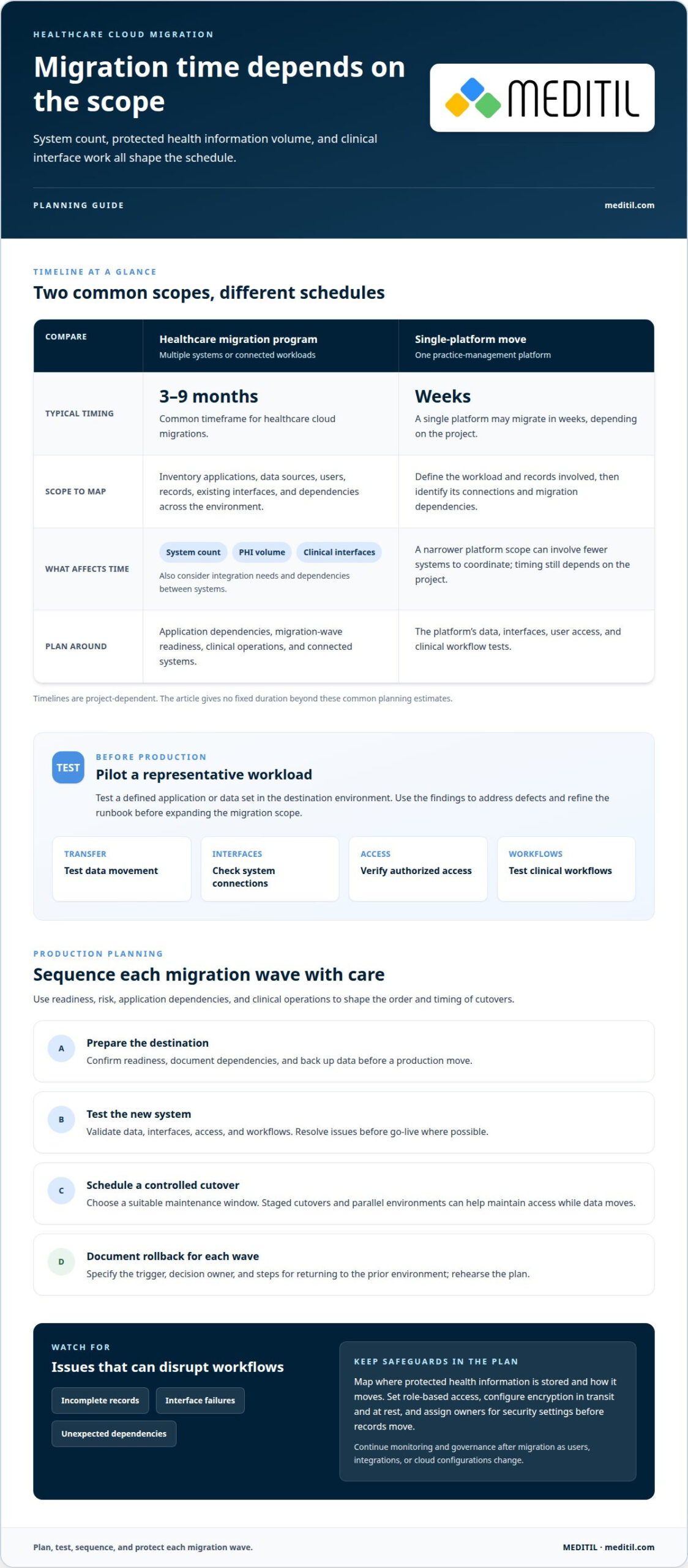
A healthcare cloud migration is usually a months-long program, not a single cutover. Healthcare cloud migration services commonly take three to nine months, depending on system count, protected health information volume, and clinical interface work. A single practice-management platform may move in weeks, depending on the project.
That scope matters when clinical teams need reliable access to records and connected systems throughout the transition. A sound plan covers more than data movement: preparation, testing, privacy safeguards, and a carefully sequenced go-live all affect the work.
This guide explains what shapes a migration timeline, how to plan for privacy and regulatory compliance, and which factors influence cloud costs. It also covers how ongoing managed services can support operations after migration, including system maintenance, cost reviews, and compliance support. You’ll see the key decisions, from assessing existing systems and dependencies to planning a controlled transition around clinical operations.
Key Takeaways
- Use a pilot migration to test data quality, application dependencies, and clinical workflows before planning production cutovers.
- Map where protected health information is stored and how it moves, then align access controls, encryption, and governance with compliance needs.
- Assess infrastructure, usage patterns, and redundant tools to understand the cost drivers and identify opportunities to manage cloud spending.
- Plan for operations after go-live, including backups, patching, security monitoring, and ongoing support for users and systems.
How long does a healthcare cloud migration take?
Healthcare cloud migrations commonly take three to nine months, depending on system count, protected health information volume, and clinical interface work. A single practice-management platform may migrate in weeks, depending on the project.
Migration Planning and Discovery
Start by inventorying electronic and paper records, data sources, applications, users, and existing interfaces. Identify inaccurate, duplicate, or unnecessary records before designing the migration sequence. Hospitals, clinics, and health systems differ in system count, data volume, integration needs, and dependencies. A clinic moving one platform may have a narrower scope than a health system coordinating imaging, EHRs, and third-party tools. The National Institute of Standards and Technology describes migration approaches that preserve suitable technology investments and support interoperability between on-premises software and cloud services.
Pilot and Production Migration Planning
A pilot tests a defined workload before production migration. Choose a representative application or data set, then test transfers, interfaces, access, and clinical workflows in the destination environment. Record defects and refine the runbook before expanding the scope. A robust migration plan includes discovery, dependency mapping, clear test criteria, and a production sequence that accounts for clinical operations. Define how integration work will be coordinated and readiness documented for each migration wave.
Migration Phases and Rollback Plans
Plan production waves around application dependencies, risk, and readiness. Prepare the destination, back up data, test the new system, and schedule cutover during a suitable maintenance window. Staged cutovers and parallel environments can help maintain access while data moves. For each wave, define a rollback plan, including the trigger, decision owner, and steps for returning to the prior environment. Common challenges include incomplete records, interface failures, and unexpected dependencies. Testing before go-live and rehearsing rollback steps help teams identify issues before they disrupt clinical workflows.
Healthcare privacy and regulatory compliance
Before moving patient records, map where protected health information is stored and how it flows between systems. Define authorized handlers, access controls, and a process for resolving exceptions.
Data Security and Compliance
Build security controls into the migration method before transferring data. Identify each source, destination, and integration that handles protected health information, then assign access according to authorized roles. Configure encryption for data in transit and at rest, identity and access management, and continuous monitoring before records move. These controls help healthcare organizations govern access as cloud environments change and scalability needs grow.
Document security settings and assign owners for them. For example, map which team can access a patient record through a clinical application, then define how unusual access or transfer errors are escalated. Include data volume and system connections in the review, since both affect how information moves and where controls apply.
HIPAA, HITECH, and HITRUST
For HIPAA support, the cloud provider should sign a Business Associate Agreement and configure encryption and access controls. A migration partner should also be able to address the HITECH Act and understand HITRUST as a healthcare framework. Treat these as specific review areas: document responsibilities, map safeguards to systems, and record how exceptions will be managed.
The U.S. Department of Health and Human Services identifies HL7 FHIR and USCDI standards, along with HIPAA, the HITECH Act, and CCPA, as relevant to medical-record handlers. Include applicable standards and regulations in the governance strategy. For each data source, record its format, authorized users, transfer path, and destination controls. That inventory gives teams a practical basis for reviewing compliance across connected systems.
Use a repeatable review for each migration wave: confirm data flows, test access, and document control ownership before transfer. Keep monitoring and governance active after migration, so changes to users, integrations, or cloud configuration are reviewed. This makes privacy safeguards part of daily operations rather than a one-time migration task.
Cloud migration cost and service availability improvements
Reduce disruption by moving systems in stages, keeping parallel environments where appropriate, and scheduling cutovers in suitable maintenance windows. Cloud spending depends on infrastructure needs, usage patterns, and which existing tools remain necessary.
Cloud Cost Management and Scaling
Cloud providers handle infrastructure and upkeep, which can reduce expenses compared with maintaining on-premises systems. Pay-as-you-go services let organizations scale usage with demand, rather than maintaining the same capacity during quieter periods. To manage costs, review consumption by application and workload, then align resources with actual operational needs.
FinOps practices make cost reviews ongoing: assign ownership, monitor usage, and investigate changes in cloud consumption. Include data storage, connected services, and workloads that need more capacity during peak activity. Organizations can also identify redundant or outdated software tools that are no longer used and remove them where appropriate.
Migration Outcomes and Cost Savings
Estimate the financial effect of a move by comparing current infrastructure and upkeep with planned cloud usage and operations. Include on-premises systems that will remain during the transition, since some environments need to coexist. A phased assessment can show which workloads can move first and where redundant tools or capacity may create avoidable spending.
Cloud migration can provide infrastructure that scales with demand, but savings depend on resource choices and ongoing management. Track actual usage after each phase, compare it with forecasts, and adjust capacity as workloads change. This ties spending decisions to application needs instead of treating migration as a one-time cost exercise.
Downtime and Clinical Operations
Keep clinical operations in view when setting transition windows. Staged cutovers, parallel environments, and low-volume scheduling let teams move workloads while maintaining access to existing systems. For example, a clinical application can remain available in its current environment while the destination is tested before staff switch over.
Use a tested rollback plan for each migration wave, and define who makes the cutover decision. Back up data before transfer, then validate system behavior and records before directing users to the new environment. These steps give teams a defined response if an interface or workflow fails during the transition.
Managed cloud services and ongoing operations
Migration support can cover planning, workload transfers, configuration, and testing, followed by operation of the cloud environment after go-live. Ongoing managed services can include cost reviews, patching, compliance support, backups, and disaster recovery planning.
For healthcare organizations, ongoing support connects platform operations with clinical workflows. The U.S. Government Publishing Office notes that public-cloud customers may have limited visibility into providers’ management, operations, and technical infrastructure.
Managed Cloud Service Offerings
Define operational responsibilities before workloads move: specify which systems need monitoring, who handles incidents, and how platform changes are approved. Managed services can also include cost reviews, system patching, compliance support, and backup planning. These responsibilities help internal teams maintain consistent processes across clinical applications, infrastructure, and connected services.
Make collaboration practical. Document escalation paths, service ownership, and reporting so internal staff can see how an issue moves from detection to resolution. For example, an application performance concern should have a clear owner and a process for coordinating with clinical users. This operating model gives teams shared visibility while keeping decision-making responsibilities clear.
Ongoing Cloud Operations
After migration, review workloads as usage and clinical needs change. Cost reviews can identify resources that no longer match demand, while regular patching and compliance maintenance keep operational tasks active. Backups support recovery planning if a disruptive event affects cloud data or applications. Assign owners to these activities and track completion through a consistent operations process.
Testing remains important after go-live. Validate backup restoration, review monitoring alerts, and assess whether integrations still support expected workflows after platform changes. Managed support should coordinate operational updates with internal teams, so changes are documented and relevant staff understand their impact. These routines turn migration handoff into sustained service management.
To establish consistent cloud operations, review managed IT support for healthcare and define the responsibilities that fit your environment.
MEDITIL: Managed IT Services (Ongoing)
MEDITIL provides ongoing IT support for healthcare organizations managing cloud operations after migration. Its Managed Services (Ongoing) can support day-to-day technology operations, while Infrastructure & Network Services address the systems that connect users and workloads.
As operational needs evolve, MEDITIL’s Cybersecurity & Compliance services support security and governance, while End-User Support & Help Desk helps staff resolve technology issues. These services suit healthcare organizations that need ongoing support across infrastructure, compliance, and user needs, rather than help with a migration project alone.
To discuss ongoing healthcare IT support for your organization, contact MEDITIL.
Make cloud operations part of the plan
A migration is an opportunity to define how technology decisions will support care delivery over time. Identify who owns cloud operations, how teams will review changing needs, and how technical priorities connect with clinical workflows. This gives healthcare cloud migration services a purpose beyond moving systems: establishing an operating model that can adapt as the organization changes.
MEDITIL helps healthcare organizations align ongoing IT operations with their cloud environment. Support includes Managed Services (Ongoing), Infrastructure & Network Services, and Cybersecurity & Compliance. Start with a focused conversation about your current environment and where ongoing support would be useful.
Contact MEDITIL about cloud migration to discuss your organization’s next step. A thoughtful plan can help your teams move forward with greater clarity and operational focus.
Frequently Asked Questions
What determines the migration schedule?
The schedule depends on project scope, system readiness, and the decisions required before each workload can move. For example, a team may need to coordinate application owners, clinical staff, and integration specialists before approving a cutover. Set milestones for discovery, testing, sign-offs, and staff communication. Delays in a dependency can shift later work, so assign owners and decision dates early.
How much do healthcare cloud migration services cost?
The cost depends on the systems in scope, data volume, integration work, destination infrastructure, and support required after migration. A project that moves one application has different needs from a transition involving connected clinical systems and ongoing operations. The price depends on the case and is given after a quote request. A clear scope helps identify which work and resources drive the estimate.
Which cloud platforms support HIPAA-compliant healthcare workloads?
Azure, AWS, and Google Cloud support healthcare workloads in private and hybrid cloud environments. A platform name alone does not establish compliance for a specific deployment. Review how the environment is configured, which services handle protected health information, and how responsibilities are divided between the organization and cloud provider. The setup should fit application needs, data flows, and operational governance.
What HIPAA, HITECH, and state privacy rules apply to healthcare cloud migration?
HIPAA and the HITECH Act are relevant to medical-record handlers, and state privacy rules may also apply to the records and organizations involved. The U.S. Department of Health and Human Services identifies HIPAA, the HITECH Act, and CCPA as relevant regulations, alongside HL7 FHIR and USCDI standards. Map applicable obligations to data types, locations, users, and system responsibilities before transfer.
How do healthcare organizations assess readiness for cloud migration?
Assess readiness by confirming executive sponsorship, application ownership, staff capacity, network suitability, and the ability to support clinical workflows during change. Identify who can approve a workflow test and who will communicate changes to affected departments. Readiness also means decision-makers are available when testing exposes an issue. A documented gap list helps leaders resolve blockers before scheduling production work.
What are the steps to migrate EHR systems and healthcare data to the cloud?
Begin with an inventory of EHR components, interfaces, data formats, and responsible teams. Define the target environment and access model, then prepare a controlled test using representative records and workflows. Resolve issues before moving production data. Coordinate the transition with application owners, validate records and connections after transfer, and document the operational handoff. Keep the existing workflow available until users can work reliably in the new environment.