
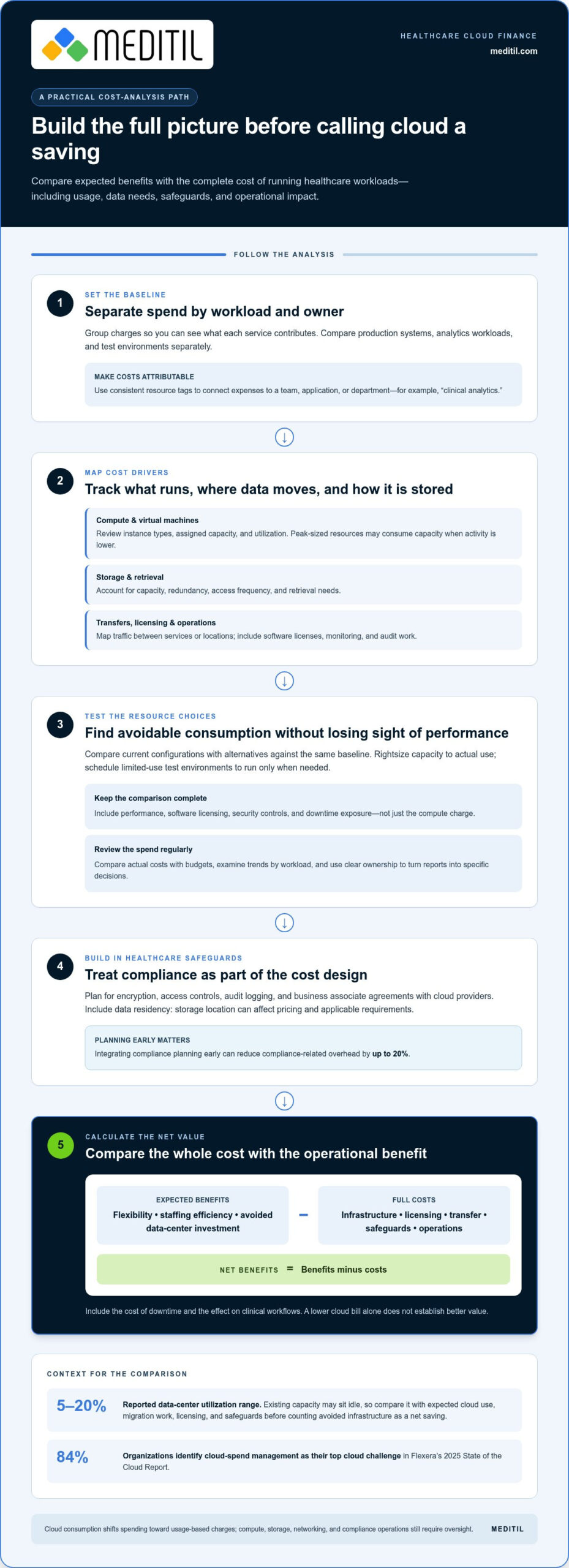
A lower cloud bill doesn’t automatically mean better value. A cost benefit analysis of cloud for healthcare compares costs and benefits in monetary terms, then calculates net benefits by subtracting costs from benefits. It should weigh infrastructure and licensing alongside storage, data transfer, security, compliance, and the operational value of flexible capacity.
Cloud pricing can make spending more responsive to demand, but total costs depend on how workloads run, how often data is accessed, where it is stored, and what safeguards are needed. These choices matter especially in healthcare, where protecting patient data and planning for HIPAA compliance are part of the financial picture.
This article explains how to analyze cloud costs, compare on-demand, reserved, and spot pricing, and assess storage, data residency, and compliance considerations. It also covers less visible costs and operational benefits, helping your organization judge whether a cloud approach supports financial discipline and reliable healthcare operations.
Key Takeaways
- Compare cloud’s expected benefits with its full costs, including infrastructure, software licensing, staffing, downtime risk, and compliance work.
- Assess how workload utilization and pricing models affect spending, then use cost visibility and rightsizing to manage resources.
- Match storage choices to data access patterns, retrieval needs, redundancy, transfer activity, and data residency requirements.
- Include encryption, access controls, audit logging, and business associate agreements in healthcare cloud planning.
- Evaluate cloud value beyond the bill by considering operational flexibility, staffing efficiency, and the cost of downtime.
Does cloud infrastructure reduce HIPAA compliance costs?
Cloud infrastructure can reduce some data-center expenses, but it doesn’t eliminate healthcare compliance costs. For U.S. organizations, upfront costs may include migration, architecture, and security setup; ongoing costs can include compute, storage, data transfer, licensing, monitoring, and audit work. The total depends on workloads, data needs, and compliance design.
Compliance and Audit Requirements
Compliance planning means building safeguards and evidence collection into cloud architecture; it matters because both require resources to implement and maintain. HIPAA-related planning includes encryption, access controls, audit logging, and business associate agreements with cloud providers. Audit logs support review of system activity, while encryption and access controls help protect patient data. Data residency also affects planning: storage location can influence pricing and applicable requirements. Integrating compliance planning early can reduce compliance-related overhead by up to 20%.
Cloud Infrastructure Cost Components
Infrastructure costs include compute, storage, data transfer, and software licensing. Separating these categories helps reveal what drives spending. Compute charges depend on instance types and utilization, while virtual machine costs reflect assigned resources and how consistently they run. Storage expenses vary with capacity, redundancy, and retrieval frequency. Data transfer adds costs as information moves between systems or locations. Licensed software can also incur ongoing expenses when it runs on cloud infrastructure.
Upfront and Ongoing Cost Drivers
Upfront cloud expenses typically arise during migration and initial architecture work, while recurring costs depend on resource use and operational needs. For example, moving a clinical workload may require configuring secure access, encryption, logging, and data connections before routine use. Ongoing budgets should account for compute, storage, network traffic, software licenses, monitoring, and audits. Pay-as-you-go pricing replaces large upfront investments in on-premises data centers with charges tied to cloud consumption, but usage still needs oversight.
Data Transfer and Virtual Infrastructure
Data transfer and virtual infrastructure costs depend on workload design, traffic routes, and capacity choices. A virtual machine sized for peak demand may consume resources when activity is lower; rightsizing aligns capacity with actual use. Data-heavy systems can incur charges when records move between services or locations, so map those flows alongside compute needs. Compare instance types and utilization, and include licensed software and recurring transfers in the same cost view.
Infrastructure and Data-Center Savings
Cloud services can reduce reliance on owned data-center infrastructure, shifting some spending from facility capacity to consumption-based resources. This can avoid large upfront investments, but it doesn’t make infrastructure free: compute, storage, networking, and compliance operations remain. Reported data-center utilization ranges from 5% to 20%, illustrating why organizations assess whether existing capacity sits idle. Compare that capacity with expected cloud usage, migration work, licensing, and safeguards before treating avoided infrastructure as a net saving.
What Is Cloud Cost Analysis?
Cloud cost analysis shows where spending goes and how resource use affects expenses. It groups provider charges into categories, then compares costs with operational benefits and compliance needs. For example, a cost benefit analysis of cloud for healthcare can separate production systems, analytics workloads, and test environments to show how each contributes to spending.
Analysis Measures; Optimization Changes
Analysis makes spending visible; optimization changes resource choices to improve value. A report might show that a test environment runs continuously despite limited use. Rightsizing its compute capacity or scheduling it to run only when needed can reduce avoidable consumption. Analysis identifies the opportunity; optimization implements and measures the change.
Resource tags connect expenses to teams, applications, or departments. A tag such as “clinical analytics” distinguishes that workload from billing systems. Consistent labels also make cost visualizations and reports more useful: finance and IT teams can review shared categories, identify ownership, and track whether adjustments affect the intended service.
Build a Useful Cost Picture
Providers and third-party tools can show usage, charges, and trends, but organizations need consistent data to interpret them. Review costs regularly, compare actual spending with budgets, and examine changes by workload. Flexera’s 2025 State of the Cloud Report found that 84% of organizations identify managing cloud spend as their top cloud challenge. Clear ownership helps teams turn reports into specific decisions.
Comparative analysis tests alternatives against a shared baseline. For example, compare a current virtual-machine configuration with a rightsized option, accounting for performance, licensing, security controls, and downtime exposure. A lower compute charge isn’t useful if a change disrupts a clinical workflow. Track both the cost difference and the operational effect.
Optimize Without Weakening Compliance
In healthcare, optimization must preserve safeguards that protect sensitive information and support audit readiness. Treat compliance requirements as design constraints, not optional expenses. Compare proposed changes with access controls, encryption, logging, and business associate agreement needs. This keeps savings analysis focused on resources that can be adjusted without compromising essential protections.
A cost benefit analysis of cloud for healthcare is most useful as an ongoing management practice, not a one-time calculation. Assign owners to tagged workloads, review provider reports, and record each optimization’s effect. Organizations aligning spending reviews with security priorities can use cloud services as part of that operational planning.
On-demand, reserved, and spot pricing models
Cloud costs vary with an organization’s size, workload demand, and provider pricing structure. A small clinic with steady application use has different compute, storage, and transfer needs from a hospital handling fluctuating imaging or analytics workloads.
Backup, disaster recovery, and business continuity costs depend on protected data volume, retention, replication frequency, recovery objectives, and testing. Network transfer and the resources kept ready for recovery also affect recurring expenses.
Match Pricing to Workload Demand
On-demand pricing charges for resources as they’re used, making it suitable for variable workloads or migration testing. A healthcare team can use it to assess an application’s actual demand before committing to longer-term capacity. Its flexibility supports changing usage, but consumption still requires monitoring.
Reserved pricing commits an organization to capacity for a defined term. It can suit stable workloads, such as a consistently used scheduling system, when demand is predictable. Compare the commitment with observed usage, since idle capacity can reduce expected savings.
Spot pricing uses spare provider capacity and may be interrupted. It can suit restartable batch analytics or nonurgent processing, where a pause won’t disrupt patient-facing services. Keep critical clinical applications on capacity models that match their availability and operational requirements.
Model Migration Costs and Returns
A migration cost-benefit model compares initial investment with ongoing expenditure and expected returns. Include migration labor, cloud operations, licensing, security design, downtime risk, and data sensitivity. A five-year analysis can compare public-cloud and in-house computing costs over the same period.
Healthcare ROI models should include more than infrastructure savings. Account for capital expense reduction, compliance cost avoidance, downtime cost avoidance, and staffing efficiency. Express costs and benefits in monetary units, then subtract costs from benefits to calculate net benefits. This helps decision-makers compare a cloud intervention’s full financial impact.
Govern Spending Through Operations
A cloud operating model assigns responsibility for budgets, resource decisions, and service performance. Finance, IT, and clinical operations can review usage together, so spending reductions don’t compromise important workflows. For example, a governance review can flag unused test capacity while preserving resources needed for patient care.
Cost visibility tools, resource ownership, and automated controls help turn analysis into ongoing optimization. Track changes against a baseline, including workload demand, downtime, and recovery requirements. Revisit the model as application use changes, then direct savings toward workloads where cloud capacity delivers measurable operational value.
Storage classes, access patterns, and data residency
Storage choices affect healthcare cloud costs through capacity, redundancy, retrieval frequency, and data location. Security, privacy, downtime, and vendor lock-in risks also matter: unauthorized access can expose sensitive records, outages can interrupt access, and provider-specific services can make later migration more complex.
Start by grouping information according to how it is used. An electronic health record system may need frequent access to active patient records, while older records or completed imaging files may be retrieved less often. Storage classes let organizations match access patterns to storage options instead of paying the same way for every dataset.
Retrieval frequency matters because lower-cost storage options can have different access and retrieval charges. A clinic reviewing active records throughout the day has different needs from an archive accessed occasionally. Estimate capacity and access patterns together, including how quickly clinicians need records during routine care.
Data lifecycle policies can move information between storage tiers as its use changes. For example, a policy might keep frequently used files in a readily accessible tier, then move less-used information to a lower-cost class. Compression can reduce required storage space, while retention decisions help prevent storing data longer than operational needs require.
Redundancy affects both cost and availability. Cloud providers typically store data in multiple locations to provide redundancy and reduce data-loss risk. For healthcare workloads, compare the protection level with the consequences of losing access to records. Include replication and retrieval needs in migration estimates rather than treating storage capacity as the only expense.
Data residency adds a location-based consideration. Cloud providers have different storage pricing structures across countries, so estimates should reflect the intended location. Residency requirements can also influence where data may be stored. For a U.S. healthcare organization, align location decisions with applicable requirements and data governance policies.
Data transfer patterns can affect costs and performance. Map how records move between clinical applications, backup systems, and analytics workloads. For organizations coordinating high volumes of business transactions and operational data, cloud platforms like 123 EDI help streamline electronic data interchange and maintain predictable transfer flows. Repeated transfers between locations may increase network expenses; a content delivery network can help optimize delivery when it suits the application. Include connectivity and transfer routes in migration planning.
Security decisions affect how storage is configured and accessed. Classify sensitive patient information, apply encryption and access controls, and include audit logging in the design. These safeguards support visibility into data access, while defined recovery processes help teams plan for downtime. Include their operational needs when comparing storage alternatives.
Provider-specific services, data formats, and transfer dependencies can increase the effort of switching providers. Document data locations, export methods, and application dependencies before migration. This gives decision-makers a clearer view of future portability, retrieval needs, and the operational impact of changing storage arrangements.
Cloud cost analysis for regulated industries, including healthcare
For healthcare, a cloud comparison must account for regulatory controls, not just infrastructure prices. A useful model compares the full cost of operating each workload with its expected financial and operational benefits. Include implementation, ongoing expenses, downtime risk, data sensitivity, compliance requirements, and expected return on investment.
Build the comparison around a defined workload, such as a patient-facing application or analytics environment. Include migration and operating costs alongside the resources needed to maintain security and audit readiness. Then estimate benefits such as reduced capital spending, staffing efficiency, avoided downtime, and greater flexibility to adjust capacity as demand changes.
A five-year analysis can compare public-cloud and in-house computing costs over the same period. The time horizon matters because migration expenses may occur early, while operational savings or new cloud expenses accrue later. Include replacement cycles, support requirements, and ongoing governance in both scenarios so the comparison reflects the full operating model.
Healthcare cloud ROI should account for compliance cost avoidance, capital expense reduction, downtime cost avoidance, and staffing efficiency, as well as infrastructure charges. For example, a dynamic workload may need more capacity during demand peaks and less during quieter periods. Model both patterns, then include the operational work required to manage changes securely.
Governance is a financial control in regulated environments. Assign ownership for budgets, workload decisions, and policy enforcement across finance, IT, and clinical operations. Cost visibility tools can reveal resources that are underused or poorly governed. Industry reports estimate that 27-29% of cloud spending is wasted through these issues, making resource oversight relevant to the business case.
Potential savings must be weighed against the controls the organization needs to retain. For regulated industries such as healthcare, estimated cloud cost savings range from 10-30% while maintaining compliance and improving operational transparency. Treat this as a planning estimate, not a substitute for workload-level analysis. The result depends on migration scope, governance, utilization, and compliance design.
Cloud providers and healthcare organizations share operational responsibilities through defined agreements and system controls. Include security planning, audit readiness, recovery processes, and staff time in the cost model. Excluding these items can make a cloud scenario appear less expensive while overlooking work essential to safe operation.
The practical takeaway is to compare complete operating scenarios, not a cloud quote against a data-center bill. Document assumptions, test demand changes, and revisit costs as workloads evolve. For support aligning healthcare cloud planning with operational and compliance priorities, discuss healthcare cloud planning.
MEDITIL: Managed IT Services (Ongoing)
MEDITIL helps healthcare organizations manage the operational work that follows a cloud cost analysis. Its Managed IT Services (Ongoing) provide consistent oversight of IT environments as workloads, usage, and priorities change.
Turn to MEDITIL when cloud decisions involve connected infrastructure, security controls, and support for staff using healthcare systems. Infrastructure & Network Services address infrastructure needs, while Cybersecurity & Compliance supports security and compliance priorities. End-User Support & Help Desk helps staff resolve day-to-day technology issues.
These services can help when your organization is reviewing cloud operations or coordinating ongoing IT responsibilities. Contact MEDITIL to discuss your healthcare IT needs.
Turn Cloud Analysis Into an Operating Plan
Make your cloud decision actionable by translating the analysis into an operating plan. Assign responsibility for reviewing spend, maintaining safeguards, and adapting capacity as clinical and administrative needs change. A cost benefit analysis of cloud for healthcare is most useful when its assumptions guide day-to-day decisions, not just the initial migration choice.
MEDITIL provides Managed IT Services (Ongoing), Infrastructure & Network Services, and Cybersecurity & Compliance for healthcare organizations managing these responsibilities. This support helps internal teams coordinate infrastructure oversight, security priorities, and ongoing IT operations. The objective is disciplined management aligned with your organization’s needs, not cost reduction at the expense of dependable operations.
Define the decisions your team needs to make, identify who owns them, and set a regular review process. This gives your organization a practical foundation for responsible cloud operations.
Contact MEDITIL about healthcare cloud costs to discuss your organization’s priorities and next steps. A clear operating plan can help your team move forward with confidence.
Frequently Asked Questions
How can decision makers use this information?
Decision-makers can use the analysis to compare cloud options with operational priorities before approving a migration. For example, a clinic could assess whether moving analytics workloads separately from patient-facing systems better suits its staffing and continuity needs. Document assumptions, assign ownership for each workload, and set measures to review spending, performance, and access. This gives finance, IT, and clinical leaders a shared basis for decisions.
How does cloud infrastructure reduce capital expense in healthcare?
Cloud infrastructure can reduce the need to buy and maintain data-center equipment upfront by shifting some capacity to pay-as-you-go services. Instead of funding servers sized for peak demand, an organization can use cloud resources as workloads require them. The financial comparison should still include migration, ongoing usage, connectivity, licensing, and security work. Cloud changes the timing and structure of investment; it doesn’t eliminate technology expenses.
How to Calculate Cloud Computing Costs?
Estimate cloud costs by listing each workload, measuring expected use, and applying provider rates to compute, storage, and data transfer. Add recurring software licenses, backup, monitoring, and operational labor. Then model changes in usage, such as seasonal demand or analytics processing, and compare the result with current infrastructure expenses over the same period. Regularly reconcile the estimate with actual invoices so the forecast reflects real consumption.
What inputs are included?
Include workload size and utilization, compute configurations, storage capacity and retrieval patterns, data transfer, redundancy, software licensing, and service location. Add migration work, security controls, audit activities, backup and recovery design, staffing, and downtime exposure. For example, an imaging workload may have different storage and transfer needs from a scheduling application. Organizing inputs by application helps teams connect expenses with the clinical or administrative service they support.
How does cloud infrastructure pricing compare with on-premises healthcare IT costs?
Cloud pricing generally ties charges to resource use and service choices, while on-premises costs include purchased infrastructure and the work needed to operate it. Compare both approaches over the same planning period. Include equipment, facilities, maintenance, licensing, cloud consumption, migration, security, and staff effort. Cloud may shift capital spending toward operating expenses, but utilization and ongoing management determine which model is more cost-effective overall.
What cost savings can healthcare organizations achieve by migrating EHRs and workloads to the cloud?
Savings depend on the workloads selected, their utilization, and the resources required to operate them securely. Organizations can assess whether cloud capacity reduces unused infrastructure, supports variable demand, or lowers selected data-center expenses. Include migration, licensing, data transfer, backup, and operational support before estimating net savings. Compare each application separately, since analytics workloads and continuously used clinical systems can have different cost profiles and operational value.
What are typical cloud migration costs and timelines for hospitals and clinics?
Migration costs and schedules depend on workload complexity, data volume, integrations, security design, testing, and staff training. A clinic moving a standalone administrative workload has different planning needs from a hospital coordinating multiple clinical systems and data connections. Build the estimate by defining scope, dependencies, validation, and cutover activities. Include parallel operations and downtime planning where relevant, then sequence workloads according to their technical and clinical dependencies.
What are the HIPAA, HITECH, and HHS requirements for healthcare cloud services?
Healthcare organizations should assess applicable HIPAA, HITECH, and HHS requirements for their roles, data, and cloud arrangements. Cloud infrastructure planning should account for encryption, access controls, audit logging, and business associate agreements with cloud providers. Include these safeguards and related operational work in the cost model. Document how systems protect patient information, record relevant activity, and manage provider responsibilities as part of the organization’s compliance planning.