
What if the safest way to automate billing is to start by changing the workflow, not buying software? Repeated manual entry across practice management, EHR, and billing systems can delay claims and create avoidable rework. Healthcare billing workflow automation can reduce repetitive steps, but only when the process, system connections, and staff responsibilities are clearly defined.
It’s reasonable to be concerned that automation could introduce errors or disrupt operations. Not every task should run without review, and disconnected systems can undermine even a carefully selected solution. Start by documenting how work moves today, including where delays and handoffs occur.
This guide explains how to map and prioritize billing tasks, decide where automation fits and where human review matters, and plan integrations, staff responsibilities, and data safeguards. It also covers how to measure performance over time so teams can identify bottlenecks and refine the workflow. MEDITIL supports healthcare organizations with billing automation and integration, EHR implementation and training, and related systems and security planning. This connects technology decisions to operational needs rather than treating software as a substitute for sound processes.
Key Takeaways
- Map each step from patient and insurance data capture through claim submission and payment posting before deciding what to automate.
- Use healthcare billing workflow automation for repetitive, rules-based tasks, while retaining human review for work that needs clinical, coding, or payer-specific judgment.
- Assess system connections, data mapping, validation rules, and exception handling to plan an integration that fits your existing environment.
- Set consistent baseline measures before implementation, then use them to identify bottlenecks and guide ongoing workflow improvements.
- Include staff training, data safeguards, and operational support in implementation planning so technology changes align with the way teams work.
What Is Healthcare Billing Workflow Automation, and Where Does It Fit?
Healthcare billing workflow automation uses connected systems and defined rules to move billing information, route work, and complete repeatable administrative tasks. It’s more than purchasing a billing application. A tool can support a process, but automation also depends on how information moves between teams and systems, who owns each step, and what happens when an exception occurs.
Consider a claim that requires staff to re-enter registration details, confirm coverage in another system, and hand the record to a billing specialist. Each transfer can add delay or introduce discrepancies. Clear ownership and reliable information flow help teams identify where automation can remove repetitive work without eliminating necessary oversight.
Which steps make up a typical healthcare billing workflow?
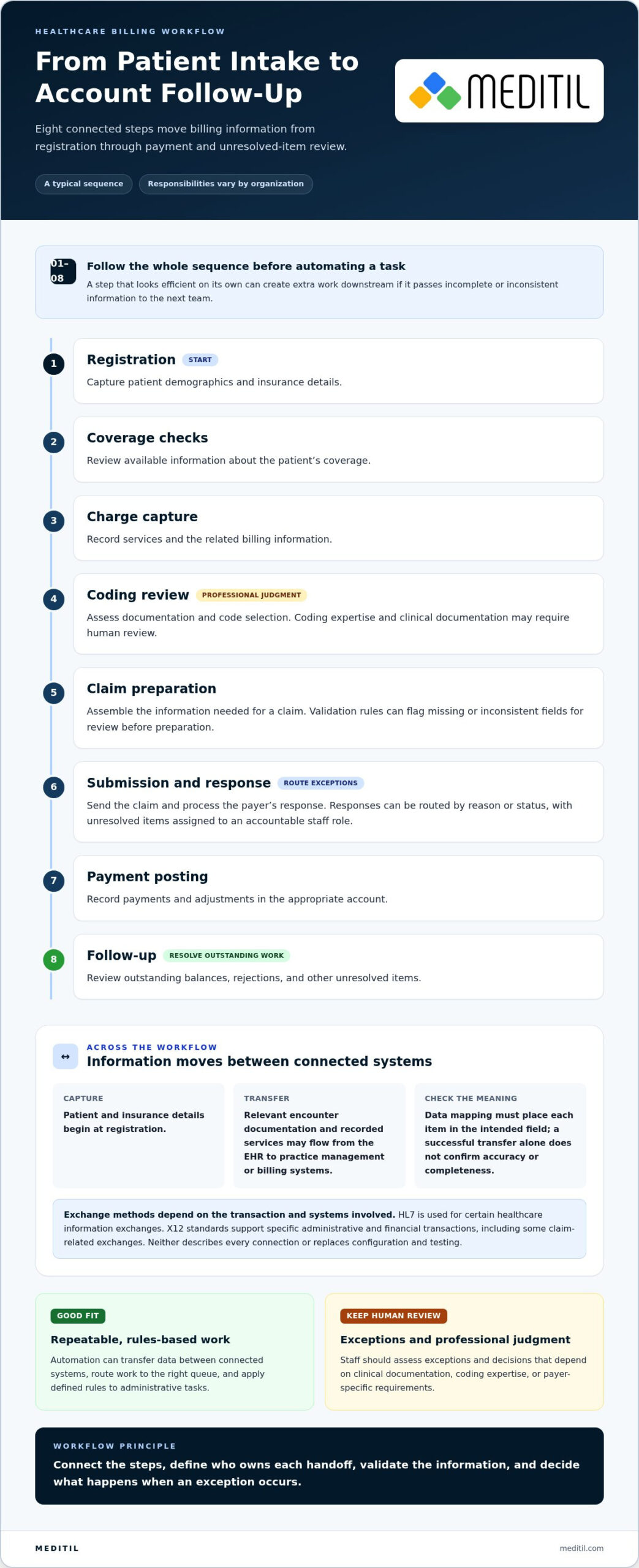
A billing workflow generally follows the patient and claim from intake through account follow-up. The sequence and responsibilities vary by organization, specialty, payer mix, and system configuration.
- Registration: Capture patient demographics and insurance details.
- Coverage checks: Review available information about the patient’s coverage.
- Charge capture: Record services and related billing information.
- Coding review: Assess documentation and code selection.
- Claim preparation: Assemble the information needed for a claim.
- Submission and response: Send the claim and process the payer’s response.
- Payment posting: Record payments and adjustments in the appropriate account.
- Follow-up: Review outstanding balances, rejections, or other unresolved items.
Review the full sequence before automating an individual task. A step that seems efficient on its own may create extra work downstream if it sends incomplete or inconsistent information to the next team.
What does automation change, and what does it not change?
Automation can transfer data between connected systems, route work to the right queue, and apply rules to defined tasks. For example, a workflow can flag a missing field for review instead of allowing an incomplete record to proceed. Staff still need to assess exceptions and make professional judgments, including decisions that depend on clinical documentation, coding expertise, or payer-specific requirements.
Healthcare billing workflow automation coordinates repeatable data movement and administrative tasks across the billing process while keeping people responsible for exceptions and professional judgment.
Automation won’t repair inconsistent source data or resolve unclear procedures by itself. If staff use different rules for the same handoff, encoding those differences can reproduce them more quickly. A clear process gives teams a stable basis for deciding which tasks can follow defined rules and which require review. For a broader overview of billing’s role and processes, see Medical billing.
How Healthcare Billing Automation Moves Data Between Systems
Billing information often begins at registration, where staff record patient demographics and insurance details. Relevant information may then flow from the EHR, including encounter documentation and recorded services, into a practice management or billing system. The organization prepares claim data there, submits it through its chosen workflow, and receives payer responses and payment information for follow-up and posting.
That process depends on connections between systems. A configured interface, a standards-based exchange, or another system-specific method may transfer information. HL7 is used for certain healthcare information exchanges, while X12 standards support specific administrative and financial transactions, including some claim-related exchanges. The applicable standard depends on the transaction and systems involved. Neither one describes every connection or replaces the need to configure and test it.
How do EHR and billing systems exchange information?
An interface moves defined data between systems, while data mapping determines where each item belongs in the receiving system. A patient identifier, service date, or insurance detail must land in the intended field and retain its meaning. Successful transfer alone doesn’t establish that information is complete, accurate, or suitable for the next workflow step.
For example, an encounter may arrive in a billing queue with a required detail missing or mapped to the wrong field. The transfer appears successful, but the record cannot proceed as intended. Effective healthcare billing workflow automation accounts for both connectivity and the rules that determine whether transferred information is ready to use.
Where should validation and exception routing happen?
Design validation at meaningful points in the workflow rather than treating it as a single check at the end. Before claim preparation, rules can flag missing or inconsistent fields for review. After submission, payer responses can be routed according to the reason or status returned, with unresolved items assigned to an accountable staff role. The appropriate checks depend on the organization’s workflow and system configuration.
An exception is useful only if staff can understand and act on it. A work item should preserve relevant context, such as which record needs attention, what check failed, and where the issue occurred. Otherwise, employees may need to search across systems or repeat work to diagnose the problem. Define who owns each exception and how its resolution is recorded.
An integration is reliable only when it preserves the meaning of billing data as it moves between systems, not merely the data itself. That principle helps distinguish successful transmission from a usable, properly routed record. The American Hospital Association’s discussion of AI in Revenue Cycle Management offers related context on technology’s role in revenue cycle work, while keeping human oversight central to decisions that need judgment.
For organizations planning system connections and workflow requirements, MEDITIL’s medical billing automation solutions support billing automation and integration within a broader healthcare IT environment.
Which Billing Tasks Should You Automate First?
Start with tasks that happen often, follow consistent rules, and rely on information available in a dependable format. Volume alone doesn’t make a task a strong candidate. Consider how often it requires exceptions, what happens if it fails, and whether downstream teams can use its output without repeating work.
Assess each candidate against five factors: task volume, consistency, exception frequency, downstream impact, and data readiness. A high-volume step may still be a poor first choice if its rules vary by payer or its source information is unreliable. A clearly defined check that regularly holds up work may be a practical starting point if its inputs and ownership are clear.
How do rule-based automation and RPA differ?
Rules-based automation applies defined conditions to predictable steps, such as routing a record to a queue when a required field is missing. Robotic process automation (RPA) performs configured actions through a user interface, such as entering information in a set sequence. Both depend on stable processes, appropriate access controls, and a defined way to handle exceptions. Neither approach makes an inconsistent workflow reliable by itself.
Candidate task: Route records with missing information. Automation fit: Strong when the condition and destination are clear. Human checkpoint: Staff resolve the missing information. Key dependency: Consistent field definitions.
Candidate task: Transfer defined data between systems. Automation fit: Suitable when the connection and mapping are dependable. Human checkpoint: Review transfer failures or mismatches. Key dependency: Tested integration and access controls.
Candidate task: Review coding or documentation questions. Automation fit: Limited to supporting defined checks or routing. Human checkpoint: Qualified staff assess the documentation and decision. Key dependency: Clear review responsibility.
Candidate task: Respond to unusual payer outcomes. Automation fit: Route predictable responses, but don’t assume every case follows the same path. Human checkpoint: Staff assess the response and next action. Key dependency: Context and accountable ownership.
Which tasks need a human review point?
Keep people involved when records conflict, a payer response is unusual, or responsibility for the next step is unclear. Coding and documentation decisions may depend on professional interpretation. Denial follow-up can require staff to understand the specific circumstances rather than apply a generic response. Automated checks can identify a condition or direct a case to review, but they shouldn’t replace qualified judgment.
This is a shared operating model, not a choice between automation and staff expertise. Healthcare billing workflow automation can handle repeatable steps and make exceptions visible, while staff focus their review on cases that call for investigation or judgment. Begin with a limited, well-understood task, define the checkpoint, and observe how often the workflow needs intervention before expanding it.
How to Implement Billing Workflow Automation and Measure It
A controlled rollout lets teams test whether a workflow performs as intended before expanding it. Document the sequence, assign owners, and agree on measures in advance. This helps distinguish the effect of a process change from outcomes that may have several causes.
- Map the workflow. Record each handoff, system, decision point, and exception path for the task under consideration.
- Establish a baseline. Capture current performance using shared definitions and consistent data sources across teams.
- Prioritize a candidate. Select a bounded task with stable inputs, clear ownership, and a defined purpose.
- Design controls. Specify access permissions, validation checks, audit records, approvals, and exception routing.
- Pilot the change. Test the workflow against agreed success criteria and document how to pause or reverse the change.
- Train staff. Explain what changes, what remains staff-led, and how to handle exceptions.
- Review and refine. Compare results with the baseline, gather staff feedback, and decide whether to adjust, expand, or pause.
How should an organization scope a safe pilot?
Choose a workflow with clear boundaries, accountable staff, and inputs consistent enough to test. Before launch, document expected paths, exception paths, approval points, and who can pause the pilot or restore the prior process. Define how staff will report unexpected behavior and how those reports will be reviewed. Include security planning from the start because access and information handling are part of workflow design, not afterthoughts.
Which measures show whether the workflow is improving?
Define every measure before implementation. Record its calculation, source system, reporting interval, and responsible owner. For example, specify whether first-pass acceptance means claims accepted on initial submission and which response statuses count as rejections. Define rework volume by the work being counted, and calculate days in accounts receivable consistently so teams aren’t comparing different measures.
- Process measures: First-pass acceptance, rejection categories, rework volume, and time spent in defined workflow stages.
- Financial measures: Days in accounts receivable and other organization-defined revenue cycle outcomes.
Keep process indicators separate from financial outcomes. A change in a financial measure doesn’t, by itself, establish that automation caused it. Review exception patterns alongside staff feedback. Recurring issues may point to unclear rules, a data problem, or a training need. Use these findings to decide whether to refine the pilot, expand it, or pause for further review.
Access should follow defined responsibilities, and activity should be auditable. Protect sensitive information through appropriate safeguards and include privacy considerations in implementation planning. Automation alone doesn’t ensure HIPAA compliance. Organizations need governance and controls that address their systems and operations. MEDITIL’s healthcare IT consulting supports workflow implementation alongside integration, cybersecurity, and staff training. See billing automation implementation planning for a process-first approach.
How MEDITIL Supports Healthcare Billing Workflow Automation
MEDITIL works with healthcare organizations on billing automation and integration as part of a broader IT environment. The work starts with the organization’s workflow and technology priorities: how information moves, where staff hand off tasks, which applications are involved, and where recurring exceptions need attention. This connects automation decisions to operational needs rather than treating a software purchase as the solution on its own.
Integration planning can align defined billing steps across existing healthcare applications, including EHR and practice management environments. MEDITIL also supports EHR implementation and staff training, systems integration and interoperability, cybersecurity, and ongoing managed IT. These capabilities work together: workflow changes affect the systems staff use, how information is exchanged, the safeguards around data, and the support teams need as operations continue.
How do integration, training, and IT support work together?
Integration connects agreed workflow steps across applications, while implementation support prepares systems and staff for the change. Training helps employees understand updated responsibilities, routine work, and how to raise exceptions. Ongoing IT operations support the surrounding environment as organizational needs evolve. For a broader view of ongoing technology operations in healthcare, MEDITIL’s Managed IT Services for Healthcare guide complements this implementation perspective.
MEDITIL supports organizations’ systems and workflows. Its focus is on planning and integrating technology around organizational requirements, including how billing automation relates to application support, interoperability, cybersecurity, and operational continuity. The appropriate approach depends on the organization’s current environment and the workflow it intends to improve.
What should a practical next-step discussion cover?
A useful discussion starts with a straightforward picture of current operations. Bring together details about:
- The applications and systems involved in billing work.
- Key handoffs between registration, clinical, and billing teams.
- Recurring exceptions, duplicate entry, or points where work waits.
- Operational priorities, existing safeguards, and the staff roles affected by change.
With this context, MEDITIL can tailor healthcare IT consulting and integration work to the organization’s environment. The discussion can clarify which workflow needs attention, which systems and stakeholders are involved, and how implementation, training, security, and ongoing support fit together. Those priorities provide a practical basis for planning healthcare billing workflow automation without assuming every organization needs the same design.
Explore MEDITIL’s healthcare IT consulting and integration services to see how implementation support can align with your organization’s technology priorities.
Set a Practical Direction for Your Next Step
The next step doesn’t have to be a broad technology overhaul. Choose one billing challenge your team can describe clearly, then identify what a well-supported process would need to change. A focused discussion can connect operational priorities to a realistic plan for healthcare billing workflow automation, with the people, systems, and safeguards involved kept in view.
MEDITIL brings healthcare-focused billing automation and integration together with EHR implementation and training, interoperability, cybersecurity, managed IT, and business intelligence capabilities. These services support the workflow and its technology environment. The right starting point depends on your organization’s current systems and priorities.
Discuss your healthcare billing workflow with MEDITIL to identify a practical path forward. A clear first step can help your team plan change deliberately and build a foundation for ongoing improvement.
Frequently Asked Questions
Can small medical practices benefit from healthcare billing workflow automation?
Yes. A small practice can benefit by targeting a narrow, repetitive task rather than attempting to automate its entire revenue cycle. For example, a team that repeatedly enters the same patient details into separate systems could assess whether a reliable connection can reduce duplicate work. The right scope depends on task frequency, system capabilities, and staff capacity to monitor exceptions, not simply the practice’s size.
Is healthcare billing workflow automation HIPAA compliant?
Not automatically. Compliance depends on how the organization configures, governs, and uses the systems involved, including how access to protected information is controlled and how activity is documented. A practical review should consider user permissions, data handling, vendor and system responsibilities, and staff procedures. Treat automation as one part of a broader privacy and security program, not as a compliance feature or substitute for organizational safeguards.
How much does healthcare billing workflow automation cost?
Costs depend on the work being automated and the environment it must fit. Project scope can be affected by the number of systems involved, the condition of existing data, integration requirements, testing, training, and ongoing support needs. Rather than comparing a single price in isolation, define the workflow and its dependencies first. That scope helps an organization evaluate implementation effort alongside its operational priorities.
What happens if payer requirements or claim rules change?
Changes should trigger a controlled review of the affected workflow rules, documentation, and staff guidance. Assign an owner to assess which steps are affected, update approved configurations, and test representative cases before relying on the revised process. Keep a record of what changed and when so staff can distinguish current procedures from outdated instructions. Escalate ambiguous requirements for appropriate review instead of encoding assumptions.
Can billing automation prevent claim denials?
No. Automation may help identify incomplete fields or apply defined checks before submission, but it can’t guarantee that a payer will accept a claim. Denials can involve documentation, coding, coverage, payer-specific rules, or other factors that require review. Track rejection and denial reasons over time, then use recurring patterns to guide workflow changes and staff education. This creates a feedback loop without treating automation as a guarantee.
Does billing workflow automation replace medical billing staff?
It shouldn’t be viewed as a replacement for staff expertise. Automation can handle defined, repeatable actions, while billing professionals interpret unusual responses, investigate discrepancies, and make decisions that require judgment. Before implementation, clarify who monitors automated work, resolves exceptions, and approves changes to procedures. This helps teams plan responsibilities around the workflow and use staff time for tasks where context and experience matter.
Can billing workflow automation work with an existing EHR?
Often, automation can be planned around an organization’s existing EHR, but the approach depends on available connections, data structure, configuration, and the workflow involved. Begin by documenting which information needs to move and how staff use it downstream. An integration assessment can identify dependencies and testing needs before changes are made. MEDITIL supports EHR implementation and training as well as healthcare application integration.